Welcome to Android Central forums. Just a few questions to be sure we are on the same page.
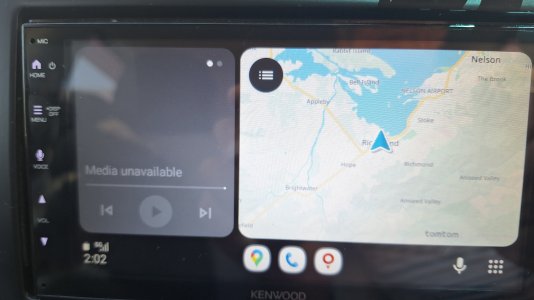
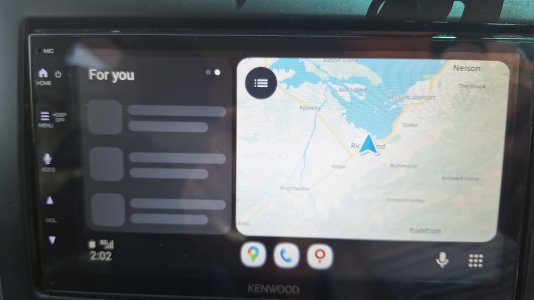
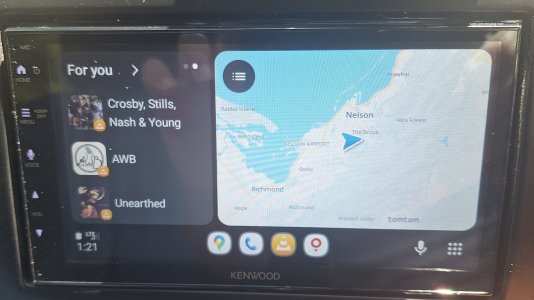
What would want in this spot if not one of these pages?
If we're unable to remove that page, have you tried expanding maps or whatever you run on that side to full screen?
Do you have the "For You" page enabled on your Samsung? I turned mine off so long ago I don't really remember what it looks like but it is displayed on your quick switch/multitasking page that shows all of your apps running in the background. On your Samsung to enable or disable this feature follow these steps.
To disable the "For You" recommended apps section in the Samsung multitasking/recents screen, open your Recents view (swipe up and hold, or tap the three-line icon), tap the three dots in the top right corner, select Settings, and toggle off Show recommended apps.
As much as I hate to send people to other sites for help, you are asking a very specific thing about a radio in a forum for phones, I imagine you will be hard pressed to find someone with this head unit, and who has also been unhappy with the screen layout and tried to change it in a pond as small as ours. I would suggest finding a Kenwood forum and ask there. When I searched for an official Kenwood forum Google recommended these.
Top of the list and cited as the top forum for Kenwood. Yes, I know what it says but Google says it's right.

(URLs snipped)
Not sure there's any other advice I can offer. Try disabling For You on your phone and see if it affects it being displayed on your head unit. I don't see it taking away the second page but it may shift what is displayed there. You could also try making whatever you display on the other side full screen, so that it doesn't display the second screen. I only see a setting in the head unit affecting the display and I imagine you've already looked through them all for any such setting? Yes/No? Anyway, check out those forums and see if you're able to find other users that might have advice for you. If you want more or other forums, my search was just "Kenwood forums"
I really wish I could help you more. I just believe your question is too specific and our pond too small. Good luck and best wishes. Let us know what you find and answer the questions and you never know, we might have more advice.







 Facebook
 Twitter
 Instagram