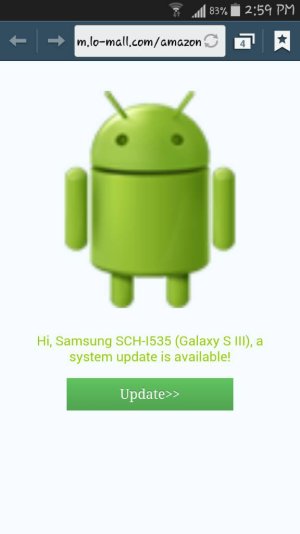
What is this? Never saw this.

FuzzyB

Well-known member
Jan 24, 2011
246
4
18
I keep getting this url in a separate sreen when I open up my browser. I have a Samsung GS3. Phone has been acting weird lately so could this be trouble??
 

Attachments

  • 1420058204396.jpg
    1420058204396.jpg
    30.2 KB · Views: 52
That looks suspicious. This is not the way system updates are delivered. Don't click on it. Clear your browser history, cookies, cache. Go to settings-storage-cache and do a global clear. Restart the phone. If it's still there, try a scan with a good anti-virus app like Avast or Lookout.
 
I'm not sure but I think KCAndroid1 meant go to Settings, Storage, Cached Data, and clear all the cached data. (Apologies if I'm wrong KC.)

Posted via the Android Central App
 
Ok I did that. So far I haven't seen it come back but it's only been an hour or so. I will check back if something changes. Thanks guys!

I just am baffled how this would open in a seperate window in my browser over and over again?
 
Well it lasted one day and this thing is back again! Any other suggestions? I've done everything mentioned here a few times.
 
A quick Google search turns up a fair amount on this apparent malware. You've done virus scans with a few different anti-virus apps? Have you checked all of your browser settings including the home screen address? Have you tried going to settings-applications-and clear the data and clear the defaults from your browser (you'll lose your bookmarks)?

If that didn't do it, I'd opt for a factory reset.
 
Last edited:
The full version of AVG is free for the holidays, so go to Robot Check and get it. (It's the Amazon App Store - I have no idea why Amazon links that were found in a search keep calling themselves "Robot Check".)
 
Quoted from the last post of Kaspersky support thread above:

[User, then moderator]

"Well... the next day it did the same thing again. I actually clicked on a link on the popup tab and it did say "Hi, Androroid 4.1 user, there's an update for you..." and I clicked on that (full page icon of the Android icon) and it took me to the Play store to install the Dolphin Browser. It did ask me how I wanted to open the link, Play Store, Chrome Browser, CM Browser, etc. Each one of them took me to an in-browser Google Play Store page to install the Dolphin Browser. I installed it and that didn't do anything. I have no idea what the Dolphin Browser has to do with this problem. I highly doubt they have gone to the trouble of embedding code in some ad to trick people into installing their browser under the guise of an Android update.

So I'm guessing I just need to restore the phone to factory settings and re-install the apps I use (old school Windows days again). At some point I really was thinking I was patient-zero for some kind of Chinese government hack where they have taken over my phone, but now it just seems like some kind of bug in the Chrome browser mixed with an ad on Amazon plus older Android OS issues. The good news is that I have loved the help Kaspersky has given plus their software. If my phone ever does get stolen, I can at least get a mugshot of the fool who wanted my cheap phone.

REPLY:
Okay yes could be bug in Chrome browser before you installed Kaspersky.
Try this before you do a Device factory reset.
Settings>Application manager>All>Chrome>Clear Defaults>Clear Cache>Clear Data>Uninstall Updates. (restart device)
After restart go to Google Play Store re-install Chrome.
Open Chrome sign in to Google.com, close chrome then re-open and see how Chrome is working.
Go to Kaspersky settings>Web protection>re-set Chrome as default browser.

If none that works do as you said a Device factory Re-set."
 
I typed m.lo-mall.com in the IE browser on a pc, and it has a list of 4 lines all in Chinese looking script.
A quick search shows reports about this happening a lot.

http://forum.kaspersky.com/index.php?showtopic=313291&hl=m.lo.mall.com

[Q] asking me to upgrade from "http://m… | T-Mobile Samsung Galaxy Note II | XDA Forums

(1st link failed, now corrected)

Well according to your second link it has to do with Go Launcher which I use! I guess getting rid of that may be where I start??
 
Yes, there's often a common denominator somewhere. They didn't seem to find a real cure on Kaspersky, I didn't read everything on XDA.
That was a bad one. Good luck.
 
It has to be Nova for the win. Most will tell you the same.
I only started using a simple layout with it a month ago.

It just allows me to put more icons on the main homepage, and more in the dock. That's all I use it for. You can go elaborate with icon packs, screens and widgets but mine is dead simple and took 15 minutes.

I never complained of lag on my previous and current Samsung, and I have a Moto G, but the transitions with Nova are an impressive extra. Like starbursts.

I toyed with a few launchers about 6 months ago, including Nova, (recommended here :
http://forums.androidcentral.com/showthread.php?t=322253 ) and found it very irritating to set everything up.

This time I was amazed how simple I could keep it and it fills those gaps.

My battery life has also become great lately. I heard some launchers were power hungry. Maybe Nova is helping there as well.
See what you think when you try the free version. It's all I need.

638d80eb8ddb795861275cb6b9659a01.jpg
 
Oh security wise, I couldn't tell you - and I rarely use Chrome. But all my apps work perfectly. I used to use Lookout, then nothing at all.
Now I use Malwarebytes to scan once a week, like on my computer. No drain at all.
 
Alright, I installed nova and uninstalled Go. Things seem to be running well and thusfar no sign of the original issue. Thanks again!
 

Trending Posts

Members online

Forum statistics

Threads
960,185
Messages
6,981,387
Members
3,164,421
Latest member
dumpsterrentals89