
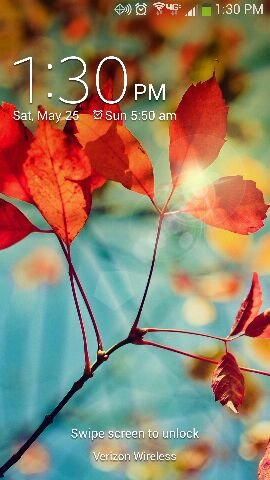
The symbol to the left of the alarm clock. Looks like a diamond with the waves. I thought it was gps but I don't have it on.
Also, just starting this morning, text messages get stuck sending. Some of them do get through because some people reply (even though it says it is still sending). I tried a restart but with no effect.
As well, I have wifi on with mobile data. Will wifi take priority? On my last phone, a motorola, I could keep both on, but when I was connected to wifi, the mobile data symbol wasn't even on.
I'm on Verizon.
Thanks in advance. I want to love this phone, but every day reveals a new, albeit small, issue.
Sent from my SCH-I545 using Android Central Forums
(And why doesnt it say sent from my galaxy s4?)
Also, just starting this morning, text messages get stuck sending. Some of them do get through because some people reply (even though it says it is still sending). I tried a restart but with no effect.
As well, I have wifi on with mobile data. Will wifi take priority? On my last phone, a motorola, I could keep both on, but when I was connected to wifi, the mobile data symbol wasn't even on.
I'm on Verizon.
Thanks in advance. I want to love this phone, but every day reveals a new, albeit small, issue.
Sent from my SCH-I545 using Android Central Forums
(And why doesnt it say sent from my galaxy s4?)



 Facebook
 Twitter
 Instagram