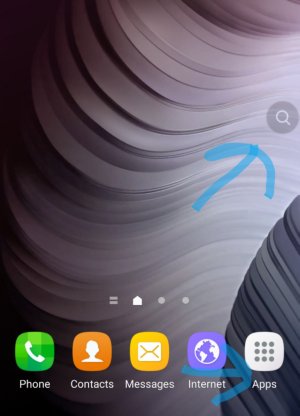
I have this little icon on my home screen that just popped up today. It looks like a search button and when you click on it it says search buzz. Anyway I can get rid of it?
Also, do you have Buzz launcher, or any other app by the same devs, installed on your phone? It sounds quite similar to the smart search included in this app.
No nothing happens when I long press it. Nothing pops up it doesn't do anything. Stays the same. Idk how to get ride of it. It's always in the way I don't like it.
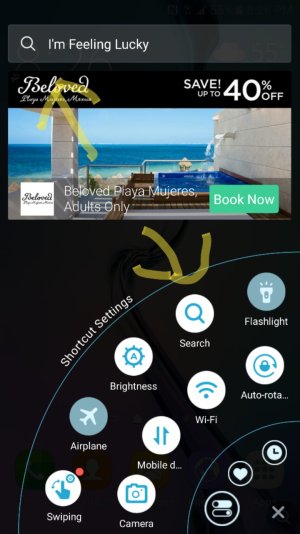
Okay found this. I went to the bottom right corner and you swipe up wards. Then I was looking and seen the seach button and the seach of one up top. I clicked on both and they do the same thing as the one I've been trying to get ride of. It says it's a shortcut but why is it on my home screan and everywhere? I still don't know how to remove it but at least I found a source! Lol
When I tap on the icon thing u where asking about this is what shows up. Same with that other picture I just posted.
See that little seach thing at the bottom it's always there still can't get rid of it lol.
Do you have Clean Master or any similar app installed in your phone? That swipe action from the bottom right corner sounds very similar to 'iswipe', a feature included in some CM apps. If you have this app installed, uninstall it and see if the problem persists.
I will look and see but I don't think so. Like I said I just started using this phone brand new a week almost 2 weeks ago. Lol so I kinda have no clue what I'm doing. I'm just searching and guessing.
yes it does looks like an app. go to settings, applications, application manager and look for an app called something like quick swipe or easy toggles or easy swipe or something like that. let us know if you find something
What's the new problem? By the way, do you have Peel Smart remote in your phone? Recently this app is pushing some ads and funny widgets on Samsung devices.







 Facebook
 Twitter
 Instagram