What's the latest 4.0.4 rom?

justin.pavsek

New member
Jan 5, 2012
3
0
0
What is the latest 4.0.4 stock rom? All of the 4.0.4 custom roms i have tried have problems with connection, music, etc. Thanks!
 
What is the latest 4.0.4 stock rom? All of the 4.0.4 custom roms i have tried have problems with connection, music, etc. Thanks!

Have you tried CM9, Liquid, Patient Zero? None of those 4.0.4 roms have those above problems, and I can attest to them personally.
 
  • Like
Reactions: 2defmouze
I downloaded the Stock leak of 4.0.4 few months ago works great on my Stock VZW GNexus all I has to do was unlock boot loader
 
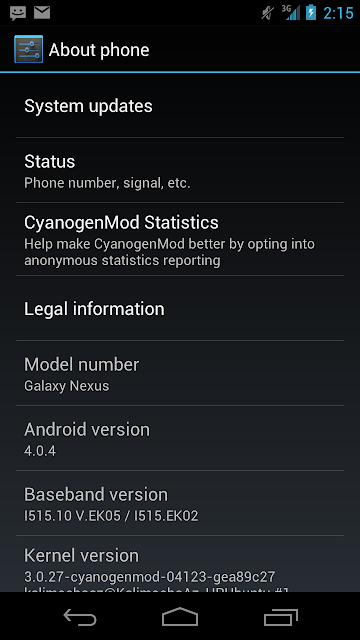
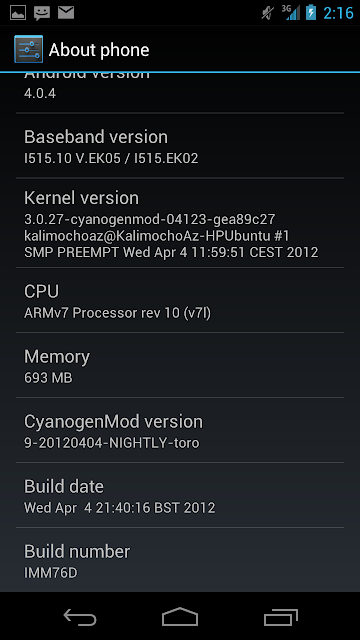
CM9 Nightly 20120404-NIGHTLY-toro on mine right now. 4G is still spotty, but not like it was. So far no drops or weirdness and the battery is better, but not great.
I was just thinking, this battery life reminds me of my first HTC EVO. That thing was equally as bad for battery life...
 
CM9 NIGHTLY:
Screenshot_2012-04-06-14-15-37.png


Screenshot_2012-04-06-14-16-24.png
 
Can I ask a really noob question?

With a nightly like that, do they literally release an update every night? Can you just install the update without wiping everything?
 
Can I ask a really noob question?

With a nightly like that, do they literally release an update every night? Can you just install the update without wiping everything?

(1) No

(2) No, not unless you want bugs. Going from nightly to the "next" nightly may be fine, but wiping is better than not wiping.
 
Isn't wiping every time you go to another nightly a major pain?

Some updates to a ROM don't always require a wipe (the OP will usually tell you). As far as it being a pain, if you switch to a launcher that can back up your home screens like Nova, you can wipe data, flash the ROM and have everything set up like before in 20 to 30 minutes. You get faster after a few flashes. Being able to back up your home screens is key. Don't forget to make a nandroid before you flash. That makes it easy to fix if you have a problem or the update doesn't run well.

Having said all that, if it's too much work, just don't flash every one of them.
 
Some updates to a ROM don't always require a wipe (the OP will usually tell you). As far as it being a pain, if you switch to a launcher that can back up your home screens like Nova, you can wipe data, flash the ROM and have everything set up like before in 20 to 30 minutes. You get faster after a few flashes. Being able to back up your home screens is key. Don't forget to make a nandroid before you flash. That makes it easy to fix if you have a problem or the update doesn't run well.

Having said all that, if it's too much work, just don't flash every one of them.

This. I have everything backed up within Nova. I go through Google setup, make sure I'm near WiFi or 4G for faster market restore, wait, load nova and nova prime, then boom, done.

It's not a pain, although doing it 3 times in a day becomes annoying very quickly.
 
Flashed CodenameAndroid and I didn't have the Google Play store so that I could download Titanium and restore all of my apps. How do I go about restoring my apps if I can't download Google Play to begin with while using Codename? Anybody else having these problems?
 
Flashed CodenameAndroid and I didn't have the Google Play store so that I could download Titanium and restore all of my apps. How do I go about restoring my apps if I can't download Google Play to begin with while using Codename? Anybody else having these problems?

Did the instructions mention having to flash gapps after the rom? If so download the gapps, put on sd card, go back to recovery, wipe everything, flash rom, flash gapps, reboot.

Sent from my Galaxy Nexus using Tapatalk 2 Beta-6
 
I cant help you with the play store, but once you get titanium backup back, there is an option in there that will allow you to make a flashable file that you flash after you flash your rom. then you don't have to worry about getting it back.
 
Did the instructions mention having to flash gapps after the rom? If so download the gapps, put on sd card, go back to recovery, wipe everything, flash rom, flash gapps, reboot.

Sent from my Galaxy Nexus using Tapatalk 2 Beta-6

Exactly the problem, thanks for the heads up. I wasn't installing gapps and I didn't notice where it said I had to. I'm currently downloading Gapps right now. How do I put the gapps on the sd card?

 
Exactly the problem, thanks for the heads up. How do I put the gapps on the sd card?

Same way you did rom... Drag it there from computer or download from phone browser

Sent from my Galaxy Nexus using Tapatalk 2 Beta-6
 
I'm not flashing roms via computer, I'm using ROM Manager. I just downloaded Gapps from ROM Manager and now I need to figure out how to put them on my SD Card.
 
Where does Rom Manager download them to? Probably on your sd card already, maybe in a ROM manager folder or download folder. Idk someone who uses rom manager can tell you.

On that note... Stop using ROM Manager immediately :)

Sent from my Galaxy Nexus using Tapatalk 2 Beta-6
 
  • Like
Reactions: Nechasin
Thanks for the help, yeah I need to figure out where things are saved when they are download from ROM mgr.
 

Trending Posts

Forum statistics

Threads
963,309
Messages
6,993,059
Members
3,164,999
Latest member
vickyy