Where Are "Emergency Alerts" Now That We're Updated To Nougat?

PsychDoc

Well-known member
May 28, 2011
1,544
269
83
It used to be a stand-alone app in the app drawer. One with an exclamation point IIRC. Now I have no idea where this is. I want to turn them off because they can be jarring and very embarrassing in a public place as they come through even if your phone is on mute or vibrate.

Can someone with nougat walk me through how to do this?
 
Re: Where Are "Emergency Alerts" Now That We're Updated To Nougat?

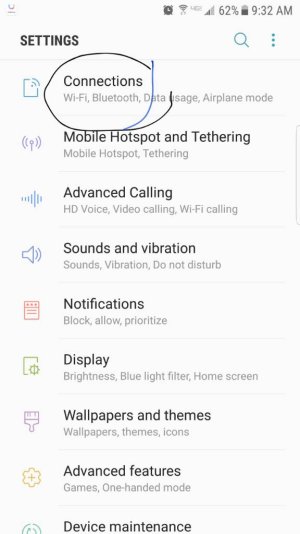
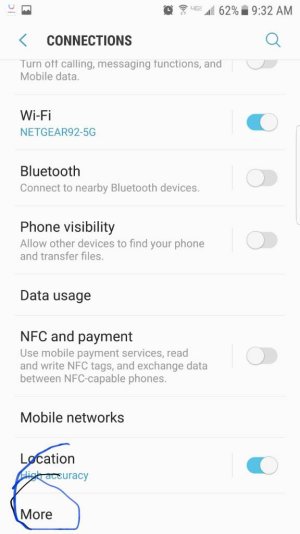
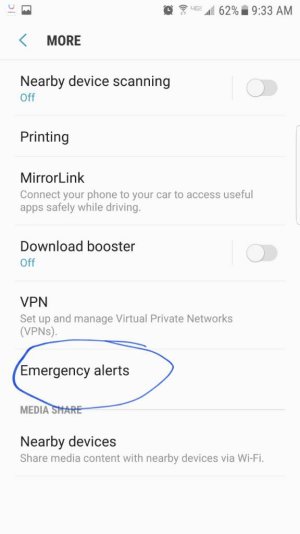
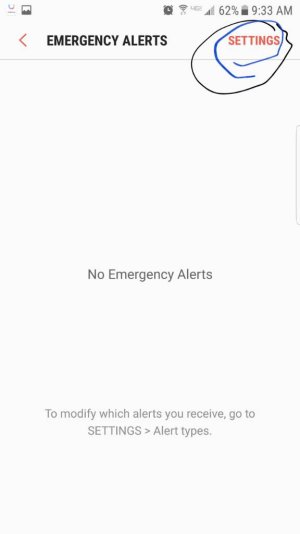
Go into settings and you will find it in connections > more > emergency alerts > settings.
 
Not sure if it varies by carrier, but on T-Mobile it's not where the previous post states. It's on the Messages app, Settings, Emergency Alert Settings.
 
Which Messages app? I tried both the Google and Samsung ones and I couldn't find it. I'm in Verizon. As you said, the first response didn't work either as I have no "connections" tab within settings. I have no idea what he is talking about.
 
Re: Where Are "Emergency Alerts" Now That We're Updated To Nougat?

Which Messages app? I tried both the Google and Samsung ones and I couldn't find it. I'm in Verizon. As you said, the first response didn't work either as I have no "connections" tab within settings. I have no idea what he is talking about.
Ok, I am on Verizon. There are two options for displaying the settings menu. When you are in settings click on the three dots and select view as simplified list and then follow where I previously noted.
 
Re: Where Are "Emergency Alerts" Now That We're Updated To Nougat?

Ok, still not seeing it. Here's a screenshot of what I get when I click "simplified view." What am I missing?
Edit: how do I post a screenshot?
 
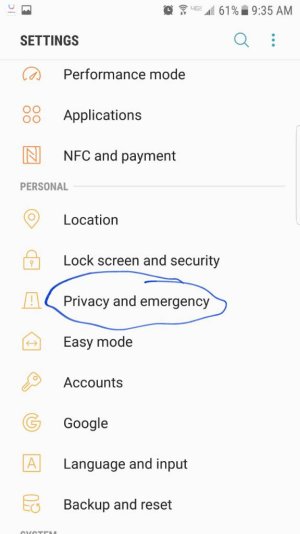
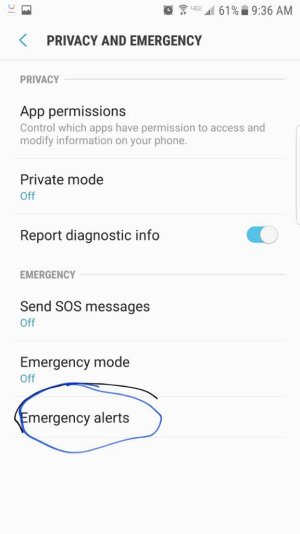
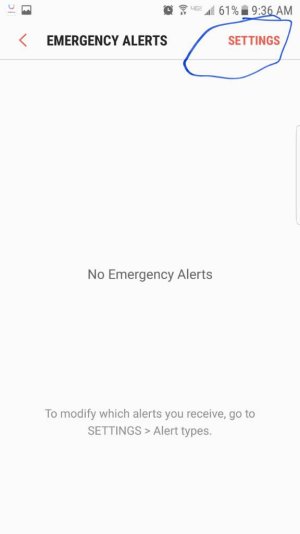
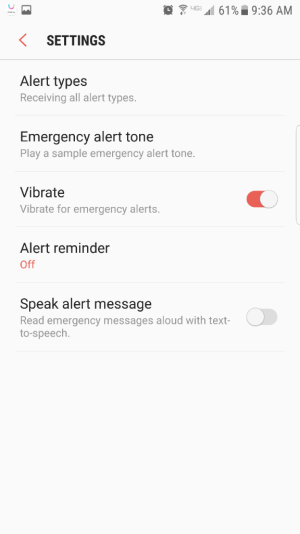
I don't see a screenshot, but in the other view in the settings menu it is in privacy and emergency > emergency alert > settings
 
Re: Where Are "Emergency Alerts" Now That We're Updated To Nougat?

Ok, still not seeing it. Here's a screenshot of what I get when I click "simplified view." What am I missing?
Edit: how do I post a screenshot?
The more section should be all the way down at the bottom of the connections menu.
 
If you would like help posting a screenshot tell me how you are viewing Android Central.
 
Here is where it is in the simplified menu. If you would like I will post where it is in the standard menu.
Screenshot_20170325-093244.jpgScreenshot_20170325-093303.jpgScreenshot_20170325-093318.jpgScreenshot_20170325-093333.jpg
 
Re: Where Are "Emergency Alerts" Now That We're Updated To Nougat?

Here is the standard menu.
Screenshot_20170325-093615.jpgScreenshot_20170325-093627.jpgScreenshot_20170325-093641.jpgScreenshot_20170325-093653.png
For some reason this post had to get approval before it posted. It came after you had already found it. I guess I will just leave it here in case anyone else might find it useful.
 
Last edited:

Latest posts

Trending Posts

Forum statistics

Threads
963,180
Messages
6,992,797
Members
3,164,986
Latest member
tsmtoolpro