- May 29, 2025
- 182
- 9
- 18
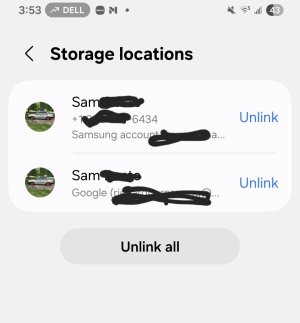
Its already linked in contacts app to samsung account and google. But for some reason the google account doesnt show phone number while the Samsung Account does, as what's shown in the screenshot. Only happening with a few of my contacts.Go to your Contacts app and choose to show only your Google contacts. Find that contact and (most likely) you'll find that it's saved with the same name or same e-mail address, but it doesn't have a phone number linked there. Which is likely why it's asking you to 'link' both contacts.
Do you have contacts syncing to both google and samsung?Go to your Contacts app and choose to show only your Google contacts. Find that contact and (most likely) you'll find that it's saved with the same name or same e-mail address, but it doesn't have a phone number linked there. Which is likely why it's asking you to 'link' both contacts.
That means the phone number isn't saved to both accounts (that's why you have those in the list to 'merge'). Samsung contacts and Google contacts are completely separate save locations. Unless you 'tell them to' (i.e. merge), the info isn't synced between the two. You can see all the info on the phone because you have both accounts, but the info won't 'flow' between accounts. Personally, since Google Contacts is more 'brand agnostic' and can sync with more devices than Samsung's, I prefer to save mine to (and only to) Google. If you use both accounts, you can run into those duplicate contact issues (like having only saved some info to one account and not the other).Its already linked in contacts app to samsung account and google. But for some reason the google account doesnt show phone number while the Samsung Account does, as what's shown in the screenshot. Only happening with a few of my contacts.
Its weird how only three of the hundreds of contacts I have there's no phone number showing in google contacts. But the Samsung Account it is.That means the phone number isn't saved to both accounts (that's why you have those in the list to 'merge'). Samsung contacts and Google contacts are completely separate save locations. Unless you 'tell them to' (i.e. merge), the info isn't synced between the two. You can see all the info on the phone because you have both accounts, but the info won't 'flow' between accounts. Personally, since Google Contacts is more 'brand agnostic' and can sync with more devices than Samsung's, I prefer to save mine to (and only to) Google. If you use both accounts, you can run into those duplicate contact issues (like having only saved some info to one account and not the other).
Not weird, those just never saved to Google. Again, Samsung and Google contacts are two very separate locations. Unless you save the contact explicitly on one service, merge them through the Contacts app, or otherwise copy/export to it, the contact information will NOT flow between the two automatically. Your Contacts app may show both locations in a single list, but in the end, if your specific contact doesn't have phone number info in Google, then that information was never saved to said contact for your Google account (it was only saved, in your case, to your Samsung account contacts).Its weird how only three of the hundreds of contacts I have there's no phone number showing in google contacts. But the Samsung Account it is.
OkNot weird, those just never saved to Google. Again, Samsung and Google contacts are two very separate locations. Unless you save the contact explicitly on one service, merge them through the Contacts app, or otherwise copy/export to it, the contact information will NOT flow between the two automatically. Your Contacts app may show both locations in a single list, but in the end, if your specific contact doesn't have phone number info in Google, then that information was never saved to said contact for your Google account (it was only saved, in your case, to your Samsung account contacts).