- 12-31-2012, 08:01 AM
Thread Author #1
- 01-01-2013, 02:51 AM #2
- 01-01-2013, 07:22 AM
Thread Author #3
- 01-03-2013, 12:32 PM #4
Re: Remove Navigation Bar
I would definitely recommend GMD gesture control. I just got the paid version ($5 but it lets you hide/unhide the navigation bar easily). I haven't had any problems with GMD yet and it lets you make custom gestures to do a wide variety of things. For example I have it set so when I tap the bottom edge of the screen it will hide/unhide the navigation bar, and it works great. I really like the extra screen space it frees up.
Sent from my Nexus 7 using Android Central Forums-Motorola Atrix 2- Nexus 7 - Nexus 4Thanked by: - 01-04-2013, 09:48 PM
Thread Author #5
- 01-12-2013, 02:05 PM #6
- 01-13-2013, 10:30 AM
Thread Author #7
- 01-22-2013, 02:45 AM #8
- 02-01-2013, 11:28 AM #9
Re: Remove Navigation Bar
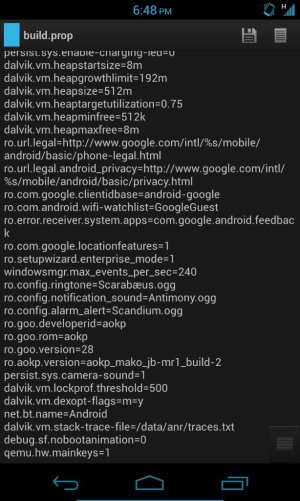
I've added that line in build.prop done a reboot but my nav bar is still there. Does GMD let you disable nav bar only? I want to keep my status bar
- 02-01-2013, 12:27 PM #10
- 02-01-2013, 12:49 PM #11
- 02-02-2013, 01:50 PM #12
Re: Remove Navigation Bar
Thank you so much for this post. Like you I feel the navigation bar take up a lot of space for what for me is essentially just 2 functions - 'Back' and 'Home'.
I used option 1 to disable the Nav Bar, but instead of Button Saviour I use GMD Gesture and created custom gestures to swipe up from the bottom of the screen for Home (bottom middle), Back (bottom left) and Recent Apps (bottom right) buttons. In doing this you are just replacing the soft keys that you press with a swipe up from the same position, so the phone functions in much the same way but now I enjoy a bigger screen on my Nexus 4. - 02-06-2013, 06:53 PM #13
Re: Remove Navigation Bar
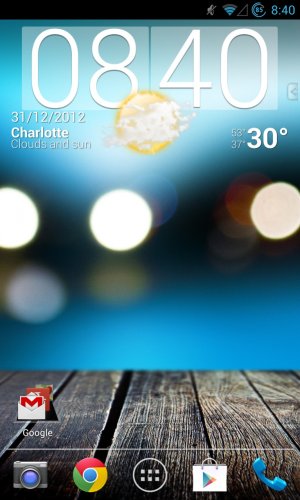
I was able to hide the bar after rooting my phone and I love that it's gone, now just debating on which app to use for the home and back functions.
I edited the build.prop in /system and it worked right after reboot, it was a little scary to be in there editing at first but thankfully all went well.
For my edit I made sure there was a space between = on both sides. If it's not working for you Abu that might be the issue.Thanked by: - 02-06-2013, 07:50 PM #14
Re: Remove Navigation Bar
That could be the reason or that I have a custom ROM (AOKP) I think this mod is for stock ROM either way I've disabled my navbar through AOKP settings and I'm using LMT launcher (pie) for the nav buttons. Thanks for the heads up though.
Sent from my Nexus 4 using Android Central Forums - 02-08-2013, 09:20 PM #15
- 02-09-2013, 02:26 PM #16
Re: Remove Navigation Bar
So, I followed the instructions laid out here using option one and installed the gesture control app. The issue I am having now is that my wallpaper changed and I can not change it back... Any ideas?
Nevermind, found the answer in the help screen. Just had to dowload simple image app and static image wp is back.
Thank you so much for this mod! Loving the larger screen now. - 02-09-2013, 03:51 PM #17
- 02-09-2013, 06:43 PM #18
- 02-09-2013, 06:47 PM #19Thanked by:
- 02-09-2013, 11:28 PM #20
Re: Remove Navigation Bar
Got the notification bar back after uninstalling GMD, deleting the line, and rebooting. Started from scratch and added the line back then installed the pie like you have and it works. Love the pie and the extra screen space. Thanks
Thanked by: - 02-10-2013, 12:31 AM #21
- 02-10-2013, 09:34 PM #22
- 02-12-2013, 05:36 AM #23
- 02-12-2013, 08:51 AM #24
Re: Remove Navigation Bar
You can use GMD to set up a custom gesture. Go to the Custom Gestures menu, hit the +, and work your way through it. After setting up the location for the gesture, number of fingers, etc., press Select, Application, Google.
Sent from the bathroom using Android Central Forums - 02-12-2013, 08:53 AM #25
Re: Remove Navigation Bar
I went the GMD Gesture Control route to hide the nav/status bar. I'm using custom gestures in place of the soft keys and liking it so far except I miss having my staus bar readily available. I made a gesture to quick access it but it then sets it to unhide. Bit of a pain. I think I will try OPs option 1 and go to a transparent staus bar.
Similar Threads
-
Can i change tye navigation bar?
By ryan211013 in forum Toshiba ThriveReplies: 1Last Post: 02-29-2012, 06:20 AM -
-- Grey Spill Nexus Navigation Bar Mod --
By ksgunderson in forum Verizon Galaxy Nexus Rooting, ROMs, and HacksReplies: 0Last Post: 02-22-2012, 07:38 AM -
[MOD] White Marble Reflection Navigation Bar
By ksgunderson in forum Verizon Galaxy Nexus Rooting, ROMs, and HacksReplies: 3Last Post: 02-20-2012, 02:00 PM -
How to remove blue bar when scrolling?
By Trevalkin in forum Samsung Galaxy S II SkyrocketReplies: 9Last Post: 01-08-2012, 03:24 PM -
remove status bar in browser?
By johnzor in forum Motorola Droid XReplies: 1Last Post: 09-29-2010, 12:48 PM


Reply