

S Pen Use
- Thread starter Phoneguy108
- Start date
You are using an out of date browser. It may not display this or other websites correctly.
You should upgrade or use an alternative browser.
You should upgrade or use an alternative browser.
MOPARchris
Member
I don't really use mine a lot it's more of a when I needed it's their kind of thing.
Sent from my SCH-I605 using Tapatalk 2
Sent from my SCH-I605 using Tapatalk 2
Bulldog1377
Well-known member
I find myself using it more and more. I had to force myself to start using it on my note tablet but as I got more familiar with it the more I liked using it. Now on the Note II, I find myself using it for anything and everything.
I think the key is just using it and finding how it helps you in the talks that you use most often.
Sent from my SPH-L900 using Android Central Forums
I think the key is just using it and finding how it helps you in the talks that you use most often.
Sent from my SPH-L900 using Android Central Forums
DAS
Well-known member
Am I the only one not really using the S Pen??!?
I hope you discover what you're missing. The s-pen is the power of the Note. Most people do not instinctively reach for their phone when they need to write something, but if you challenge yourself to do just that for a week or so you will soon wonder how you ever got along without it.
I was a lunch with a new friend today, and she was sharing with me a website she has with some of her artwork. Instead of asking the waitress for pen, and scribbling the web address on a napkin, I just used my phone.
It's become an integral part of my life.
Sent from my SPH-L900 using Android Central Forums
I have only had the phone for about a week so. So far though I haven't had much use for it, but that could change with time.

Cobravision
Well-known member
TheDroidLurker
Well-known member
I feel like an idiot because this morning I needed to write down a series of numbers and instead of using my note 2 I used a pen to write it on my hand.... /facepalm
Sent from my sweet Verizon Galaxy Note 2
Sent from my sweet Verizon Galaxy Note 2
scorpiodsu
Well-known member
I hope you discover what you're missing. The s-pen is the power of the Note. Most people do not instinctively reach for their phone when they need to write something, but if you challenge yourself to do just that for a week or so you will soon wonder how you ever got along without it.
I was a lunch with a new friend today, and she was sharing with me a website she has with some of her artwork. Instead of asking the waitress for pen, and scribbling the web address on a napkin, I just used my phone.
It's become an integral part of my life.
Sent from my SPH-L900 using Android Central Forums
Yeah that can be useful but I think many have become accustomed to picking up their devices and typing the info so people have to retrain themselves and that's hard because let's face it we won't have this device forever and it's no guarantee that the next device people get will have these capabilities. So it can be challenging to integrate something Inc your life especially if it's not used that often.
Sent from my SCH-I605 using Android Central Forums
scorpiodsu
Well-known member
I feel like an idiot because this morning I needed to write down a series of numbers and instead of using my note 2 I used a pen to write it on my hand.... /facepalm
Sent from my sweet Verizon Galaxy Note 2
Lol. I often write it down and then enter it on my phone. When I'm at work its still easier to grab and pen and paper.
Sent from my SCH-I605 using Android Central Forums
dwaynewilliams#WN
Well-known member
I use mine all the time. I agree with one of the above posters, when you force yourself to use it, it really becomes apart of your daily routine. I love using it.
from my Samsung Galaxy Note 2, baddest phone on the planet.
from my Samsung Galaxy Note 2, baddest phone on the planet.

SpookDroid
Ambassador
But still no REAL suggestions on how to use it... I mean, sure, note taking is 'cool' I guess, but I still haven't found an app that TRULY takes advantage of the S Pen... And no one seems to be giving any other suggestions than note-taking and (oddly) Draw Something... Mine is still neatly tucked behind the device most of the time...
dwaynewilliams#WN
Well-known member
But still no REAL suggestions on how to use it... I mean, sure, note taking is 'cool' I guess, but I still haven't found an app that TRULY takes advantage of the S Pen... And no one seems to be giving any other suggestions than note-taking and (oddly) Draw Something... Mine is still neatly tucked behind the device most of the time...
It's a pen. What else do you use a pen for? It is meant for writing.
from my Samsung Galaxy Note 2, baddest phone on the planet.
Coug
Well-known member
I have had mine for a week and just came home from a meeting where I used it all of the time for taking notes. I bought the S pen with eraser and I keep it in my shirt pocket. For me at least it makes a big difference because it is more like pulling out a pencil to write a note. I have not used the pen in the body of the phone very much.
hummingbirdhill
Well-known member
I would use my S-pen on a regular basis if I had a NUMBERED LIST template I could select as the default. Or even a not-numbered LIST template.
If I could quickly make lists on the spur of the moment, I'd use it many times most days! Grocery lists, student supply lists, project/event to-do lists, etcetera . . . So, am I missing something here? I mean, is a LIST template available? If so, is there an option to make it the default popup when I extract the S-pen?
If I could quickly make lists on the spur of the moment, I'd use it many times most days! Grocery lists, student supply lists, project/event to-do lists, etcetera . . . So, am I missing something here? I mean, is a LIST template available? If so, is there an option to make it the default popup when I extract the S-pen?
DAS
Well-known member
no one seems to be giving any other suggestions than note-taking and... Mine is still neatly tucked behind the device most of the time...
Other than note taking what else would you do with a note pad and pen?
The device is called the Galaxy "Note." The ability to take electronic notes on the go, at anytime, is the whole point of the device.
Sent from my SPH-L900 using Android Central Forums
DAS
Well-known member
So it can be challenging to integrate something Inc your life especially if it's not used that often.
Sent from my SCH-I605 using Android Central Forums
Without the s-pen all you have is a smartphone with a large screen. What distinguishes this phone from any other is that you have a full featured smartphone, an adequate sized tablet display, and an electronic notepad all in one device.
On every billboard advertising the Note, you always see the pen. That's because it's the pen that sets this device apart from any on the market today.
Countless times a day I need a quick pen and notepad. Sometimes to jot an idea; to write down a phone number; remember a task etc.
I was in the UPS store the other day, and I needed to jot down the tracking number of my shipment. The clerk asked me if I needed a pen to write down the number, I said no thanks. I pulled out my s-pen and jotted it down on my phone.
I was at a conference out of town last week and a colleague asked if I had a piece of paper to write down the name of the restaurant a group of us was planning to meet up at after the last session. I said sure and pulled out the s-pen and wrote down the information.
I was at my desk on Friday, the phone rang and instead of grabbing a traditional pen a paper, I jotted down the number of a customer using the s-pen of my phone. Later, when I went to call the customer back I didn't have the number scribbled on a post it note in my pocket, but rather right with me in my phone.
If you really think about how many times you scribble little thoughts or ideas on a piece of torn paper, napkin, back of a business card or whatever, and just switch those times to using the convenience of the Note 2, you'll be amazed how truly useful having the s-pen with you all the time really is.
Sent from my SPH-L900 using Android Central Forums
xKrNMBoYx
Well-known member
I wish my S3 had the S-Pen. There are many instances in my daily life where I need to jot things down. I usually type it in my phone, but writing it accurately would be much better.
Sent from my SGH-T999 using Android Central Forums
Sent from my SGH-T999 using Android Central Forums
DAS
Well-known member
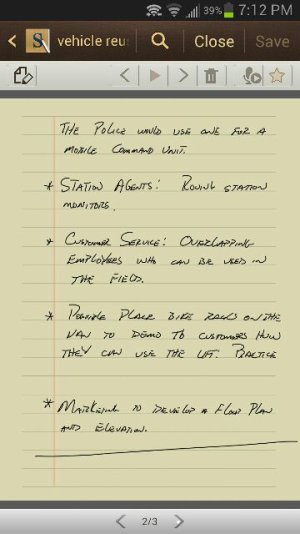
The notes themselves don't mean anything to you per se, but this is an example of how I use the s-pen and Galaxy Note at work.
Sent from my SPH-L900 using Android Central Forums
Sent from my SPH-L900 using Android Central Forums
Attachments


dwaynewilliams#WN
Well-known member
Without the s-pen all you have is a smartphone with a large screen. What distinguishes this phone from any other is that you have a full featured smartphone, an adequate sized tablet display, and an electronic notepad all in one device.
On every billboard advertising the Note, you always see the pen. That's because it's the pen that sets this device apart from any on the market today.
Countless times a day I need a quick pen and notepad. Sometimes to jot an idea; to write down a phone number; remember a task etc.
I was in the UPS store the other day, and I needed to jot down the tracking number of my shipment. The clerk asked me if I needed a pen to write down the number, I said no thanks. I pulled out my s-pen and jotted it down on my phone.
I was at a conference out of town last week and a colleague asked if I had a piece of paper to write down the name of the restaurant a group of us was planning to meet up at after the last session. I said sure and pulled out the s-pen and wrote down the information.
I was at my desk on Friday, the phone rang and instead of grabbing a traditional pen a paper, I jotted down the number of a customer using the s-pen of my phone. Later, when I went to call the customer back I didn't have the number scribbled on a post it note in my pocket, but rather right with me in my phone.
If you really think about how many times you scribble little thoughts or ideas on a piece of torn paper, napkin, back of a business card or whatever, and just switch those times to using the convenience of the Note 2, you'll be amazed how truly useful having the s-pen with you all the time really is.
Sent from my SPH-L900 using Android Central Forums
This exactly.^^^
from my Samsung Galaxy Note 2, baddest phone on the planet.
Yeah that can be useful but I think many have become accustomed to picking up their devices and typing the info so people have to retrain themselves and that's hard because let's face it we won't have this device forever and it's no guarantee that the next device people get will have these capabilities. So it can be challenging to integrate something Inc your life especially if it's not used that often.
Sent from my SCH-I605 using Android Central Forums
Exactly
Similar threads

- Replies
- 12
- Views
- 724

- Replies
- 24
- Views
- 5K


- Replies
- 0
- Views
- 211
- Replies
- 22
- Views
- 1K


Trending Posts
-
[Chatter] "Where everybody knows your name ..."
- Started by zero neck
- Replies: 53K
-
-

-
News Play Store 'Cubes' spotted early, teased as the 'one place' for shops and shows
- Started by AC News
- Replies: 0
-
 S24 pictures... show us how they look!
- Started by Walter Wagenleithner
- Replies: 396
Forum statistics

Android Central is part of Future plc, an international media group and leading digital publisher. Visit our corporate site.
© Future Publishing Limited Quay House, The Ambury, Bath BA1 1UA. All rights reserved. England and Wales company registration number 2008885.
 Facebook
 Twitter
 Instagram