Results 1 to 21 of 21
- 01-04-2013, 10:16 AM
Thread Author #1
Equalizer for Google Play Music
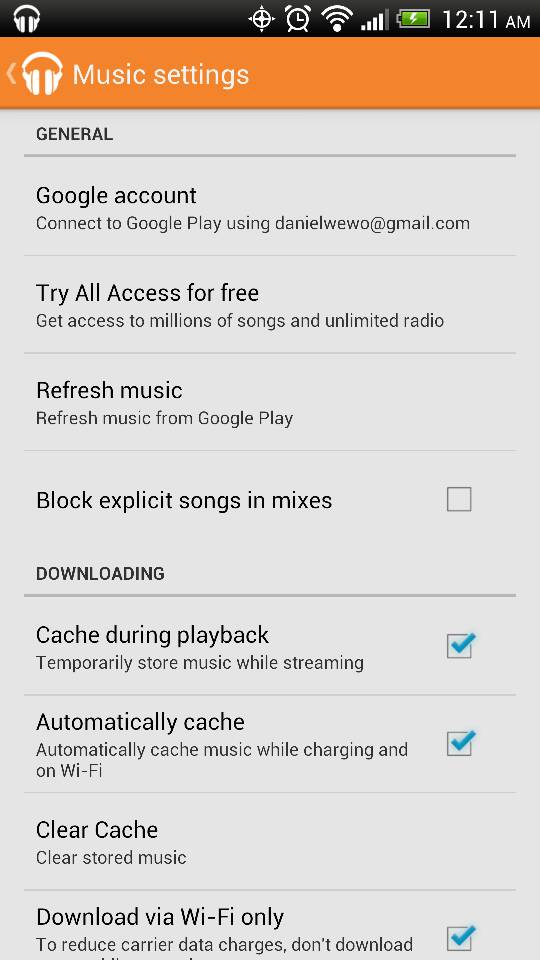
Is there no Equalizer settings for the Google Play Music player?
I know for a fact that the SG3 has that option, but I can't seem to find it for the DNA... - 01-04-2013, 10:35 AM #2
- 01-04-2013, 11:10 AM #3
- 01-04-2013, 11:19 AM #4
Re: Equalizer for Google Play Music
In Play Music: Start playing a song.
Press Menu
"Equalizer" is at the top. Select it.
Turn it on. Set it to what you want.
Pretty easy to find, IMO. Not sure how you missed it. - 01-04-2013, 11:28 AM #5
- 01-04-2013, 04:32 PM
Thread Author #6
- 01-04-2013, 05:19 PM #7
Re: Equalizer for Google Play Music
Hey folks, I just did some research and found out that Google Play actually uses the built-in "Beats Audio" function on
the DNA. When you plug in your headphones and start to play a song in Google Play, you should see the "red" Beats Audio logo show up in your notification bar. If it shows up greyed out, that just means that it's not activated. Go to your notification bar, select it and activate it. If you are looking for a different equalizer tool, you would need to install a third party app for this. Hope this helps. - 01-04-2013, 09:12 PM

Thread Author #8
- 01-04-2013, 10:39 PM #9
- 01-04-2013, 11:55 PM #10
- 01-04-2013, 11:57 PM #11
Re: Equalizer for Google Play Music
No such app is required. I've never installed third party media apps on my phone. Maybe it has something to so with the audio hardware in the phone whether the menu option surfaces or not. I barely install any apps on my,phone and the few I do have are all first party apps from google Samsung etc. those type of apps.
Sent from my AT&T Skyrocket using Tapatalk 2. - 01-05-2013, 12:00 AM #12
- 01-05-2013, 12:27 AM #13
- 01-05-2013, 01:22 AM
Thread Author #14
Re: Equalizer for Google Play Music
That screenshot doesn't do any of us any good if its not coming from a HTC Droid DNA.
The question I posted is strictly related to using Google music player on a HTC Droid DNA in which our menu options don't include the "equalizer".
I even mentioned that my sg3 had the equalizer option which is why I was asking if the DNA had it as well...
Sent from my HTC6435LVW using Android Central Forums - 01-05-2013, 07:41 AM #15
Re: Equalizer for Google Play Music
For those who chose to Root, there is a install of DSPManager
that works very well with the DNA, it allows for seperate profiles of headphones/speakerphone and bluetooth.
I've not been impressed with beats though it does help, it doesn't have many options to customize . - 01-07-2013, 09:24 AM #16
- 05-16-2013, 10:48 AM #17
Re: Equalizer for Google Play Music
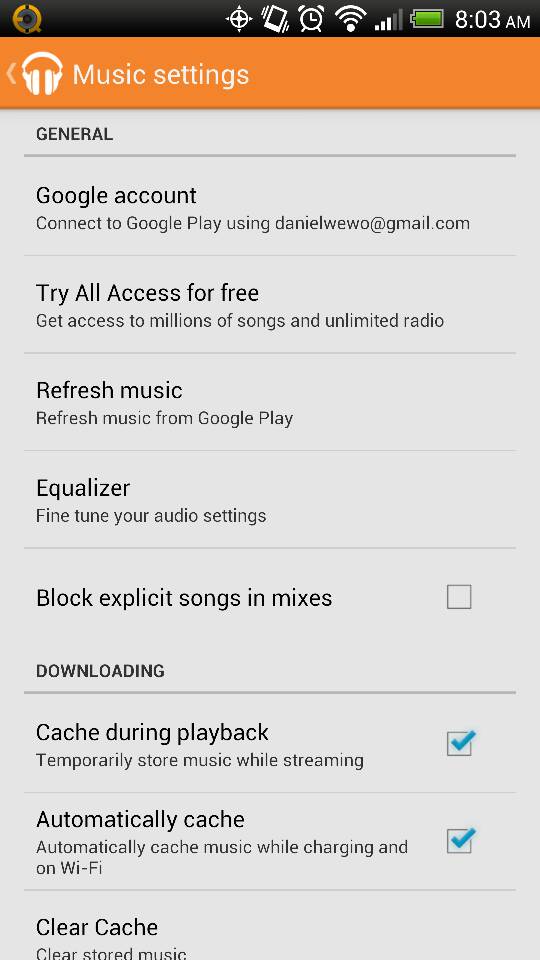
I believe Google Play Music has just upgraded to Music Version v5.0.1026J.676641.
Steps to adjust your equalizer setting:
1. Launch Play Music
2. Press Menu (from Galaxy S3, this is the option to the left of the Home button. Not sure with other Android devices)
3. Tap "Settings"
4. You'll be then displayed with "Music Settings" panel. (Colored in orange)
5. Under the "General" section, you should be able to see the "Equalizer" option
Should you need further assistance, feel free to tweet me @meoMonares. I'd be glad to provide screenshots.
God bless! - Yesterday, 02:12 AM #18
- Yesterday, 05:43 AM #19
- Yesterday, 10:05 AM #20
- Yesterday, 10:10 AM #21
Similar Threads
-
Anyone able to get music matching for Google Play working on Linux?
By 6tr6tr in forum Google Nexus 4Replies: 1Last Post: 01-04-2013, 08:42 AM -
Vlingo and Google Play Music
By courtneyp85 in forum Android ApplicationsReplies: 0Last Post: 04-06-2012, 12:41 AM -
[MOD]Google Play Music[BEATS]
By l Monster l in forum Sprint LG MarqueeReplies: 4Last Post: 04-05-2012, 12:45 AM -
Google Play Music App Modded
By inmenzo27 in forum Optimus V Rooting, ROMs, and HacksReplies: 3Last Post: 03-28-2012, 02:41 PM -
Google Play Music App
By omahawk in forum AT&T ATRIX 2Replies: 2Last Post: 03-18-2012, 12:00 PM


Reply