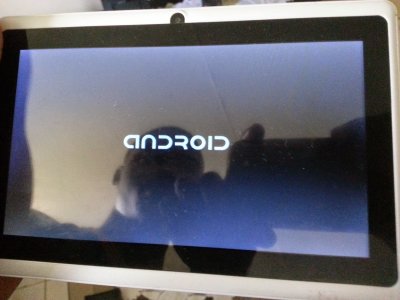
How do I do a hard reset on my Fusion 5 tablet?

masterblaster198

New member
Dec 31, 2014
4
0
0
fusion 5 tablet hard reset!!!!!

hi, i have a fusion 5 tablet, thats all it says on the back so dont know much else on what its called, my tablet turns on but just stays on the android logo screen, ive looked online and it needs a hard reset but i dont know the combination to do so can anyone help me with finding out or who knows how to do so, ive looked all over the internet for a solution but cant find one, ive tried the hold down the power button and up/down button volume at the same time and it doesnt work, pleassee help!!!!!!
 
Re: fusion 5 tablet hard reset!!!!!

hi, i have a fusion 5 tablet, thats all it says on the back so dont know much else on what its called, my tablet turns on but just stays on the android logo screen, ive looked online and it needs a hard reset but i dont know the combination to do so can anyone help me with finding out or who knows how to do so, ive looked all over the internet for a solution but cant find one, ive tried the hold down the power button and up/down button volume at the same time and it doesnt work, pleassee help!!!!!!
I found this online, hopefully its the same tablet that you have: FAQ - Fusion5

From the site:
Q. My tablet has frozen
A. This problem usually occurs when any specific app malfunctions so you need to perform a factory reset.

To do this, turn off the tablet completely (press and hold power button for about 10 seconds)

Whilst the power is off, press and hold the SILVER button (adjacent to screen). While holding the SILVER button, turn on the tablet and keep holding the SILVER button and release if after 3 seconds after you have turned on the tablet.

The tablet will then show multiple options. Please move the cursor down and select YES using the POWER button, the tablet will recover back to factory defaults.

Let us know if that works.
 
Re: fusion 5 tablet hard reset!!!!!

hi, thanks for the reply but it doesnt have a silver button on it, ive found out its a A1CS fusion 5 but still no look with factory resetting it, it still connect upto my computer with usb, any chance i could do it from my computer, if not ive been looking all day for a solution and none of them have worked :/ ?
 
hi, thanks for the reply but it doesnt have a silver button on it, ive found out its a A1CS fusion 5 but still no look with factory resetting it, it still connect upto my computer with usb, any chance i could do it from my computer, if not ive been looking all day for a solution and none of them have worked :/ ?
 
You can try turning the tablet off, pressing the Volume Up button while pressing the power button, and it should reset and power on.

You can read https://www.youtube.com/watch?feature=player_embedded&v=xSM8k4LIeQE

You can install adb to your computer (Mini-SDK), and enable USB debugging. (Settings/General/Developer options. If there's no Developer options menu item [it's the next to last one - Security, Developer options and About device], go into About device and press Build number 7 times. Then press the back button and you'll see Developer options. USB debugging is in Developer options.)

Connect the phone to the computer (you'll probably have to install a driver - if Windows doesn't find one itself, try the Koush Universal Driver.

Go to a cmd window in the folder in which you installed adb (Go to the folder [to it, not into it, don't open it], press the shift key and right click the folder. Select "Open command window here".) Type

adb shell

The adb server will start and you'll be at a # prompt. Type --wipe_data and press Enter. (That's 2 dashes, wipe, an underline and data.) Your phone will restart in recovery mode and do a factory reset.

One of these methods should work for just about any tablet.
 
hi thanks for the reply ive downloaded most of it but it says i need to get into my tablet and acivate usb debugging but i cant as it wont go no further than the android text startup screen. (the image linked with this reply is not my tablet nor what it looks like just an example of whats happening with my own tablet) Issue with Bricked tablet.jpg
 
Small incremental find - based on the 2017 model of the Fusion 5 16GB/32GB 8 core Android 7 version, the reset button is hidden inside the door where the MicroSD card goes - it's grey and about 1mm wide.

Trying UpVolume+Power (held for 10 seconds or so) gets me a broken Droid icon with "No command" indicating it can't find the alternative kernel to boot from.

Pushing reset at that point, did restart the tablet, but still just marches at the "android" logo with shading changes.

Still trying to figure out the right sequence of button pushes to get it to reset back to stock 7.0.
 

Trending Posts

Members online

Forum statistics

Threads
963,359
Messages
6,993,133
Members
3,165,009
Latest member
tuovst