
- Sep 20, 2018
- 923
- 0
- 0
How often should I be optimizing ram? Seems like poor ram management when I have under 2 gigs available. Is it bad to optimize ram and battery a lot?


I've already optimized maybe 3 times in the week I've had the phone. Hope I didn't harm anything.

No no harm but I leave mine in device care settings under advance to automatically optimize once a dayI've already optimized maybe 3 times in the week I've had the phone. Hope I didn't harm anything.
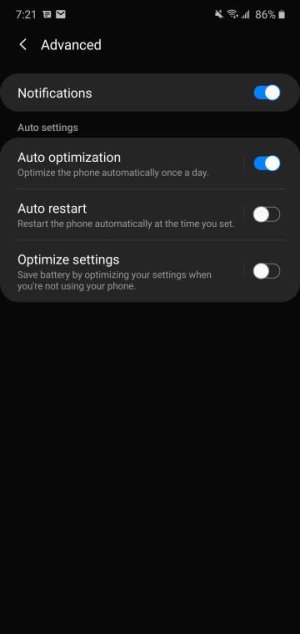
I reset my phone once a day always have.

I'm sure you mean "reboot," not "reset." Just want to make sure the OP doesn't get the wrong idea.

RAM uses the same amount of power regardless if it's full or empty. Android and other modern OS's take advantage of this by keeping your most commonly used apps loaded but dormant in the background. They are effectively paused, using no processing power, but can be quickly brought to the foreground when you want to access them. This not only allows for more efficient multitasking, but uses less power compared to initializing everything from scratch.
When you use RAM optimizing apps that arbitrarily force close apps, the OS will just re-initialize those apps again to refill the RAM. There's no way to prevent this, so those optimization apps and OS will just spend all day fighting each other, wasting battery re-loading apps only to be closed again.
I'm not sure how manufacturers are handling things on the OS level. If I had such an option like Samsung has, I would leave it off. If they still force close things on occasion, there's not much you can do about, but I wouldn't add to the problem by installing another management app.That being said, I think Samsung has been going down Huawei's path in terms of more aggressive RAM management at the firmware level, hasn't it? The main problem this causes is that apps are more likely to be killed in the background, which can be a pain if you have an app in the background that you want to continue working (like a music or podcast app, for example).

I agree. This is why I'm glad we now have the option to lock/pin apps we want to stay open. This is a good thing right? I used it for the first time and I like it.The main problem this causes is that apps are more likely to be killed in the background, which can be a pain if you have an app in the background that you want to continue working (like a music or podcast app, for example).

I agree. This is why I'm glad we now have the option to lock/pin apps we want to stay open. This is a good thing right? I used it for the first time and I like it.
I only tried it for one app, and it didn't work. When I went back to the app a few hours later it reloaded to the homepage.



 Facebook
 Twitter
 Instagram