A new SD-card

Dementikko

Member
Oct 14, 2012
14
0
0
Hello everyone!

I was just wondering what is the professional way to change my SD-card? I don't have any of my music etc. saved on the current card because I knew I'd change my card soon.

Can I just take the old card away and put a new one in? SD-card doesn't have any important system files, does it?

Thank you!
 
Hello everyone!

I was just wondering what is the professional way to change my SD-card? I don't have any of my music etc. saved on the current card because I knew I'd change my card soon.

Can I just take the old card away and put a new one in? SD-card doesn't have any important system files, does it?

Thank you!
Yeah just take it out and replace it, that's what I do
The safest way is to go to Settings -> Storage, then scroll down and click "Unmount SD Card", which will then allow you to remove it, but it isn't really necessary
 
The card uses FAT format. It is easy for there to be lost clusters if you simply pull it out. Unmount the card, or better yet, power off the device.
You may never have a problem, but it is too easy to unmount it first and not worry about it.
 
The filesystem type on the SDCard depends on where it was originally formatted - if it was formatted in a Samsung Galaxy S III, then the filesystem type is actually ext3, not FAT (or FAT32).

Anyway, there are no system files stored on the SDCard but you may have camera pictures or other content that you've downloaded on the old SDCard, so be sure to check the contents before you erase/format it.

Generally your best bet is to format the new SDCard in the phone prior to use (they usually come formatted from the factory) - there seem to be mixed reports on this forum that suggest people are having problems with large numbers of files, or specific file types (music in particular) with the default ext3 filesystem, so if you do run into problems you may have to reformat the SDCard as FAT32. Search the forum for tools that will allow that.

Sent from my rooted, debloated, deodexed Sinclair ZX-80 running CM -0.001 using Tapatalk 2
 
so far my half-full (music) 32gb, formatted in my phone, has been sound :)

Unbranded Global s3, Official JB, Paisley, Scotland, Western Europe :beer:
 
Is there a way to tell what format your current ext. SD card is? Whether it's currently formatted in the exfat file system (or ext3?), or if it's already formatted in FAT32?
Anyway to tell without being rooted?
 
I looked through half-a-dozen file managers and a couple of utilities and none of them showed the filesystem type.
If you just connect your phone to a PC you should be able to tell that way (doesn't require root). Of course, you could remove the SDCard and put it in an adapter connected to a PC and find out that way.
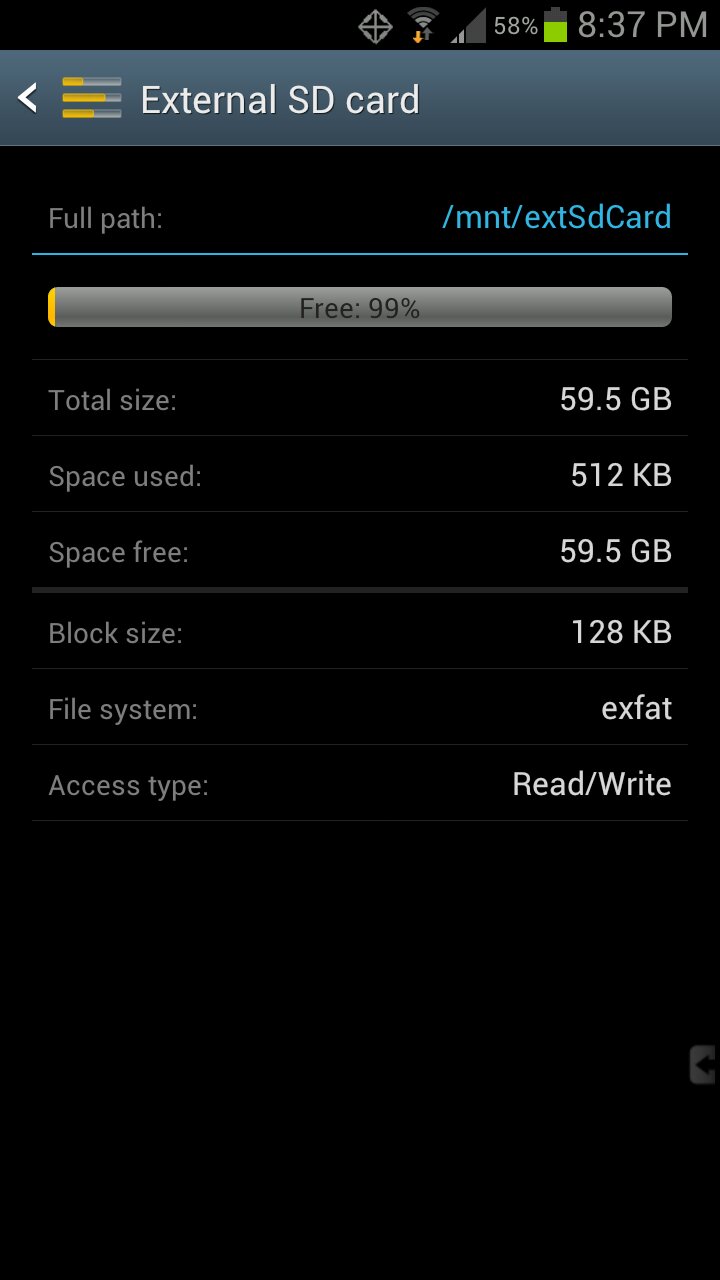
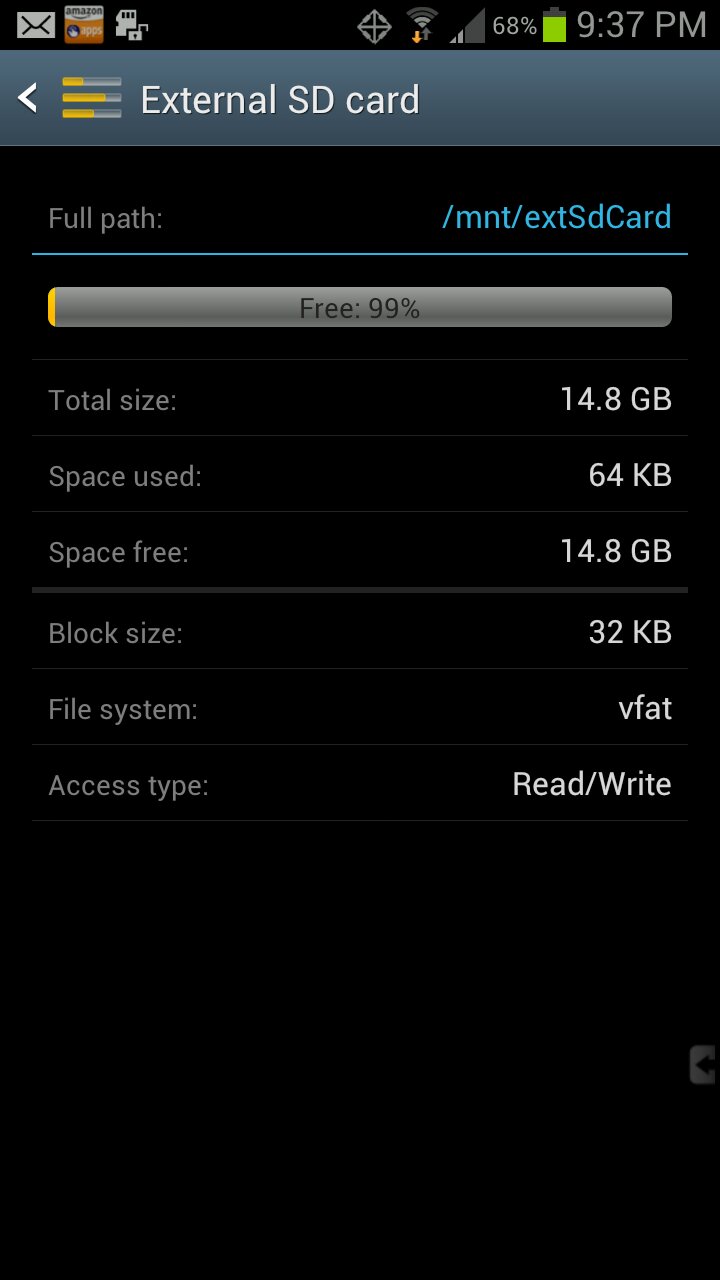
Edit: well, this app DiskInfo: http://market.android.com/details?id=me.kuder.diskinfo shows my FAT32-formatted SDCard as 'vfat'. If someone else that has their SDCard formatted in the phone can try it out we'll see what it shows.
2nd Edit: I went ahead and did it myself and learned a few things in the process:
1. It appears that any SDCard less than 64GB is formatted as FAT32 (shown in the DiskInfo app as 'vfat')
2. Looks like a 64GB SDCard is formatted as exfat (shown in the DiskInfo app as 'exfat')
Learned something the hard way that I'll be starting a new thread for :(
Screenshots to follow:
y3uqu9aj.jpg
ehyry5az.jpg
Sent from my rooted, debloated, deodexed Sinclair ZX-80 running CM -0.001 using Tapatalk 2
 
Last edited:

Latest posts

Trending Posts

Members online

Forum statistics

Threads
963,373
Messages
6,993,162
Members
3,165,016
Latest member
tinni99