Adware problem on Chrome Galaxy S4

Rikku Watro

Well-known member
Dec 2, 2014
368
0
0
I usually use incognito mode on Chrome on my S4, and sometimes accidentally get adware sites (e.g. the ones saying you have a virus even though you don't), which are really annoying. Whenever I encounter an adware site (even in incognito mode), I clear browsing history, cookies, and cached images to be sure I'm safe.

However, I'm still worried that the adware sites might have already injected something, so I've been searching for ways to get rid of them from my phone. I read one article saying you should force stop Chrome, then clear data. But doing so would probably erase everything, including all my bookmarks. I've already saved many bookmarks, and it would be a hassle to have to visit each site and bookmark them again. Also, I don't really want to sign in with my Google account to the Chrome app, and I don't want to use synced bookmarks.

On my other S4, which has Malwarebytes installed, I also sometimes get adware on Chrome. When I tried doing a full scan, Malwarebytes said that nothing is wrong (besides the developer options enabled, which I already disabled after the scan)
 
If you don't actually click on something or download stuff you should be fine. It's not that easy to get malware in Android, you actually have to agree to stuff, just be careful what you click on and never open unknown links or attachments.
 
Drive by doesn't exist?
Ghostery is what I now use after being disappointed in other browsers and extensions.
There are none for chrome but is for Samsung Internet.
Routers can be an entry point.
One site said I lacked and needed an a/v product and offered to install one!! (I have one btw, one of major nsmes)

Having all the most current security and is updated is most important item. But many users do not. And that is a big issue
 
Well, I go to some dodgy places at times and never had a problem. When those popups come and give me dire warnings about my android being infected, or my sim being corrupted (!) I just back out of the site without clicking on anything and go some place else... Android is fairly good at protecting itself if you keep it updated. I do use a (adguard) firewall these days and the app does screen all traffic...
 
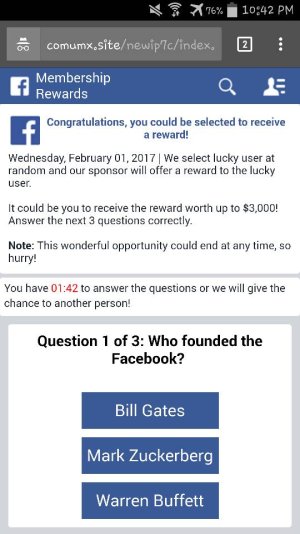
I've been avoiding suspicious websites as much as possible, and I have managed not to get adware for a few days. However, after clicking on a certain video on NicoVideo (the popular Japanese video site), I suddenly got redirected to another adware site! This site said my Android has been chosen to get a 1000 dollar reward (which is definitely a scam) or something like that. And the site was called statserv or startserv if I remember it right, and it looked like another fake Facebook page.
 
But I've always thought it was easier to get malware on Android than iOS or Windows... Maybe it's easier in the case that some Google Play apps have malware, and you have the option to install from other sources such as Amazon Appstore.
 
I also had that voice changer app called "nöid" on both of my S4's, and when I scanned with Anti Adware, it said that the nöid app was a high risk app because it has a particular kind of ad generating system. I was wondering if this was what was causing the problem, because I've had that app for 2 years and have experienced adware problems in the past month or two.
 
I tried uninstalling nöid, but when I went to Petful (which gives news about pets), I was suddenly redirected to a suspicious site again! (something like "promo dot haomoney dot top"). I wonder what could be causing the problem by now, if it's not that nöid app?
 
That site suddenly said "Congratulations, you are today's lucky winner!" with a wheel spinner, which I still didn't believe. Oh no!

And this has happened despite doing my best not to visit suspicious sites, and with Chrome's Safe Browsing on. Disabling JavaScript and/or going to the desktop site may help, as I've read before, but disabling JavaScript also disables Google Search's search suggestions, which can be a problem to me.
 
I've come across an Adguard app, however, it states that it just works for Samsung Internet and Yandex Browser. Is this the firewall you're talking about?
 

Trending Posts

Forum statistics

Threads
962,947
Messages
6,992,254
Members
3,164,950
Latest member
DannaOgle83