
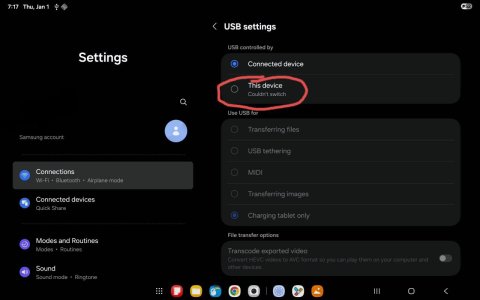
After buying a Samsung A9+, I cannot get individual apps that are not file managers to see the USB device. I can open photos on the drive with imaging applications through a file manager, but then I am unable to move to the next image from within the imaging application. I have to exit and select the next image from the file manager, which is a very awkward process. When I attach the USB device, I get a system notification that a device is attached, and when I select it I am taken to some obscure systems settings screen, where it appears that Android believes I am tethered to a PC. There is a radio button option to change the role and let the Android system take control of the USB, but all attempts to select the correct radio button give an error, as shown in the red circled area of the attached image.
This is all pretty frustrating. It doesn't look like Google or Samsung actually want to make it easy to use a USB flash drive. They have so much security - that is implemented in a DEFECTIVE way - that I cannot effectively use the device. Does anyone have an insight on how I can configure things to allow me to select the correct USB "role" radio button on the attached image?
This is all pretty frustrating. It doesn't look like Google or Samsung actually want to make it easy to use a USB flash drive. They have so much security - that is implemented in a DEFECTIVE way - that I cannot effectively use the device. Does anyone have an insight on how I can configure things to allow me to select the correct USB "role" radio button on the attached image?



 Facebook
 Twitter
 Instagram