Android Auto Shortcuts

Gemstonian

New member
Jul 28, 2024
1
0
1
I want to change the Spotify shortcut shown on my Android Auto screen to my Messaging app shortcut. But I cannot seem to be able to do it either using the Android App on my Samsung S24 of the head unit in my car. Please see attached pictures. Any help is appreciated. Thanks!
 

Attachments

  • AndroidAuto1.jpg
    AndroidAuto1.jpg
    1.4 MB · Views: 14
  • AndroidAuto2.jpg
    AndroidAuto2.jpg
    1,016.2 KB · Views: 14
Welcome to AC!

When you open AA in the phone choose customize launcher?
cd6589923134f168b250c3f568622185.jpg
 
  • Like
Reactions: marksains61
OP did you get anywhere with this? My Samsung S25 does not even have Spotify on its list of apps in the customise option, and just always shows it on the quick launch toolbar which is always visible?

Is that intentional? Is it the same for everyone with this phone?

I rarely use Spotify and never want it on in my car. I'd like to have a different item in the quick launch toolbar.
 
For me, all/any apps that I have from Google/Samsung which are built/released as Android Auto compatible, show up in the list as available to be displayed on the vehicle's screen, via the customize launcher settings. For me, the quick launch tool bar at the bottom of my vehicle's screen shows the icons for apps recently launched/used, and different icons will cycle onto or off that list depending on what I've recently used.
 
The other day, Maps started not showing up for me anymore to Android Auto. This was after I had messed up some permissions to Google Play Services and then had to reset all app permissions. What brought Maps back to Android Auto for me was a recheck of what permissions it had. It had ended up in a disabled state for battery restricted use. Once I adjusted that, Maps became available again for selection via the Android Auto launcher settings.

Maybe something similar happened for you for Spotify.
 
Last edited:
The other day, Maps started not showing up for me anymore to Android Auto. This was after I had messed up some permissions to Google Play Services and then had to reset all app permissions. What brought Maps back to Android Auto for me was a recheck of what permissions it had. It had ended up in a disabled state for battery restricted use. Once I adjusted that, Maps became available again for selection via the Android Auto launcher settings.

Maybe something similar happened for you for Spotify.

I've been experimenting for the last month and I've managed to remove Spotify. I deleted it from my phone altogether so it was removed from the Android Auto screen. I then made a point of jumping in and out of some other apps for a bit. The icon went away. I have reinstalled Spotify though I haven't logged in yet. I don't really use it. So for now it's gone.

For most of the last month the screen looked great. Just full screen maps and that was what I wanted.

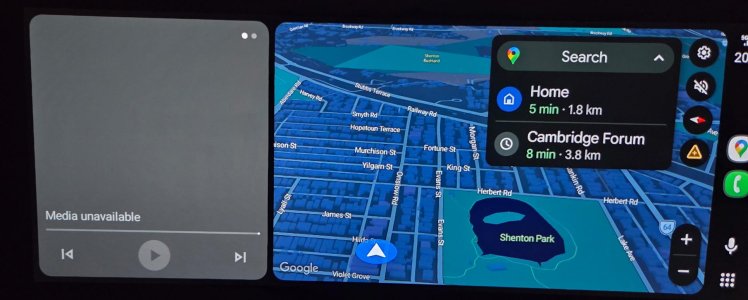
Now it has found some other app to show in the left third of the screen which is annoying as it just says "Media Unavailable". I have no idea what the app is. I used to be able to remove it by going into the app drawer and selecting Maps, which would force it to full screen, but it no longer behaves like that.

A setting to say "I never want Android Auto to show a media option" would be awesome. Why would I want to use my phone to play music over data when the car has an excellent radio?

Also, I'd love to be able to not show the Search dropdown by default. Seems invasive to show my passengers things I've previously searched for. I don't really have much to hide, but I spend a second looking away from the road every trip hiding it. Can't be an ideal setup.


aauto.jpeg
 
Last edited:
...Now it has found some other app to show in the left third of the screen which is annoying as it just says "Media Unavailable". I have no idea what the app is. I used to be able to remove it by going into the app drawer and selecting Maps, which would force it to full screen, but it no longer behaves like that.

A setting to say "I never want Android Auto to show a media option" would be awesome. Why would I want to use my phone to play music over data when the car has an excellent radio?

Also, I'd love to be able to not show the Search dropdown by default. Seems invasive to show my passengers things I've previously searched for. I don't really have much to hide, but I spend a second looking away from the road every trip hiding it. Can't be an ideal setup....
The frame on the left of your picture can basically provide a shortcut non full screen way to play the media files from your phone, and for into messaging. From what I understand, it's a standard function of Android Auto, not an app.

If you have an Android Auto compatible media player app on your phone (like VLC for example, but I'm pretty sure the frame also works with others), then in the frame there will be controls for selecting and playing the media files from your phone. Lots of folks have a ton of media files on their phones and listen to them in their vehicle, without the need of using phone data for streaming services.

Likewise, if you have an Android Auto compatible messaging and contacts apps on your phone, the frame may periodically display for into a recent message received or sent thread, or a recent contact with whom you've messaged.

For me, the frame is not massively useful and I can still get rid of it by going into full screen mode for any other app (like maps or messages).

I agree that a good radio station is fine. However, most people seem to like the option of having control over listening to the media they want to hear when they want to hear it, as opposed to whatever a radio station decides.

I agree that the search drop down is annoying. If you touch the up drop down arrow, it'll slightly minimize, as I think you've been doing, but I don't think there's a way to complely get rid of it.
 
Last edited:

Trending Posts

Forum statistics

Threads
961,319
Messages
6,985,783
Members
3,164,696
Latest member
dustydj