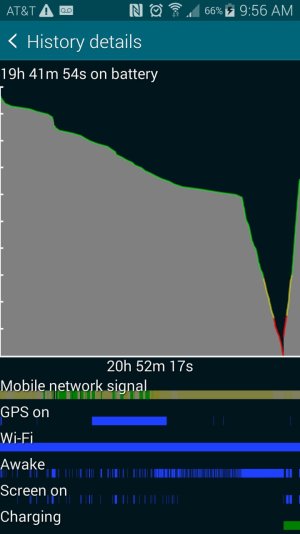
Battery takes a dive and dies over night

Harvey Williams

New member
Apr 17, 2014
2
0
0
Hey guys,

S5 battery has been dying over night when falling asleep with ~75% battery. Thoughts?
 

Attachments

  • Screenshot_2014-04-17-09-56-05.jpg
    Screenshot_2014-04-17-09-56-05.jpg
    114 KB · Views: 59
Strange. Never happen this to me.
May be, many apps were running in background..

Sent from my SM-G900H using AC Forums mobile app
 
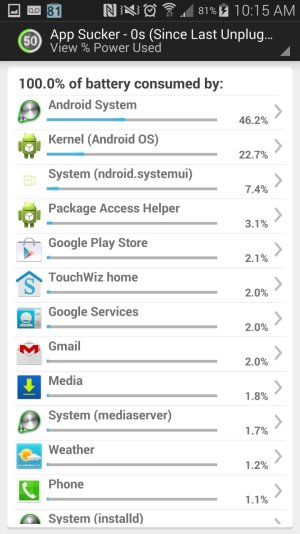
Seems like there may be an app in the background killing things. Might try using gsam battery and it will show you what's eating things up!

Sent from my SM-G900P using Tapatalk
 
Thanks for the help I checked it out and its just the Android OS?
 

Attachments

  • Screenshot_2014-04-17-10-15-19.jpg
    Screenshot_2014-04-17-10-15-19.jpg
    175.9 KB · Views: 52
both mine and my wife's S5 (only had for 5 days) died last night, mine was at 100% and I played a game for 25 minutes then turned the screen off and went to bed. I woke up a little early today and found it was off and completely dead. when my wife got up, hers was dead too. she full charged it last night, then unplugged and went to sleep. When it came back on and I checked the battery stats it only showed the last 5 minutes after I turned it back on... and had no history. Nothing seemed wrong on the phone.
 
Does a reboot help? There is definitely something waking your phone up a ton that is causing the drop.

Sent from my T-Mobile Note 3 using AC Forums.
 
I know there has been a rash of excessive battery drains on the S5 lately. Everyone is still trying to figure out what may be the exact cause. Two of the possible causes have been Location reporting, and Samsung Link.
 
I have been having the same issue recently. It seems to be Google+. Every time in turn on location services, this kicks in and drains my battery something like 10% per hour. I uninstalled the app, but it keeps asking me to update it in Google Play store. Anyone know how to turn this darn thing off? Just started having this issue the last day or so. Thanks!
 
I have been having the same issue recently. It seems to be Google+. Every time in turn on location services, this kicks in and drains my battery something like 10% per hour. I uninstalled the app, but it keeps asking me to update it in Google Play store. Anyone know how to turn this darn thing off? Just started having this issue the last day or so. Thanks!

Have you disabled it in settings>application manager?

From a Kang Nexus 5 using the AC forums app
 
I didn't install anything new in the last 36 hours, and have not had any issues before with over night battery drain, was just weird both mine and my wife's did it the same night... #1 battery use is always screen...
 
When sleeping at night, ALWAYS turn on Ultra Power Savings. My battery only drops 1% over night with that feature running.

Also, go to Application Manager and uninstall or turn off unruly apps. Keep Bluetooth turned off unless where needed as in one's car.

I disabled but could not remove the S-Health App since it was always spinning into my screen. I suspect that may be the big battery drainer.
 
Last edited:
I have the same issue with mine, i did upgrade to lollipop, and the battery does drain quickly when i'm using it, but not fast enough to drop from 90 to 0 in just 7 hours while being asleep. Does anyone know how to fix this?
 

Latest posts

Trending Posts

Members online

Forum statistics

Threads
963,069
Messages
6,992,617
Members
3,164,980
Latest member
pamatika