I have music and navigation working through the car speaker but can not get the phone to work through the car it works from phone speaker. Anyone know how to get it to work.
My understanding is that you can get the media and application sounds to go through the car stereo system by using an AUX IN female plug on the stereo and a combination USB and male jack cord from the phone (iBolt sells one that is 9 ft. long for example). According to iBolt the phone can not be routed through the stereo system from the phone's microUSB port due to how that port was wired by Samsung. I am going to try using the cable for the media and app sounds and then try using Bluetooth for the phone portion. I will post my findings, amateuruag as they will be.
I unplugged the bolt from my aux and plugged a aux cable that i had to the phone and the phone worked through my car speakers. Guess that is how i will use it from know on.
I unplugged the bolt from my aux and plugged a aux cable that i had to the phone and the phone worked through my car speakers. Guess that is how i will use it from know on.
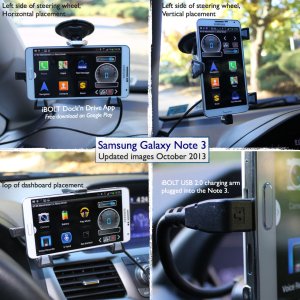
All, I'm with iBOLT and the Note 3 works fine with the xProDock with aux-out. See attached pictures. If you look at the pictures you can see that I've plugged the Charging Arm to the LEFT side of the phone, this is necessary on the Note 3 so the volume button is on top right. The on-off button is then below but when you use the Dock'n Drive App (or CarHome Ultra) there's hardly a need to access it ever since the App takes screen control etc. We are also getting a ton of questions about the need for microUSB 3.0 charging arm. However, while in a car-dock there is no benefit of using a 3.0 connector over the included 2.0 connector as the higher data streaming and faster charging is only applicable when connected to a computer using AC charging. Feel free to ask more questions and I'll chime in as needed...





 Facebook
 Twitter
 Instagram