Can't find Google Maps navigation option (anymore?)

hhiguera

Member
May 29, 2015
9
0
0
I used to use Waze as my main navigation program. Unfortunately since the Lollipop upgrade on my Note 4 waze has stopped working correctly. It is a known issue they are supposed to be fixing. So, I went to my back up plan which is Google Maps (of course?).

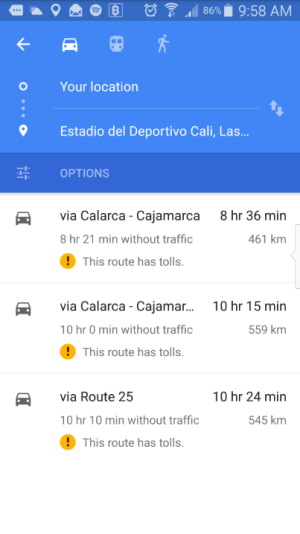
I can't find the option to navigate inside Google Maps. I can see turn-by-turn directions, but I can't have Maps navigate. I'm referring to the triangle that appears in a blue circle (or blue triangle with the "start" text), once you have the route displayed in the map.

I've been searching the web for similar problems and nobody seems to experience this problem? Is like it's only me. Weird! I know I've used Google Maps before to navigate on this phone. I just didn't notice when I lost this option (as mentioned my daily navigation app is waze)

What I know is that I used this option some time ago in USA. Now I'm in Colombia. Could it be that this option is blocked by the provider? Or not available in some countries? Or was it removed in the latest version?

Any ideas?
 
Welcome to Android Central! Are you seeing that blue navigation button but it isn't working, or are you not seeing that button at all?
 
That's not how my version looks. Which version are you on? I'm on 9.9.0.
 
That's my version too:
Maps Version 9.9.0
installed in
Galaxy Note 4
Android version 5.0.1

My map has a little blue car where you have ever the blue arrows. If I tap on the car, it takes me to a screen where I can change the type of travel and has a small map with "start navigation" under it. I click that and it goes.
 
Ok, if I open it back up again, I have the same buttons you do, but without a destination. I hit the bottom blue and it wants me to type in a destination and I do then I get the map screen with the blue arrow to navigate.

Have you tried clearing data in the app manager and starting over?

Oh and missed.. Are you in Columbia with your unlocked USA Note 4?
 
Thanks to both for your help

My phone is Colombian. It is unlocked. I didn't buy it to the carrier, but directly to a Samsung dealer. I travel often to USA and at some point, I used navigation inside Google maps there. I didn't try navigation here until now. That's why I suspected that navigation is blocked in some countries, but it could also be the upgrade to Lollipop too. Or perhaps the Maps version is different here. I don't understand.

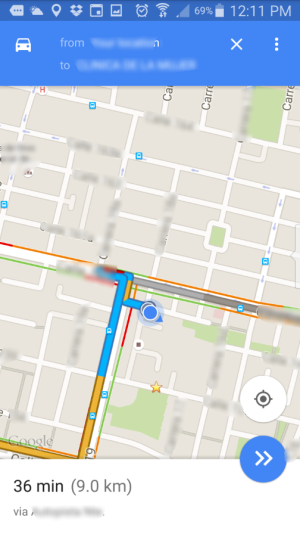
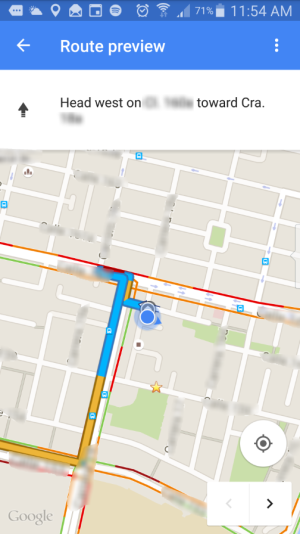
The screenshoots I show appear after I select the dstination. I don't see the "blue arrow" or the "start" button, only what you see in the pics. I can't figure it out. If I click the small dot it becomes blue and it shows your position wherever you go, but that is not really the navigation I've seen in some videos in youtube (I can't past the link here yet, though).
 
Thanks to both for your help

My phone is Colombian. It is unlocked. I didn't buy it to the carrier, but directly to a Samsung dealer. I travel often to USA and at some point, I used navigation inside Google maps there. I didn't try navigation here until now. That's why I suspected that navigation is blocked in some countries, but it could also be the upgrade to Lollipop too. Or perhaps the Maps version is different here. I don't understand.

The screenshoots I show appear after I select the dstination. I don't see the "blue arrow" or the "start" button, only what you see in the pics. I can't figure it out. If I click the small dot it becomes blue and it shows your position wherever you go, but that is not really the navigation I've seen in some videos in youtube (I can't past the link here yet, though).

Well clear data will just reset anything back to default and then you change settings you want.

That might take care of the issue, there could be some setting that needs to be changed, especially since you used the other app.

One more thing, if the other app is still on your phone, check default applications in the settings and make sure that your old app isn't set as a default app and that is causing the issue.
 
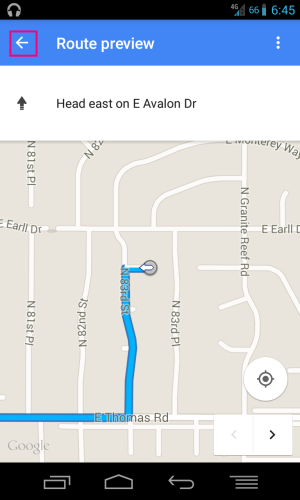
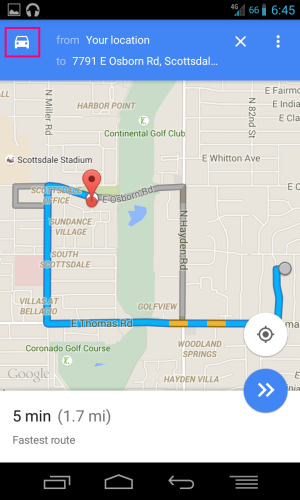
Finally I find someone else with this problem! Instead of going straight to the normal navigation mode, it gives me this "route preview" screen, and it's impossible to actually start navigation from that screen. It happens about half the time for me, usually when there are two clear alternate routes to reaching a destination. The only workaround requires clicking the car symbol in the upper-left, and then a laborious process consisting of about four other button presses.

Background: I'm in the US, using Android 4.4. I'm on the newest version of Google Maps, but it doesn't fix the problem if I downgrade to an older Google Maps version. I deliver pizzas, so I literally have this happen about a dozen times a day.
 
Finally I find someone else with this problem! Instead of going straight to the normal navigation mode, it gives me this "route preview" screen, and it's impossible to actually start navigation from that screen. It happens about half the time for me, usually when there are two clear alternate routes to reaching a destination. The only workaround requires clicking the car symbol in the upper-left, and then a laborious process consisting of about four other button presses.

That sounds very similar to what happens to me, however I haven't found any workaround like you mention. There is NO WAY I can enter to navigation mode. Not even some times like in your case. I'm not really sure what is the process with "the four other button presses". Would you mind explaining it to me? I'd be glad to get into navigation, even if I have to do some workaround.

I've cleared the app cache, removing the updates (suggested by some google searches, although no exactly the same problem), downgrauding Maps. It seems physicaly impossible for me. And you are the first other user I find experiencing something similar!
 
That sounds very similar to what happens to me, however I haven't found any workaround like you mention. There is NO WAY I can enter to navigation mode. Not even some times like in your case. I'm not really sure what is the process with "the four other button presses". Would you mind explaining it to me? I'd be glad to get into navigation, even if I have to do some workaround.

I've cleared the app cache, removing the updates (suggested by some google searches, although no exactly the same problem), downgrauding Maps. It seems physicaly impossible for me. And you are the first other user I find experiencing something similar!

Sure, I'll walk you through it when I get home in a few hours.
 
That sounds very similar to what happens to me, however I haven't found any workaround like you mention. There is NO WAY I can enter to navigation mode. Not even some times like in your case. I'm not really sure what is the process with "the four other button presses". Would you mind explaining it to me? I'd be glad to get into navigation, even if I have to do some workaround.

I've cleared the app cache, removing the updates (suggested by some google searches, although no exactly the same problem), downgrauding Maps. It seems physicaly impossible for me. And you are the first other user I find experiencing something similar!

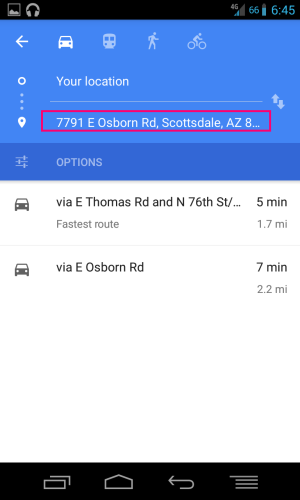
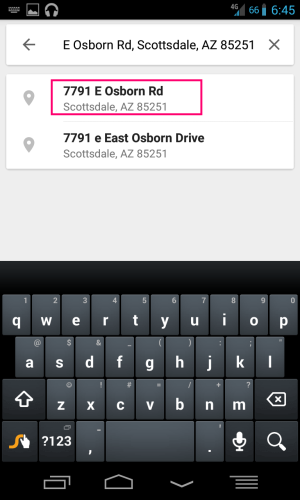
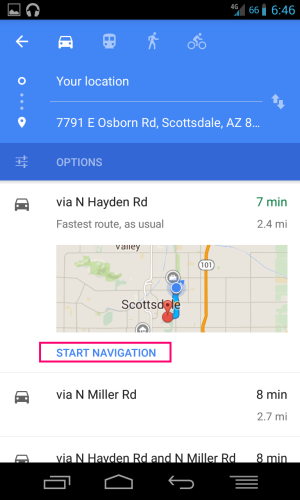
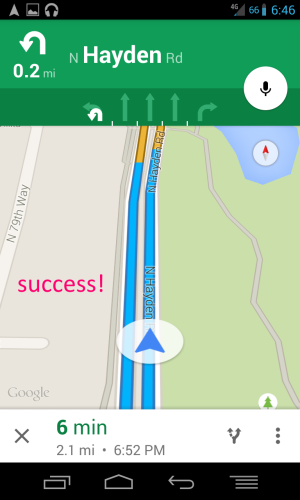
Alright, here's the convoluted process I have to follow to get navigation to work. This is hardly a solution to this problem, as there's clearly something very wrong here. I'm on a Nexus 4, so this problem isn't inherent to the Note 4.

The first screen is what I get after saying "navigate to 7791 East Osborn Road". The red boxes are the buttons I have to press to get into actual navigation mode:

1.png2.png3.png4.png5.png6.png
 
Wow, that's kind of ridiculous.:-\ If you haven't already, swipe in from the left, tap Send Feedback, and give Google a piece of your mind!
 
Alright, here's the convoluted process I have to follow to get navigation to work. This is hardly a solution to this problem, as there's clearly something very wrong here. I'm on a Nexus 4, so this problem isn't inherent to the Note 4.

The first screen is what I get after saying "navigate to 7791 East Osborn Road". The red boxes are the buttons I have to press to get into actual navigation mode:

Wow! For a moment I though I had found the fix to my problem. However, for me it doesn't work. When I get to the step where you can see the "start navigation" I can only see the list of options, but nothing about navigation :(

Screenshot_2015-05-31-09-58-25.png

Thanks a lot anyway! I really appreciate it!!
 
Has anyone called Google?

Here is the number for anyone in the USA: (855) 836-3987

Numbers for a few other countries are listed here in the drop down menu:

There is also a Google Support forum for maps. There are users and developers on that forum.

Thanks for the suggested links. The Mpas community seems very helpful for this type of issues.
 
Just a thought ...does the same thing happen if you speak in your command. For example, I have google now enabled, so I say ,"ok google navigate to (insert adress) and it starts navigation for me. Or just try using the microphone in the google search bar and start the command with the words" NAVIGATE TO"followed by your destinaiton...not get directions or just directions to. Maybe it's worth a shot for you.
 
Well. Thanks to all that tried to help. I went to the Maps forum as suggested by Kelly Kearns, and it turned out that Navigation is not available in mi country :( (BTW: It is spelled Colombia).

You can see the countries where navigation is enabled on this link: support.google.com/gmm/answer/3273406?hl=en-GB&rd=1 (please copy and paste. I still can't post links), under "What you need to use navigation".

Thanks again!
 

Trending Posts

Members online

Forum statistics

Threads
961,063
Messages
6,984,799
Members
3,164,640
Latest member
sukarisw22