Clearing Memory

Nitro211K

Well-known member
Oct 7, 2014
321
2
18
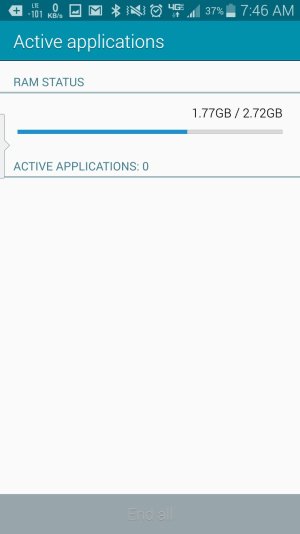
On the S4 I was able to go to recent app and click the pie chart button and in the RAM section see the memory usage and hit a button to clear/release the memory. On the Note 4 the same process gets you to the memory meter but you can't release/clear the memory usage. The only thing you can do is End running apps. Am I missing something?
 
I don't have a Note 4, but I can ask around. Keep in mind, though, Android prefers to have RAM full not the other way around.
 
Use the stock widget called "active apps". You can end one or all apps.

Sent from my Verizon Samsung Galaxy Note 4
 
See attached

Sent from my Verizon Samsung Galaxy Note 4
 

Attachments

  • uploadfromtaptalk1414507937755.jpg
    uploadfromtaptalk1414507937755.jpg
    133 KB · Views: 84
  • uploadfromtaptalk1414507945697.jpg
    uploadfromtaptalk1414507945697.jpg
    72.8 KB · Views: 84
See attached

Sent from my Verizon Samsung Galaxy Note 4

see that is just it. Ending apps doesn't have significant reduction on memory uses. On my S4 after clearing memory 40 more apps close and release the memory, and you would see a huge drop in the memory usage.
 
see that is just it. Ending apps doesn't have significant reduction on memory uses. On my S4 after clearing memory 40 more apps close and release the memory, and you would see a huge drop in the memory usage.

It's actually good for Android to have more ram used than not. Clearing it often uses more battery since Android will just start re-caching it all again.
 
On the S4 I was able to go to recent app and click the pie chart button and in the RAM section see the memory usage and hit a button to clear/release the memory. On the Note 4 the same process gets you to the memory meter but you can't release/clear the memory usage. The only thing you can do is End running apps. Am I missing something?

I use DU Speed Booster. Anytime you want to clear memory, you just drag the icon to the bottom of the screen.

Posted via the Android Central App
 
Don't clear mine very often but have noticed this phone is using a lot more then my note 3. Note 3 never got over 1.6 the note 4 is usually around 2.2 and higher.

Posted via the Android Central App
 
It's actually good for Android to have more ram used than not. Clearing it often uses more battery since Android will just start re-caching it all again.

I completely understand the logic, but my N4 gets choppy when the ram starts getting full. And it seems to have a significant effect when I clear it.

Posted via the Android Central App
 
I completely understand the logic, but my N4 gets choppy when the ram starts getting full. And it seems to have a significant effect when I clear it.

Posted via the Android Central App

I haven't noticed this. Since my Note 3 I haven't cleared RAM and my phone runs great. I have been getting amazing battery life on the Note 4 and it runs snappy without me ever touching RAM. The most I do is clear my recent apps when I am done using the phone (hit the button on the bottom left , hit clear) .. But all the stuff cached and running in RAM due to Android I leave alone.
 
I completely understand the logic, but my N4 gets choppy when the ram starts getting full. And it seems to have a significant effect when I clear it.

Posted via the Android Central App
Never seen this behavior on my S3, S4, or Note 4. The most I ever do is restart the phone in the morning after I wake up.
 
Why is my note using so much ram?

I just picked up my note yesterday and we I hit the button on the bottom left and go to see usage of apps I'll have no apps open and be sitting at 1.78-2.02 gigs of ram used of 2.72. Is this normal? Or do I have to clear a cache or something?
 
Re: Why is my note using so much ram?

Very normal for mine. I think this just helps it to be quick. Unused ram is wasted ram with android is what I have been told
 
Re: Why is my note using so much ram?

I just picked up my note yesterday and we I hit the button on the bottom left and go to see usage of apps I'll have no apps open and be sitting at 1.78-2.02 gigs of ram used of 2.72. Is this normal? Or do I have to clear a cache or something?

It is normal.
 
Don't clear mine very often but have noticed this phone is using a lot more then my note 3. Note 3 never got over 1.6 the note 4 is usually around 2.2 and higher.

Posted via the Android Central App

Yeah...my note 4 isn't slow but the ram is at around 2.2 when the phone gets older it should get slower...
 
Re: Why is my note using so much ram?

I just picked up my note yesterday and we I hit the button on the bottom left and go to see usage of apps I'll have no apps open and be sitting at 1.78-2.02 gigs of ram used of 2.72. Is this normal? Or do I have to clear a cache or something?

No. This is normal. Memory needs to be maintained whether it is empty or not, and having something in memory means it is instantly available if you need it again. Clearing things out of memory manually means if you go to that app again, Android has to reload it from slower, more battery-intensive SRAM.

The ideal state for Android is to have the memory nearly full of stuff you've used recently (in case you want to use it again soon!), with a little reserve left over so it doesn't have to waste time making free space if you want to load up something new.

If you have specific apps that are requesting very large amounts of memory, taking the time to clear them manually will sometimes make it seem like other apps will load faster, and they will, but only because all of your wait time was when you hit "clear", not when you are waiting for the new app to fire up. The net time spent was the same.

On the other hand, if you clear 20 apps out of memory to kill that one hog, then you run all 20 of them again, you've wasted time both clearing and re-loading them. If you're switching to an entirely different application that needs lots of memory, it can sometimes be marginally useful to clear all your running apps, but you're just doing what Android would have done more judiciously and efficiently.
 

Trending Posts

Forum statistics

Threads
960,662
Messages
6,983,159
Members
3,164,544
Latest member
boyl99