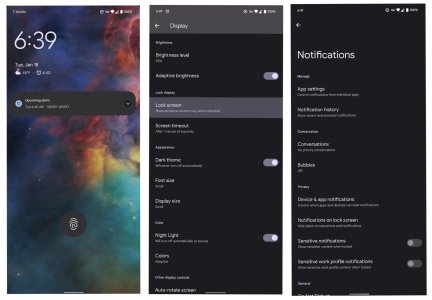
clock size on lock screen?

Strangely, I've gone back to having notifications on the lock screen. When I look at the phone and it's got a large clock, I know there are no notifications. When I see the clock's small I'm not thinking "shame, the clock is small" ... instead I'm thinking "I have a notification - it's time to look at what the notification is" and after looking it's back to large clock.
If you don't want to see notifications on the lock screen you have to go into the settings and select "Don't show any notifications on the lock screen."

Is it possible you might have changed that setting? You might want to verify that setting.
 
I think the original question/issue was about trying to keep the clock size consistent, and through the follow on posts I think the dependency and linkage to notifications were discussed.
 
I'm sorry I don't have an answer to your question, but you may be able to help with mine! How in the world do you get icon-only notifications on your lock screen?? I had them on my Pixel 4 but can't figure out the equivalent settings on P6P. I've spent hours toying with various notification settings and scoured the interwebs for a solution. Your image is the first mention/proof I've seen of it even being possible on the P6P! Any help would be so very much appreciated!
 
I'm sorry I don't have an answer to your question, but you may be able to help with mine! How in the world do you get icon-only notifications on your lock screen?? I had them on my Pixel 4 but can't figure out the equivalent settings on P6P. I've spent hours toying with various notification settings and scoured the interwebs for a solution. Your image is the first mention/proof I've seen of it even being possible on the P6P! Any help would be so very much appreciated!

Welcome to Android Central! Try going to Settings>Privacy>Notifications on Lock Screen​ and change it to Show Sensitive Content Only When Unlocked.
 
Welcome to Android Central! Try going to Settings>Privacy>Notifications on Lock Screen​ and change it to Show Sensitive Content Only When Unlocked.

Yes, that's my current setting, but attached is what I'm seeing. What other setting(s) do I have wrong?
 

Attachments

  • inCollage_20220118_064220841.jpg
    inCollage_20220118_064220841.jpg
    397.9 KB · Views: 19
It should still hide the content on the lockscreen though, with the settings the way they are.

Is it only Calendar that still shows the sensitive content, or is it any notification?

Also, even though the fingerprint icon suggests the screen is locked, what happens if you tap the notification? Does it automatically open Calendar, or do you see the PIN entry keypad or pattern dots appear? If it's the former, that would mean the screen actually isn't locked, and that's why it's showing sensitive content.
 
You'll never believe this. I just started using my P6P again after having retired it two years ago when I got a Samsung S24. First thing I noticed is that the clock goes small when there are notifications, so off I went to Google and ended up here to find "somebody else" had asked that question, only to find that it was me, 4 years ago.

Of course I needed to restore P6P usage because my Samsung did their usual trick of having a swelling battery. Until my replacement battery arrives and I can change it, the P6P gets to daily drive. I really don't miss the gigantic size of this compared to the smaller S24 (not Plus or Ultra). It's otherwise still good. And miracle of miracles, it's able to wirelessly charge now. That was one of my reasons for retiring it. Same chargers, same phone, but now it charges. Seems like Google might have actually realized they had done something wrong.
 
  • Like
Reactions: BerryBubbles

Trending Posts

Forum statistics

Threads
961,078
Messages
6,984,912
Members
3,164,637
Latest member
mitiku Berihe