
The lighter shades of color are messed up on my display. All the nearly-white pastel shades are yellow-tinted, and many of the other light colors are wrong and/or "pixely". Here are images to show what I'm talking about.
Here is the the original test pattern I'm using:

Here is a photo of my Samsung Galaxy Tab 4 10.1" screen, displaying the above test pattern:
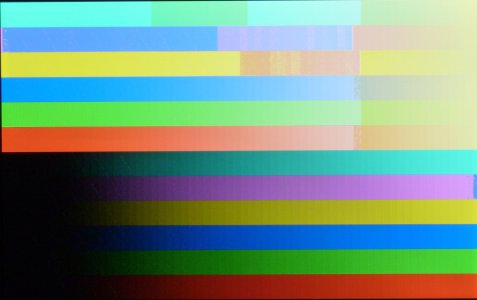
Note how all the colors in the upper-right are yellowish, and many other colors are incorrect. (Yes, I know the color balance is different in the photo compared to the original image, but that's not what's concerning me.)
Here is a closeup of part of the screen:
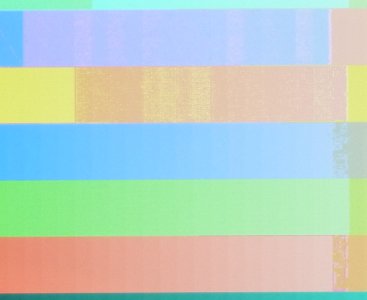
The pixelated stuff is all real (not an artifact of my amateur photography), and the pixels are actually jittery/flickering on the Samsung's screen.
This looks like a hardware problem to me... except that, coincidentally, I noticed it right after upgrading from Android KitKat to Lollipop. So I'm wondering if there's any chance it's a software bug.
I have tried booting into system recover mode and wiping the cache partition. That made no difference.
Anyone ever seen anything like this? If it's definitely a hardware problem, it's still under warranty (yay!).
Thanks for any advice or hints you can provide.
Here is the the original test pattern I'm using:
Here is a photo of my Samsung Galaxy Tab 4 10.1" screen, displaying the above test pattern:
Note how all the colors in the upper-right are yellowish, and many other colors are incorrect. (Yes, I know the color balance is different in the photo compared to the original image, but that's not what's concerning me.)
Here is a closeup of part of the screen:
The pixelated stuff is all real (not an artifact of my amateur photography), and the pixels are actually jittery/flickering on the Samsung's screen.
This looks like a hardware problem to me... except that, coincidentally, I noticed it right after upgrading from Android KitKat to Lollipop. So I'm wondering if there's any chance it's a software bug.
I have tried booting into system recover mode and wiping the cache partition. That made no difference.
Anyone ever seen anything like this? If it's definitely a hardware problem, it's still under warranty (yay!).
Thanks for any advice or hints you can provide.



 Facebook
 Twitter
 Instagram