controlling media volume like on ios

latinking91

Well-known member
Jan 11, 2015
145
0
0
Im coming from an iphone world and i have a new Galaxy Note 4 and i just am in love with this phone theres only one thing i truly miss from the iphone and its how to change the media volume without pressing any hard keys. Ive seen widgets but you gotta exit the app then change it. Is there anything easier?? Sorry if im on the wrong forum

Posted via the Android Central App
 
Im coming from an iphone world and i have a new Galaxy Note 4 and i just am in love with this phone theres only one thing i truly miss from the iphone and its how to change the media volume without pressing any hard keys. Ive seen widgets but you gotta exit the app then change it. Is there anything easier?? Sorry if im on the wrong forum

Posted via the Android Central App

In some, but not all, media playback apps available for the Note 4, you can swipe up on the playback screen to increase the volume and swipe down to decrease the volume.
 
Welcome to Android!

I know you said by "not pushing the hard keys" but this is the easiest way.

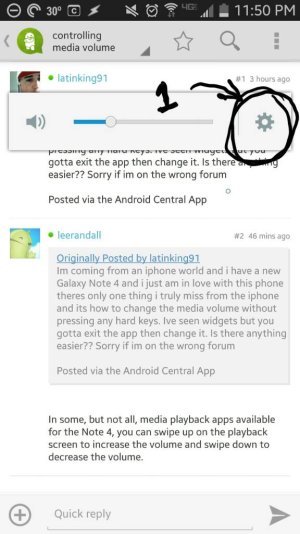
Push the volume rocker hard button on the side (either up or down).

1. Then, push the gear icon on the volume pop-up.
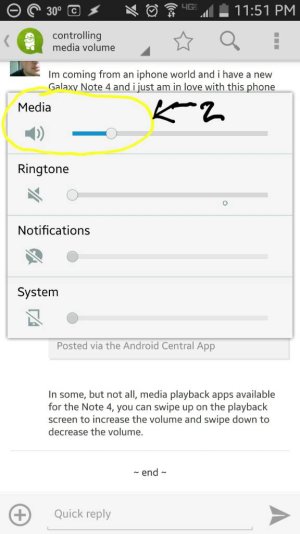
2. You can now see all the volume settings. Adjust the media volume. Then wait a couple seconds (or touch the screen) and the volume pop-up will go away.

See the pictures below.

Will this work for you?
 

Attachments

  • 1421470664623.jpg
    1421470664623.jpg
    67.8 KB · Views: 51
  • 1421470675812.jpg
    1421470675812.jpg
    52.1 KB · Views: 51
Just a little thread hijack here - can you link the ringer and notification volume? If I press the volume down, will my notifications change with the ring volume or will they still be loud? I'll be coming from a Nexus where that's all one volume.
 

Forum statistics

Threads
962,670
Messages
6,991,307
Members
3,164,900
Latest member
bzznpt3696380