Dead spot on touchscreen

kirksucks

Well-known member
May 26, 2011
2,089
27
0
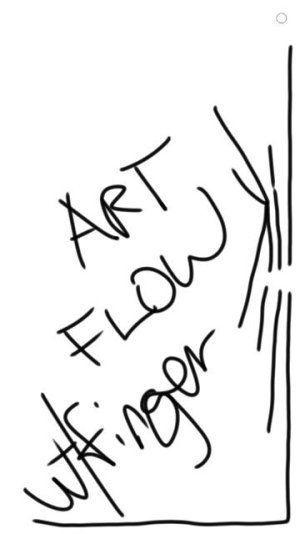
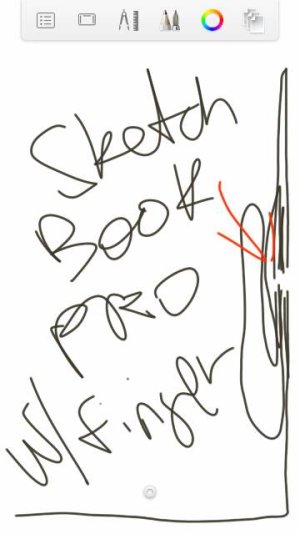
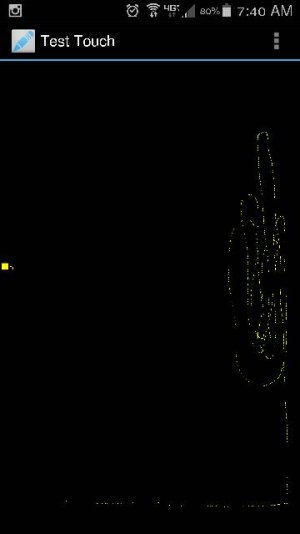
I've been noticing that when I type or press icons on the right side of the screen I'd have to hit it a couple to make it work. Here's the proof.

Is this something that can be fixed? Is it a defect?

Posted via the Android Central App
 

Attachments

  • Screenshot_2015-10-09-07-40-09.jpg
    Screenshot_2015-10-09-07-40-09.jpg
    13.4 KB · Views: 59
Looks like a defect. What happens if you start the phone in Safe Mode? Is the problem still there?

Wanted to add... do you have a case with a magnet in that area?
 
Last edited:
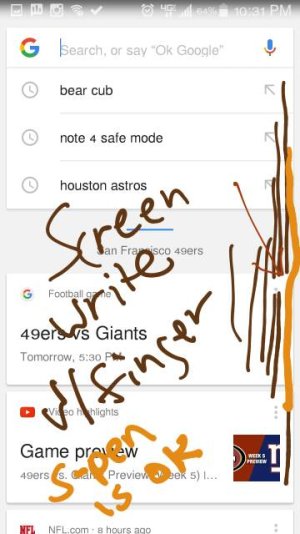
No Magnets. When in safe mode it appeared to be ok. But I didn't have access to the dead spot test app. I used screen write with the spen.

Posted via the Android Central App
 
If it's ok in Safe Mode, then it might be an app you installed... or it could also just be the test app you're using actually causing the issue? The only way to find out which app is causing the problem is to disable them all and start them one at a time until the problem reappears. Does screen write work fine in normal mode? I assume you tested that.
 
I had an issue where the left side was giving me the same problem. I was very close to taking it to the Samsung store in best buy to check it out. But, then I friend had an idea. Maybe my tempered glass screen protector had worn down where I had the most finger traffic. So, I emailed iloome and they said they'd never heard of it but would send me a new one just in case. (Best customer service I've experienced in a while, BTW) I installed it and the problem has not happened since. This was about 3 months ago. Maybe look into this if you use a glass screen protector.

Posted via the Android Central App
 
No screen protector..

Posted via the Android Central App
 

Attachments

  • Screenshot_2015-10-10-22-28-44.jpg
    Screenshot_2015-10-10-22-28-44.jpg
    19.5 KB · Views: 34
  • Screenshot_2015-10-10-22-30-13.jpg
    Screenshot_2015-10-10-22-30-13.jpg
    25.1 KB · Views: 34
  • Screenshot_2015-10-10-22-32-32.jpg
    Screenshot_2015-10-10-22-32-32.jpg
    34.7 KB · Views: 34
Seems to happen more using my finger., Works fine with the spen.

Posted via the Android Central App
 
I can't think of anything that would cause this except a bad screen. The fact that the S Pen works is probably due to it being electronic with the screen reacting better to it. I'm just guessing.

I would try taking it to BestBuy if you're in the US and see what the Samsung rep has to say. If he agrees the screen has a defect, it's possible you can use his reference for a phone replacement or at least a screen replacement. This looks like a bad screen to me since it's happening consistently in that one area. I hope you're still in warranty.

EDIT... by the way, did you test with your finger and pen in safe mode?
 
I am in the us but hours away from a best buy. Verizon store useless now?

I am under warranty.

I didn't have access to any drawing apps in safe mode . Screenwrite doesn't work with the your finger. I'll try action memo maybe.

Posted via the Android Central App
 
The reason I mentioned BestBuy was so you can get the Samsung rep to agree there's a problem. Might make it easier to get a replacement. You could try the Verizon store too, or call Samsung to see what they say. Looks very much a hardware problem since factory reset didn't help either.