Help Adding "My Apps & Games" Icon to Home Screen

bigslam123

Well-known member
May 3, 2010
707
28
28
So on every previous phone that I have had, I was able to add a play store icon that went directly to the My Apps & Games screen. I am now on the Ultra and cannot find a way to do so. Is this no longer an option, or am I missing something?
 
I had never heard of this so I looked it up. There is an app called Shortcut to My Apps. Not sure if this is what you had previously but seems to do the trick.
 
It is not. The Play app always had a menu option to add it directly from there. I can no longer find it. Not sure if it was taken out or moved. Regardless, I will look into the option you offered up.
 
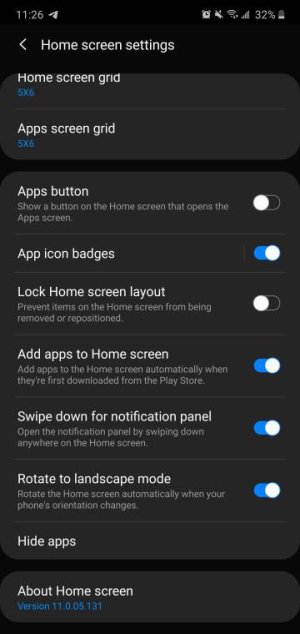
Long press empty page on home screen a menu should pop up home screen settings tap that and toggle on add new apps to home screenScreenshot_20200312-112617_One%20UI%20Home.jpeg
 
So on every previous phone that I have had, I was able to add a play store icon that went directly to the My Apps & Games screen. I am now on the Ultra and cannot find a way to do so. Is this no longer an option, or am I missing something?

Are you referring to the page that has app updates, installed, library, etc?
 
It is not. The Play app always had a menu option to add it directly from there. I can no longer find it. Not sure if it was taken out or moved. Regardless, I will look into the option you offered up.
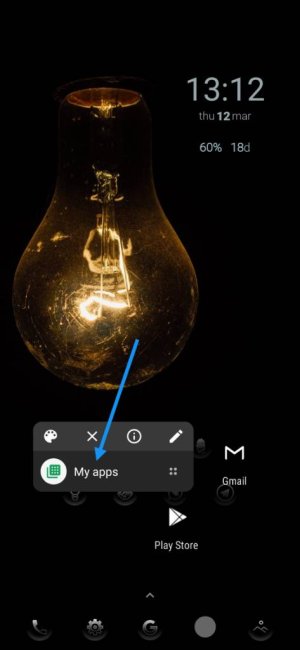
Not sure if it will work with One UI but worth a try. Long press the Play Store icon on your home screen, this will give you a window with "My apps" included, long press it and drag it to the home screen.
Screenshot_20200312-131228.jpeg