HELP - camera not working after Jelly Bean 4.2.1 update

Isabella Oliveira

New member
Dec 6, 2012
4
0
0
Hi, my Galaxy Nexus updated to Jelly Bean 4.2.1 and since then I can't open my camera. I called Google for help and after 40 minutes of reinstalling, cleaning cache and other things my camera is still not working. Any thoughts on how to fix this?

I'd be forever thankful, help out an android fan!

:)
 
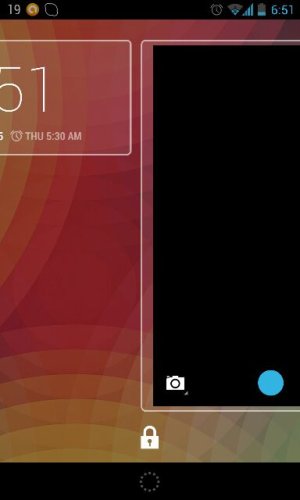
Hmm show a screen shot of the camera button , what happens when you slide to it on the lock screen?

Sent from my Nexus 4 using Android Central Forums
 

Attachments

  • uploadfromtaptalk1354755102708.jpg
    uploadfromtaptalk1354755102708.jpg
    17.4 KB · Views: 139
Hi, that's pic is exactly how my camera screen shot looks like. But now as I tried to take a screen shot what is appearing is a "Gallery is not working" message!
 
Hi, that's pic is exactly how my camera screen shot looks like. But now as I tried to take a screen shot what is appearing is a "Gallery is not working" message!

Humm try clear the data of the galaxy app and the camera. App

Sent from my Nexus 4 using Android Central Forums
 
I've tried that, no success...
Any other tips of what I can try to do?

Sent from my Galaxy Nexus using Android Central Forums
 
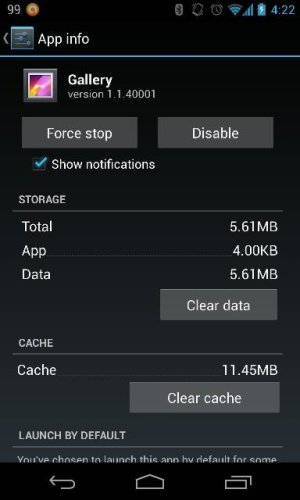
Is ur gallery disabled?
(In screenshot its enabled)
Sent from my Nexus 4 using Android Central Forums
 

Attachments

  • uploadfromtaptalk1355307771736.jpg
    uploadfromtaptalk1355307771736.jpg
    24.7 KB · Views: 122
It is enabled. When I disable it the camera just don't show up in the app drawer.

Sent from my Galaxy Nexus using Android Central Forums
 
Nope... I've even tried to go in boot loader mode and wipe cache, reset everything... No good...

Sent from my Galaxy Nexus using Android Central Forums
 
Yeah, I'm still having the same problem. Google told me to send the device to Samsung, for repair, I'm not in the US, so that's a problem. I love this phone but this is incredibly annoying and I've tried resetting, hard resetting, cleaning the cache...installing other camera apps...etc. Can someone tell me if there is an answer to this problem?
 
you could root and flash custom ROM if its just a software issue

Sent from my Nexus 4 using Android Central Forums
 
I've tried flashing CM, MIUI and Stock 4.0... No success on any of those.
I think it must be a hardware problem... has anyone else settled this issue?
 
Did the OTA update yesterday morning; no camera. This morning, with no intervention on my part, camera is back!
 
I just received a GSM GNex off ebay that has a camera issue. It was on 4.1 when I turned it on, but I was prompted for an update to 4.2.2. The camera was doing the same thing before and after the update... you can open the camera but the screen is black and the buttons are there for the camera, but nothing ever comes on the screen and you can't actually take a picture. I've cleared the cache and rebooted yada yada yada. None of this works. This phone isn't rooted or anything. I was going to try a custom ROM, but it sounds like that may not fix it either. If anyone has any other suggestions, I'm all ears.
 
I recently updated to Jellybean and i too faced the same problem. I have a Samsung Galaxy tab 2 p3100.
I first unmounted the sd card, then took it out. Then I restarted my device. And then 'Yay! The camera works'. I dont know how it happened but it worked.
See if that helps. I also have put the sd card back and there is no problem.
 
Last edited:
i had the same problem, tried everything... but couldnt fix this goddamn camera. i almost lost all hopes but than i did what u said - removed the sd card and now it works again!!
man i just love u. thanks! :)
 

Trending Posts

Members online

Forum statistics

Threads
963,366
Messages
6,993,148
Members
3,165,015
Latest member
bruce03510