
Sorry if this was posted before. I've tried reading a few relating to the problem but I can't seem to get the handle of it. I am using Samsung Galaxy S3, model GT-I9300. So I accidentally deleted a huge file in my phone earlier and I was trying to recover the file by rooting the phone and using this apps called DiskDigger. I obviously made a huge mistake as I have now made it worse. Long story short, I've used tips from multiple websites and youtube videos so now my phone is basically forever showing this right now 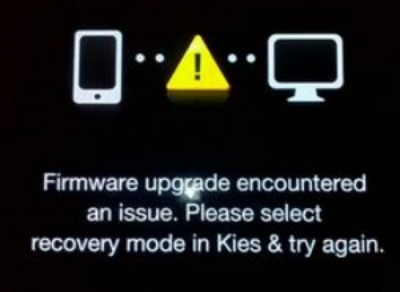
After reading a few threat, some people suggested to hold the volume down + home + power but this made no difference. I can't switch it off, it will blank out for 3 sec and go back to saying "Firmware upgrade encountered an issue. Please select recovery mode in Kies and try again". I installed Kies but the device will not connect to my laptop for some reason. I have uninstall and reinstall Keis a few times. I've tried every single USB port on my laptop and even the extended USB port but none of them work too. I used my sister's android for Kies and it's working fine, so the problem is my phone.
I have already downloaded ODIN 3.07. I read in one of the thread that I have to put in a .tar file. Another person had the same problem as me (http://forums.androidcentral.com/an...bean/319267-stuck-firmware-upgrade-issue.html) and it seemed to be working for him but I don't know what the .tar file is. Can someone please help me?
I was so dumb to do think I could do this on my own but at the time I was desperate to get my deleted file back. Right now I don't care if that file is gone, I just hope I get my phone back. is there a way to fix my phone without deleting everything on it? Thank you in advance
After reading a few threat, some people suggested to hold the volume down + home + power but this made no difference. I can't switch it off, it will blank out for 3 sec and go back to saying "Firmware upgrade encountered an issue. Please select recovery mode in Kies and try again". I installed Kies but the device will not connect to my laptop for some reason. I have uninstall and reinstall Keis a few times. I've tried every single USB port on my laptop and even the extended USB port but none of them work too. I used my sister's android for Kies and it's working fine, so the problem is my phone.
I have already downloaded ODIN 3.07. I read in one of the thread that I have to put in a .tar file. Another person had the same problem as me (http://forums.androidcentral.com/an...bean/319267-stuck-firmware-upgrade-issue.html) and it seemed to be working for him but I don't know what the .tar file is. Can someone please help me?
I was so dumb to do think I could do this on my own but at the time I was desperate to get my deleted file back. Right now I don't care if that file is gone, I just hope I get my phone back. is there a way to fix my phone without deleting everything on it? Thank you in advance



 Facebook
 Twitter
 Instagram