Hi. Bit of a difficult situation.

Jun 10, 2014
7
0
0
Hi. I'm in a bit of a predicament. I had my rooted Nexus 5 on Stock 4.4.2. Well I'm sure you guys know what comes next. I accidentally took the OTA update, and broke my phone. It still boots, but doesn't go into an animation or anything. I can get to TWRP and my bootloader. I've tried Google-ing and pushing roms with ADB side load, but that only ends up telling me that I cannot mount /system. At this point I don't care if I have to start new or whatever. I have all my pictures uploaded to my Google account. So if I have posted this in the wrong section I'm sorry. But if someone could point me in the right direction I'd appreciate it. Thanks.

And yes. I searched.

Posted via Android Central App
 
Hi. I'm in a bit of a predicament. I had my rooted Nexus 5 on Stock 4.4.2. Well I'm sure you guys know what comes next. I accidentally took the OTA update, and broke my phone. It still boots, but doesn't go into an animation or anything. I can get to TWRP and my bootloader. I've tried Google-ing and pushing roms with ADB side load, but that only ends up telling me that I cannot mount /system. At this point I don't care if I have to start new or whatever. I have all my pictures uploaded to my Google account. So if I have posted this in the wrong section I'm sorry. But if someone could point me in the right direction I'd appreciate it. Thanks.

And yes. I searched.

Posted via Android Central App

You can't mount at all?
 
Nope. Not at all. Can't even do it manually. When I press system to mount it, it just hangs there and doesn't select it.

Posted via Android Central App
 
Nah, no ODIN here.

Make sure you have the Nexus drivers installed and it sounds like you already have ADB.

Once you download the Nexus factory image, you'll have to use 7Zip or something to extract the files. Once you do, just double click the "flash-all.bat" file and it'll go through and put it back on stock.

Google made it extremely simple to get your Nexus back to stock when you get stuck like you are. I've never been able to brick a Nexus phone and I've done some DUMB stuff.
 
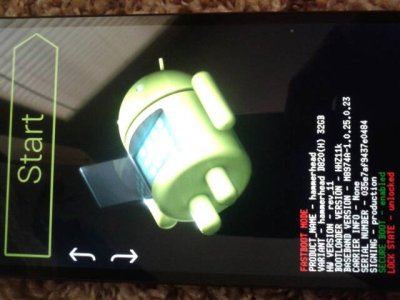
Alright. Downloading the stock image again as I'm on a different computer. And I just leave the phone like this when I press the flash command?

Posted via Android Central App
 

Attachments

  • 20140610_134222.jpg
    20140610_134222.jpg
    32.9 KB · Views: 29
Yup. Just like that - then double click "flash-all.bat" and it'll flash the stock radio, system, recovery, etc.

Obviously you'll have USB connected to the computer.
 
I read somewhere else that I can edit the file to save my personal data. If I follow the steps there, should I still be good, or is it safe to just erase everything? Maybe try one and if it doesn't work try it with erasing everything?

Posted via Android Central App
 
You could, but that's dabbling in some more tricky territory. You might just want to wipe everything to get a clean start. It's a pain but it shouldn't be that long to get it back to where you had it. Couple hours of work at most. It's annoying but just make sure to do a nandroid backup next time so you can flash that if you get in trouble again.
 
You could, but that's dabbling in some more tricky territory. You might just want to wipe everything to get a clean start. It's a pain but it shouldn't be that long to get it back to where you had it. Couple hours of work at most. It's annoying but just make sure to do a nandroid backup next time so you can flash that if you get in trouble again.

Good work!
 
No problem, glad you got it worked out. Wasn't that easy of a question, I was in the same situation myself when I first had to flash a factory image. You never really know these things until you have to do them yourself, so no harm in asking for help.
 
Hi. I'm in a bit of a predicament. I had my rooted Nexus 5 on Stock 4.4.2. Well I'm sure you guys know what comes next. I accidentally took the OTA update, and broke my phone. It still boots, but doesn't go into an animation or anything. I can get to TWRP and my bootloader. I've tried Google-ing and pushing roms with ADB side load, but that only ends up telling me that I cannot mount /system. At this point I don't care if I have to start new or whatever. I have all my pictures uploaded to my Google account. So if I have posted this in the wrong section I'm sorry. But if someone could point me in the right direction I'd appreciate it. Thanks.

And yes. I searched.

Posted via Android Central App
Is there a good place to go for instructions on installing 4.4.3 on a rooted device (Nexus 4)? Or are the instructions below sufficient. Sounds like flash_all.bat will put the stock recovery back in, which I don't want (or do I?). In any case, I guess I should ignore the OTA that just showed up on my phone. I was burned installing the 4.2->4.3 OTA when rooted back then.

I guess I'd like to preserve root if possible. Though I only rooted recently, and then just in a vain attempt to recover some deleted photos. But if they make it really hard to get updates after rooting, maybe rooting for its own sake isn't such a good idea.
 
Rooting in itself won't stop you from getting updates, as long as you aren't messing with system files or anything. What really hurts OTAs is when you flash a custom recovery. You can achieve root on a completely stock device as long as the bootloader is unlocked. You just have to boot into a custom recovery one time to flash SuperSU.

You can easily update to 4.4.3 if you have root and a custom recovery - just flash a zip. I'm sure someone has made a flashable zip of the update over on XDA. Just check the Nexus 4 forums.
