How can I get my messages to show up on my lock screen with the senders name?

LaurenTX

Member
Apr 9, 2015
6
0
0
HELP! Iphone 4s to Samsung Galaxy S6 -- Feel like a new born baby learning to walk

So I finally saw the light. I've just transitioned from an iPhone 4s to a Samsung Galaxy S6. I feel like I've been speaking one language and now learning to speak French -- a very sophisticated and sexy language. I need help with ONE issue, please!

On my iPhone, when I would receive a text message, my lock screen would show who the message was from but it wouldn't include a "preview" of what the message said. It just said Text Message and the persons name. Whenever I receive a text message on my Galaxy S6, is it not possible for the alert on my lock screen to just say "New Message" or just even the contact's name and no preview of the message?

Under Notifications settings --> Notifications on lock screen -- I have the option of Show Content or Do Not Show Notifications.
Shouldn't there be additional options of "turn preview off". Something to that effect? Same with my emails. I'd rather it just say who the email is from an not a snippit of the email contents. Is this possible for email and text messages?

Thank you for any help. I really appreciate it.
 
Re: HELP! Iphone 4s to Samsung Galaxy S6 -- Feel like a new born baby learning to walk

I thought the "hide content" option would do what you wanted. I'm underground at the moment so I can't receive any messages, but give that a try. You should see three options -- Show Content, Hide Content, and Do not show notifications
 
Re: HELP! Iphone 4s to Samsung Galaxy S6 -- Feel like a new born baby learning to walk

I haven't received my S6 yet, but in the S5 (Lollipop) and basically all previous Galaxies, in the Message App, in Settings, Notification, you have the option to turn off/On the Preview Message option. Have you checked to see if the S6 still has the same?

FYI, it has been a long time since I don't use any Native message App on my past 6 or 7 devices in the last year, I tried Textra and have never looked back, and in Textra you have Specific Notification privacy that will fit your needs.
 
Re: HELP! Iphone 4s to Samsung Galaxy S6 -- Feel like a new born baby learning to walk

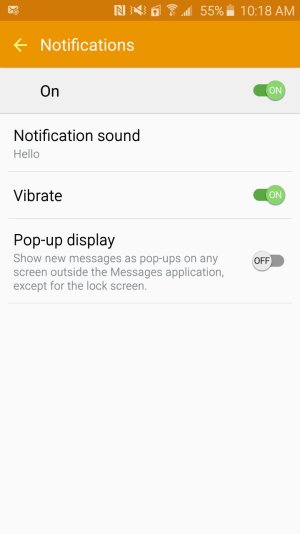
That's what I seem to be experiencing, that on previous Galaxies you have the option for Turn Off/Turn On the Preview Message but I just can't seem to find that option ANYWHERE on the GS6. Granted, I am known for trying to find something in my fridge or pantry for 10 minutes and it'll be right in front of my face the entire time. But I'm certain I've looked thoroughly. The screen shot below is the notification settings in my messages app. Pretty bare bones!

Screenshot_2015-04-09-10-18-35.jpg
 
Re: HELP! Iphone 4s to Samsung Galaxy S6 -- Feel like a new born baby learning to walk

That's what I seem to be experiencing, that on previous Galaxies you have the option for Turn Off/Turn On the Preview Message but I just can't seem to find that option ANYWHERE on the GS6. Granted, I am known for trying to find something in my fridge or pantry for 10 minutes and it'll be right in front of my face the entire time. But I'm certain I've looked thoroughly. The screen shot below is the notification settings in my messages app. Pretty bare bones!

View attachment 170391

OK I see, try looking for what in the S5 was Sounds and notifications settings and in S5 lollipop you have a While Locked option, in there you can select Show All Content, Hide Sensitive Content and Do Not Show Notifications, my guess is that Samsung eliminated some redundant new lollipop settings and I think that Hide Sensitive Content should be the one that does what you want.

BUT I insist that you try Textra from the Play Store, is free and by far way more customized and more feature rich than the OEMs Messaging Apps.
 
Re: HELP! Iphone 4s to Samsung Galaxy S6 -- Feel like a new born baby learning to walk

OK I see, try looking for what in the S5 was Sounds and notifications settings and in S5 lollipop you have a While Locked option, in there you can select Show All Content, Hide Sensitive Content and Do Not Show Notifications, my guess is that Samsung eliminated some redundant new lollipop settings and I think that Hide Sensitive Content should be the one that does what you want.

BUT I insist that you try Textra from the Play Store, is free and by far way more customized and more feature rich than the OEMs Messaging Apps.

+1 for Textra, Thats what im using now and its great. Way more features and has exactly what you're looking for as far as no message previews option to turn on or off, just shows the notification on the lockscreen with the senders name.
 
Re: HELP! Iphone 4s to Samsung Galaxy S6 -- Feel like a new born baby learning to walk

Thank you! This really helped me!
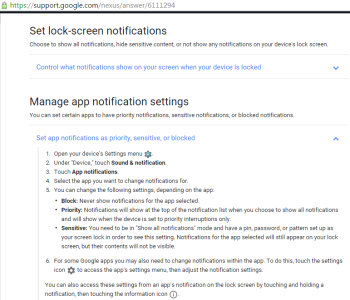
It turns out, you have to have a pin, password, or pattern set up as your lock screen in order to see the setting "Hide content on lock screen" and I didn't have a pin/password/or pattern set up on my lock screen. I set a pin and wahlah! The "Sensitive" option appeared. I've copied and pasted the instructions below should any other iPhone transplant need help on this issue. Thanks again you guys, I really appreciate it.

Untitled.png
 
Re: HELP! Iphone 4s to Samsung Galaxy S6 -- Feel like a new born baby learning to walk

I'll definitely download the app. Thank you!
 
Re: HELP! Iphone 4s to Samsung Galaxy S6 -- Feel like a new born baby learning to walk

+1 for Textra, Thats what im using now and its great. Way more features and has exactly what you're looking for as far as no message previews option to turn on or off, just shows the notification on the lockscreen with the senders name.
Another +1 for Textra. First app I download on any new device.

Sent from my SAMSUNG-SM-G920A using Tapatalk
 
What irritates me other than the lack of preview options,is that even though my screen is off but not yet formall locked,the preview of the text shows up. Once the screen locks,which i have set at 3mins,then the preview stops. I miss my s3. The settings on this phone or lack thereof ruffle my feathers.
 
Re: HELP! Iphone 4s to Samsung Galaxy S6 -- Feel like a new born baby learning to walk

Thank you! This really helped me!
It turns out, you have to have a pin, password, or pattern set up as your lock screen in order to see the setting "Hide content on lock screen" and I didn't have a pin/password/or pattern set up on my lock screen. I set a pin and wahlah! The "Sensitive" option appeared. I've copied and pasted the instructions below should any other iPhone transplant need help on this issue. Thanks again you guys, I really appreciate it.

View attachment 170396

This was a big help. Thanks for posting the instructions!
 

Forum statistics

Threads
961,824
Messages
6,987,469
Members
3,164,716
Latest member
berikilikipoti489