How can I install Android 6.0 Marshmallow on Google Nexus 7 2013 (1st generation)?

  • Thread starter Thread starter Android Central Question
  • Start date Start date
A

Android Central Question

Today is 12/9/2017 and I still haven't been prompted to update my OS to 6.0 from 5.1.1. I need a way (as a tech novice) to safely install Marshmallow on my Nexus 7.

Thank you!
 
The 2013 model is the second-generation Nexus 7.

Have you checked in Settings, About, Software Update?
 
Mine said for a few days that I had to upgrade, but as soon as marshmellow started downloading, it stopped and said there is a problem with my WiFi. I resumed the download and the same thing continues to happen. I have tried a factory install, hoping it will download the latest software, but it still downloads 5.X initially. All other apps update and I am able to stream with no problem, so I'm wondering if it is not a hardware problem by any chance. I've looked up o how to do the installation manually, but it's way too difficult for me. Please help somebody :-)
 
Mine said for a few days that I had to upgrade, but as soon as marshmellow started downloading, it stopped and said there is a problem with my WiFi. I resumed the download and the same thing continues to happen. I have tried a factory install, hoping it will download the latest software, but it still downloads 5.X initially. All other apps update and I am able to stream with no problem, so I'm wondering if it is not a hardware problem by any chance. I've looked up o how to do the installation manually, but it's way too difficult for me. Please help somebody :-)

See response in your other thread: https://forums.androidcentral.com/a...arshmallow-upgrage-nexus-7-a.html#post6122406
 

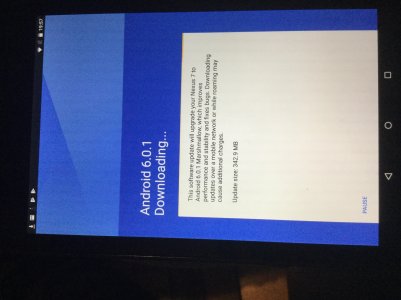
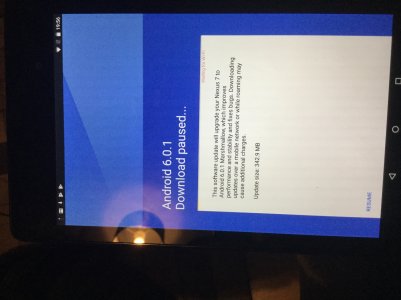
Thank you for your reply. I hadn’t used my Nexus 7 2013 (2nd gen) for almost 18 months now. Yesterday when I turned it on, one of the first things it said was that I needed to upgrade my software version from 5.10 (I can’t quite remember the version number) to 6.01 (or around that), so I went to settings, hardware, and it started to download. A few seconds later, my update window said “update paused” and at the top of that window, it reads in red writing “waiting for wi-fi” - I have managed to take two screenshots with another device which I will attach so you can see exactly what I mean. If I try to “resume” the download, a second or two later, it brings up again “waiting for wi-fi”. I have tried to boot it in safe mode as you requested, but it would still not allow an update.

Any further help would really be appreciated - THANK YOU! 😜👍
 

Attachments

  • 14E56BC3-A761-452A-809F-5A2D889E8DF1.jpg
    14E56BC3-A761-452A-809F-5A2D889E8DF1.jpg
    637.2 KB · Views: 1
  • 9A981817-836E-4BB9-B830-CAE204DD030A.jpg
    9A981817-836E-4BB9-B830-CAE204DD030A.jpg
    594 KB · Views: 1
Just so that we don't have to duplicate the discussion in two threads, see your other thread for continued responses. Thanks!
 

Trending Posts

Forum statistics

Threads
959,757
Messages
6,980,113
Members
3,164,299
Latest member
sellhousefastmke