How Do I Get JB Calendar To Automatically Sync?

jodyberry

Well-known member
Oct 25, 2012
253
0
0
Hi All...


So I almost screwed up a business appt. because the stock calendar synced my appts. when I set up my phone a week ago, but hasn't done it since. (So, an appt I put on my phone didn't sync to the internet calendar.)

And I couldn't find any menu settings to automatically sync.

Is there something I'm missing? Some setting that is blatantly obvious?!

Thanks all...
 
settings -- accounts (select the account for the calendar) -- click on the sync at the top -- check mark the "sync calendar"

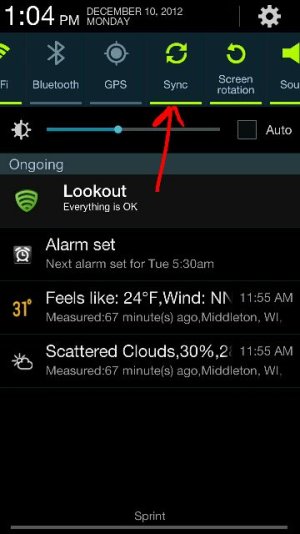
Make sure sync is turned on in your quick toggles.
 
settings -- accounts (select the account for the calendar) -- click on the sync at the top -- check mark the "sync calendar"

Make sure sync is turned on in your quick toggles.

Thanks! What's weird is that one of the accounts that I have in Calendar, ISN'T listed in the place you told me!! So I'll have to see if I need to add that account in the main account settings, then see if it shows up in Calendar!!
 
settings -- accounts (select the account for the calendar) -- click on the sync at the top -- check mark the "sync calendar"

Make sure sync is turned on in your quick toggles.


OK, it was the the first thing you had me try. It was unchecked.


Thanks again!!

- - - Updated - - -

View attachment 50510

Make sure this is on.

Sent from my Samsung Galaxy Note2

Weird, but I don't have this toggle. Maybe cuz I'm on VZW?
 

Trending Posts

Forum statistics

Threads
961,043
Messages
6,984,669
Members
3,164,630
Latest member
akununtukunduhfilm2