How do you like your google wifi?

I have it; I tested it last year and bought a 3 pack when it was released. Very easy to set up and then quickly forget about. Everything works, so far no issues.
 
Got mine yesterday, so far I like it. The only thing that makes me wonder is, I did a test with the google wifi app on speeds and I got a pretty consistent read throughout the house. When I tried testing the speed with a different app though it was way different speed wise.. I don't know who's telling the true speed or not lol.
 
I would use open signal. But I got different readings too. But I got the 3 pa ck google wifi and it's so much better then my airport extreme
 
Google's speed test is reading speed at the router, while most others are testing at the device you're using to test.
 
I'm really looking into this. I think it's what I would need for my house. My house makes basically a "Z" shape. Our current router would be in the middle of the "Z" and my master is at the end of the "Z". In the master, service is ok, but it sometimes goes in and out, and the rooms in the hallway seem to be lacking in bandwidth. I think this would probably be what would cover us the best, but I'm just not sure exactly how it works. My house is roughly 2700 sq ft., FYI.
 
I replaced my apple airports extreme for this I got the 3 pc. I have no complaints yet and its been 2 days and my house is 2300 squsre feet
 
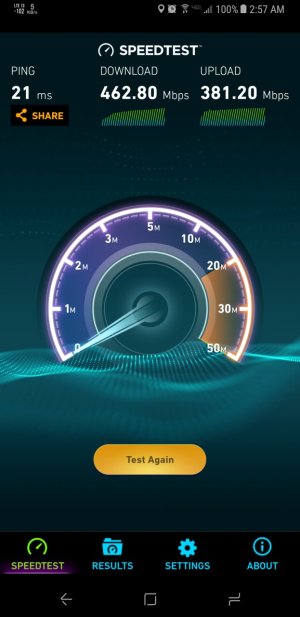
I use mine at home (single one) without issue. It powers all my devices like it should. The devices that can use the 5ghz network get it and benefit from the speed of my ISP.

My one wired device (my PC) gets the full benefit of my ISP (940 Mbps down / up).
 

Attachments

  • Screenshot_20170602-025732.jpg
    Screenshot_20170602-025732.jpg
    152.3 KB · Views: 45
I use mine at home (single one) without issue. It powers all my devices like it should. The devices that can use the 5ghz network get it and benefit from the speed of my ISP.

My one wired device (my PC) gets the full benefit of my ISP (940 Mbps down / up).

That is nice! I think I'll grab a second puck for my office and wire my PC as well. With it wired does it still shoot out wifi? I'm thinking it should.
 
That is nice! I think I'll grab a second puck for my office and wire my PC as well. With it wired does it still shoot out wifi? I'm thinking it should.
Yep. If it's the one not plugged into the modem it should still transfer.
 
Yep. If it's the one not plugged into the modem it should still transfer.

I just thought of something. Can I plug my PC into the second puck (non primary router) for Ethernet connectivity if the 2nd puck is only connected via WiFi mesh? I'm assuming yes or else it wouldn't have ports, but is that a bad assumption?
 
I just thought of something. Can I plug my PC into the second puck (non primary router) for Ethernet connectivity if the 2nd puck is only connected via WiFi mesh? I'm assuming yes or else it wouldn't have ports, but is that a bad assumption?

I haven't tried that with my release units, but my test units that did not work. What you could do was connect a third party router (your old router) to one of them via ethernet and then use it to provide ethernet to a device, however third party stuff doesn't actually play that nicely and it can get buggy. But again, that was last year with test equipment, I'm not certain if that has changed now.
 
I haven't tried that with my release units, but my test units that did not work. What you could do was connect a third party router (your old router) to one of them via ethernet and then use it to provide ethernet to a device, however third party stuff doesn't actually play that nicely and it can get buggy. But again, that was last year with test equipment, I'm not certain if that has changed now.

Thank you. Well I ordered a second puck so I guess we'll see soon enough. The old router is a modem/router combo that I put into bridge mode to let the Google wifi act as primary.
 
I haven't tried that with my release units, but my test units that did not work. What you could do was connect a third party router (your old router) to one of them via ethernet and then use it to provide ethernet to a device, however third party stuff doesn't actually play that nicely and it can get buggy. But again, that was last year with test equipment, I'm not certain if that has changed now.

It works! Have my wifi meshed 2nd puck in my office with my PC plugged in to it. Shows a 1 gb Ethernet connection and is way faster than it was on wifi. Also doesn't seem to drag the test of the mesh down at all. This is working exactly as I'd hoped. LOVE this system.
 
It works! Have my wifi meshed 2nd puck in my office with my PC plugged in to it. Shows a 1 gb Ethernet connection and is way faster than it was on wifi. Also doesn't seem to drag the test of the mesh down at all. This is working exactly as I'd hoped. LOVE this system.

Glad you're enjoying it :D.
 

Trending Posts

Forum statistics

Threads
960,318
Messages
6,981,929
Members
3,164,474
Latest member
moon970