How to eliminate call connection vibration?

nucleus3

Member
Apr 14, 2019
17
0
0
When I dial a call and the receiver answer me, I hear an annoying vibration that makes my ear tremble and sometimes it doesn't make me understand the first word.
I found nothing in the settings, how can I deactivate this vibration?
I have a Zenfone Max Pro M2
Thanks
 
When I dial a call and the receiver answer me, I hear an annoying vibration that makes my ear tremble and sometimes it doesn't make me understand the first word.
I found nothing in the settings, how can I deactivate this vibration?
I have a Zenfone Max Pro M2
Thanks
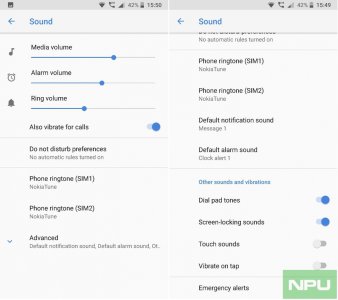
Go to Settings, Sounds and Vibration. Can you toggle off what I circled in the Pic?
b6b73af105eb069c19bc750f9fff052a.jpg
 
under that menu I have "also vibrate for call" that is deactivated, by the way my problem is 1 vibration that happens when receiver answer to my call

I have oreo 8.1.0
 
under that menu I have "also vibrate for call" that is deactivated, by the way my problem is 1 vibration that happens when receiver answer to my call

I have oreo 8.1.0
What do you have in settings >sounds >should be something for vibrate
 
I don't have that "advanced features" menu; by the way my phone doesn't vibrate when i pick up after missing calls, but when I *make* a call
Yeah that's strange, how about if you put phone on silent then test the call ?
You should be able to toggle between ring,silent,vibrate in notification panel long press the icon for sound
 
Another thing is check your dialer app ,go into settings there see if anything available.
 
Yeah that's strange, how about if you put phone on silent then test the call ?
You should be able to toggle between ring,silent,vibrate in notification panel long press the icon for sound

do you have a screenshot where is this?

Anyway if i put the phone in "do not disturb" mode from drop down panel, the vibration goes away, I think because this mode deactivate *all* vibrations


Also checked dialer app settings
 
do you have a screenshot where is this?

Anyway if i put the phone in "do not disturb" mode from drop down panel, the vibration goes away, I think because this mode deactivate *all* vibrations


Also checked dialer app settings
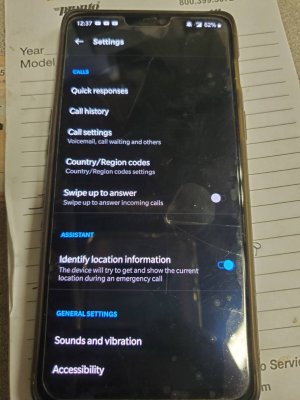
When you open the dialer app in the upper right corner should be 3 Dots >tap.it to get access to phone's settings
 
You should be able to toggle between ring,silent,vibrate in notification panel long press the icon for sound

I mean a screen of where I can change this because I don't find it

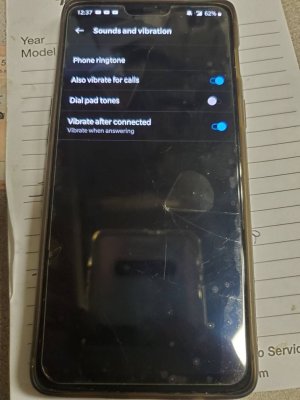
Nothing in dialer app settings; the section "sound and vibration" is the same of previous image
 
I mean a screen of where I can change this because I don't find it

Nothing in dialer app settings; the section "sound and vibration" is the same of previous image
Ok let me pull up from my one plus device
 
When I have to put the phone in vibration I slide the volume slider at the very beginning and it turn on vibration; for silent I have to set this mode from "do not disturb mode" as said

Maybe my version of Oreo (that is Android one) is different from other versions of Oreo?