How to get Samsung Messages into new Galaxy s26 Ultra?

hummingbirdhill

Well-known member
Apr 6, 2011
813
74
28
S26 Ultra comes with Google Messages---which is disgustingly different & difficult from the easy-to-use Samsung Messages that I've used since my Note 2 in 2012. I spent a very long wasted time today in vain attempting to find Samsung Messages in the Galaxy Store.. If I cannot get Samsung Messages into the s26, I'll have a 4-day old s26 for sale at a great price---but I'd much prefer to get the Samsung Messages on it. Can someone please advise me?
 
  • Like
Reactions: corvette72778
can you download it from the Galaxy Store?
I spent about a half hour looking for it on a search in Galaxy Store & it never appeared. I'm wondering if Samsung made a hunk of money by allowing Google to have the texting app henceforth in their new phones. Google told me that the s25 also has Google Messages. I'm about at my 84 year old wit's end trying to deal with Google Messages!
 
Samsung is phasing out Samsung Messages. Since you've confirmed that you've searched the Galaxy Store and cannot find it, I'm guessing it starts with the newest flagship, no more Sammy Messages.

When asked about Samsung Messages being phased out Google said this.

Samsung is phasing out the native Samsung Messages app in favor of Google Messages, which is now the default app on new devices like the Galaxy S25. While older phones can still use Samsung Messages, it no longer supports RCS (Rich Communication Services) on many US carriers, resulting in a loss of features like typing indicators and high-quality image sharing.

Key Details on the Shift:

  • Default App Status: Google Messages comes pre-installed as the default app, while Samsung Messages is no longer pre-loaded on new models.
  • RCS Support Ended: Starting in early 2025, Samsung Messages lost RCS support on several carriers, including Verizon.
  • Availability: Although being phased out, the Samsung Messages app remains available for download on the Galaxy Store.
  • Reasoning: The move is a collaboration with Google to provide a more consistent, feature-rich, and universally compatible messaging experience (RCS) across Android devices.
Despite this transition, users can still download and use Samsung Messages if they prefer its interface, though it will not offer the same, modern messaging capabilities as Google Messages.
 
Samsung is phasing out Samsung Messages. Since you've confirmed that you've searched the Galaxy Store and cannot find it, I'm guessing it starts with the newest flagship, no more Sammy Messages.

When asked about Samsung Messages being phased out Google said this.

Samsung is phasing out the native Samsung Messages app in favor of Google Messages, which is now the default app on new devices like the Galaxy S25. While older phones can still use Samsung Messages, it no longer supports RCS (Rich Communication Services) on many US carriers, resulting in a loss of features like typing indicators and high-quality image sharing.

Key Details on the Shift:

  • Default App Status: Google Messages comes pre-installed as the default app, while Samsung Messages is no longer pre-loaded on new models.
  • RCS Support Ended: Starting in early 2025, Samsung Messages lost RCS support on several carriers, including Verizon.
  • Availability: Although being phased out, the Samsung Messages app remains available for download on the Galaxy Store.
  • Reasoning: The move is a collaboration with Google to provide a more consistent, feature-rich, and universally compatible messaging experience (RCS) across Android devices.
Despite this transition, users can still download and use Samsung Messages if they prefer its interface, though it will not offer the same, modern messaging capabilities as Google Messages.
Thank you for this info! HOW should I be able to FIND Samsung Messages in Galaxy Store? I typed Samsung Messages into the search box but it never showed me Samsung Messages.
 
Thank you very much for this link; however when I clicked it, this is what it says: "Application not supported. This app is no longer available for purchase or is not supported in this country."
Oh, I'm so sorry. I was hoping for the best. For reference, I'm in the US. If I find anything else to try, I'll post again.
 
S26 Ultra comes with Google Messages---which is disgustingly different & difficult from the easy-to-use Samsung Messages that I've used since my Note 2 in 2012. I spent a very long wasted time today in vain attempting to find Samsung Messages in the Galaxy Store.. If I cannot get Samsung Messages into the s26, I'll have a 4-day old s26 for sale at a great price---but I'd much prefer to get the Samsung Messages on it. Can someone please advise me?
Seems to be an issue with the S26 range in general:


Hopefully Samsung will fix it before not too long for you.
 
  • Like
Reactions: BerryBubbles
First Go To:
Settings
Apps
Press The 3 Dots
Special Access
Install Unknown Apps
Turn On The Browser/Source You're Downloading The APK File from

Then,
Download Samsung Messages APK
Install It
Open It & Accept The Permissions
Click "Continue With Messages"
After The "App Was Denied Access"
Warning Pops Up, Click Close


Now Go To:
Settings
Apps
Samsung Messages
Press The 3 Dots
Click Allow Restricted Settings.

Go Back To Previous Screen
Click Choose Default Apps
SMS Apps
Choose Samsung Message As Default
 
Last edited:
First Go To:
Settings
Apps
Press The 3 Dots
Special Access
Install Unknown Apps
Turn On The Browser/Source You're Downloading The APK File from.

Then,
• Download Samsung Messages APK
• Install It
• Open It & Accept The Permissions
• Click Continue With Messages
• After The "App was Denied Access"
Warning, Click Close.


Now Go To:
Settings
Apps
Samsung Messages
Press The 3 Dots
Click Allow Restricted Settings.

Go Back To Previous Screen
Click Choose Default Apps
SMS Apps
Choose Samsung Message As Default.
Thank you Bruzzi. I'll attempt to find a safe APK.
 
Here is the link and safe

Thank you, mustang; I'm ready to download the Samsung Messages APK from apkmirror.com. It says Add SafeSuggest in Chrome---What does that mean? I use only Chrome for a browser. What is SafeSuggest and how should it be added to Chrome?
 
  • Like
Reactions: mustang7757
S26 Ultra
I use Google Messages App.
Just installed the Samsung Messages APK to help you. 🙂

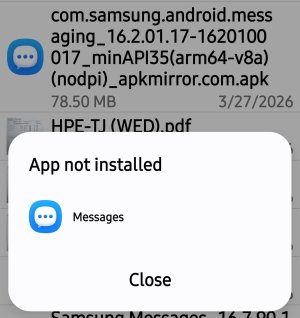
Again for whatever reason I cant install any other APK version except 16.7.90.105 or I get this message:
 

Attachments

  • Screenshot_20260328_001553_Package installer.jpg
    Screenshot_20260328_001553_Package installer.jpg
    148.5 KB · Views: 24
Last edited:
  • Like
Reactions: hummingbirdhill
S26 Ultra
I use Google Messages App.
Just installed the Samsung Messages APK to help you. 🙂
Thank you! I've not tried yet because I'm too fatigued tonight to concentrate on each step I need to do. It'll probably be Sunday or Monday before I can try it.
 

Trending Posts

Forum statistics

Threads
963,176
Messages
6,992,789
Members
3,164,986
Latest member
ellahayes