How to remove.....

Mojave

Well-known member
Nov 15, 2013
392
0
16
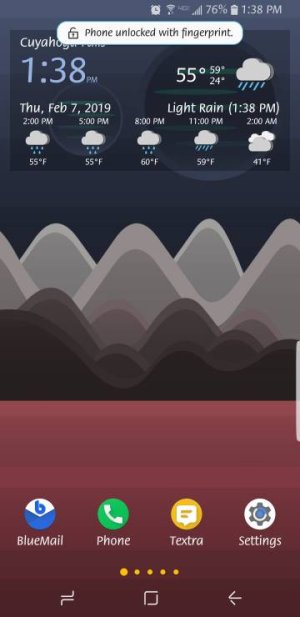
Hello. I have the S9+ and have my phone set to unlock with my fingerprint. It unlocks so no issue there. But once it unlocks and shows my home screen I see this notification at the top telling me I have unlocked my phone with a fingerprint. It shows for only a few seconds. How do I get that notification to not show up? Thank you.
 

Attachments

  • 5165.jpg
    5165.jpg
    24.3 KB · Views: 37
Unfortunately you can't. It's a system notification and it's baked into the OS. Only way would be to get a custom ROM with that notification removed or an option coded in to enable/disable.
 
That only shows up for me if I am on a custom third party lockscreen. Do you have one? For example a lockscreen that served you ads is considered one.
 
As chanchan05 suggests, try using the stock lockscreen and see if that stops. If it does, then you know that not using a 3rd party lockscreen would disable it. If it still shows, then you know it's hard-coded into your OS for all unlocks.
 
Pie beta S9+ and no pop up like that. Don't think it's a Pie thing. Didn't get it in Oreo either so I don't think it's a Samsung thing.
 
Thank you everyone for the information! It was the Ava Lockscreen app that was doing it.
 
Last edited:

Trending Posts

Members online

Forum statistics

Threads
961,113
Messages
6,985,041
Members
3,164,652
Latest member
phrepai11
