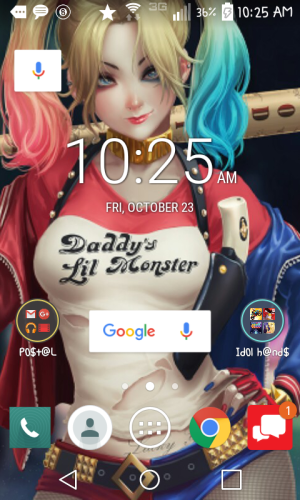
Is there a smaller widget for "OK, Google?"

g5laurie

Member
Jun 9, 2014
5
0
0
Thank you for all the great hints, tips and info that I found reading through this forum. I have just two little nits that I'd like to solve on my new Galaxy S5 that I couldn't find in here, but I'll put them in two different topics so others who may be seeking the same answers can more easily find them.

Question #1: "OK, Google" is pretty cool, but I don't want to give up a full icon line to have it. Is there a smaller version of the widget that will only take up one icon space? I couldn't find such a beast.
 
If not, I'm going to just stick with Voice Search, which is pretty dang awesome (so much "smarter" than Siri!).
 
Welcome to Android Central! Are you talking about the Google Search bar? That usually can't be removed unless you install a 3rd party launcher app like Nova.
 
Welcome to Android Central! Are you talking about the Google Search bar? That usually can't be removed unless you install a 3rd party launcher app like Nova.

Well, that sucker's gone. Don't remember how I did it because I made about a zillion changes to my phone the first three days I had it, but it's no longer there taking up a full row on my screen.
 
Perhaps the S5 allows you to get rid of it from the homescreen. I know you can't using stock Android (on my Nexus 5). If you go to your Widgets screen, you can look for a Google Search Bar widget--if it's there, then you know how to get it back if you ever want it again.
 
Welcome to Android Central! Are you talking about the Google Search bar? That usually can't be removed unless you install a 3rd party launcher app like Nova.

That's not true on the S5.

I took it off my Homescreen and it's not on any of my homescreens now. And I'm on KitKat with Stock Touchwiz.
 
You can delete it and plug it right back onto any screen by holding down the left, lighted soft key/multitasking button and clicking on widgets, google now...

Posted via Android Central App
 
If you have nova launcher, press on the Google widget until resize appears click on that then drag it to whatever size you want

Posted from my VZW GALAXY S3
 
The latest version of Nova lets you say "Ok Google" right from your home screen without pushing anything (as long as your screen isn't locked). Works great on my S5. 👍

Posted via Android Central App
 
Screenshot_2015-10-23-10-25-41.png
Check this out. New marshmallow platform allows resizing from 3x1 down to 1x1 as u can see. Took me a min to fig how I did it, just pickup and drop the bar in your home screen then I should be able to resize.
 

Trending Posts

Members online

Forum statistics

Threads
962,439
Messages
6,990,345
Members
3,164,836
Latest member
jeffnachatilo