Light Flow on the Galaxy S4 - working properly for you?

jeffreii

CrackBerry Convert
Apr 20, 2012
798
53
0
Hey guys - just looking to get any input on Light Flow's stability on the S4. There were significant issues with the S3 so I'm hesitant to install but I'm going to go ahead and be a guinea pig and let you know what a find.

Please post your findings as well.

Thanks
 
It works fine.

Sent from my SAMSUNG-SGH-I337 using Android Central Forums
 
I'm reading on XDA that there are some talkback issues, as there were on the S3...the dev is already working on a fix...already ordered an S4 JUST to fix it for us. Great guy.
 
Hey guys - just looking to get any input on Light Flow's stability on the S4. There were significant issues with the S3 so I'm hesitant to install but I'm going to go ahead and be a guinea pig and let you know what a find.

Please post your findings as well.

Thanks

you don't even need the app....the LED notification colors finally work
 
you don't even need the app....the LED notification colors finally work

Explain further. Iv tried changing colors for different things but cannot find out how.

Sent from my SAMSUNG-SGH-I337 using Tapatalk 2
 
There are talkback issues in the stock browser and also if you long press an item in the gallery. Using chrome works fine - as it's not written by samsung :-) as do custom galleries.
They really need to realise that the one shipped accessibility service isn't the only existing one. I thought after getting a fix ready for a similar issue on the s3 they wouldn't have messed up on the s4.

@eyecon82 I'm a little unsure what you mean also. Colors that issue specific notification colors will show their colors, everything else will be blue plus there won't by any color cycling or configuration of colors.

I'm working on a version which restricts the notification list to ones that don't need accessibility and then I'll go onto writing a root only method by bypassing the accessibility service and monitoring events in a different way that stock android doesn't have permissions to do so.
 
I had LightFlow installed and then unistalled but now everytime i hold a pic in the stock gallery my phone starts speaking out loud that i've selected it!!! It's so annoying! Any suggestion on how to fix this??? Thanks!
 
Make you there's nothing selecting in your phone settings->accessibility
I'd also try a phone reboot.

Hi Andrew - I've tried different settings but currently my LED is not functioning at all through Light Flow. Notification sounds seem to be working fine though. I'm not sure if it's my settings or perhaps it's due to my import of settings from my S3. I'm hoping your fix works so I don't have to start from scratch. Changing the sounds alone after restoring a backup takes a good 20 minutes of monotonous screen tapping!

Thanks again and I look forward to your fix.
 
Hi Andrew - I've tried different settings but currently my LED is not functioning at all through Light Flow. Notification sounds seem to be working fine though. I'm not sure if it's my settings or perhaps it's due to my import of settings from my S3. I'm hoping your fix works so I don't have to start from scratch. Changing the sounds alone after restoring a backup takes a good 20 minutes of monotonous screen tapping!

Thanks again and I look forward to your fix.

Did you take the whole lightflow directory or just the backup file? Don't take the whole directory as some things get caches and won't be reprocessed on the new phone.
 
If light flow is not working, then you should give light manager a try. It works great on my Note 2.
 
You have to be rooted for lots of apps to work correctly with light manager. I've got a version of lightflow coming later this week which will restrict the notification list any bypass the accessibility service.

- - - Updated - - -

@Michelangelo Do you have any other apps using the accessibility service?
 
I only restored the backup file. I did not edit out the per-contact settings as per your suggestion at XDA...
 

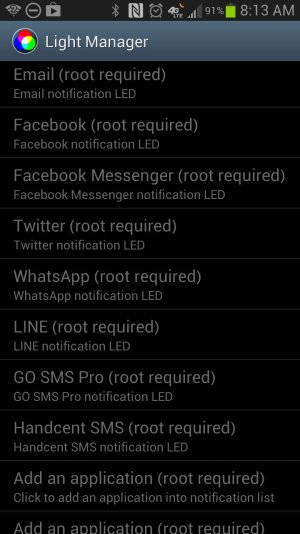
Uh, no. It will only work without rooting for texts, missed calls, Gmail, Google Talk, and calendar reminders. That's it. As you can see below, if you want notifications for (non-Gmail) email -- EMAIL!! -- or Facebook, Twitter, or any other application that gives notifications (e.g., VVM, weather, etc.), you have to root.

The annoying talkback bug is a problem for me with Light Flow, though. I'm hopeful the version Andrew mentioned is coming out later in the week fixes this. Then I will get the paid version.
 

Attachments

  • Screenshot_2013-05-08-08-13-50.jpg
    Screenshot_2013-05-08-08-13-50.jpg
    98.1 KB · Views: 65
The TalkBack issue on the Galaxy S4 is not just limited to LightFlow, but any app that needs to use Accessibility Services, including some DashClock extensions. Pretty annoying ,especially because I had no idea why the stock browser was reading things aloud even though the TalkBack setting was off, and spent a bit of time trying to figure out what was going on. Never owned a Galaxy S3 previousl, but the fact that users are saying the same issue was on the S3 previously and Samsung fixed it, you would have thought the issue couldn't possibly rear its ugly head again in the Galaxy S4, but yet it has. I hope Samsung comes out with a fix for this soon.
 
NoLed is a good app to have. I've used it on previous phones and plan on using it for my S4 when it comes in from Verizon

Sent from my GT-N8013 using Android Central Forums
 

Forum statistics

Threads
963,525
Messages
6,993,459
Members
3,165,054
Latest member
ZackS