Question Minor layout issue: hide the navigation bar

groston

Well-known member
Jul 7, 2018
66
9
8
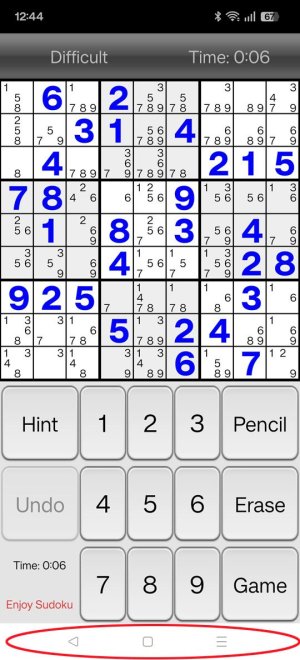
I have a OnePlus 12 that is rooted, up, and running. I disabled the various swiped gestures, because, for me, they are the cause of possible issues and I do have the navigation bar visible at the bottom of the screen. Question: Is there some way to hide the navigation bar when apps run in full screen mode? All of the stuff I have seen on line indicates that swipe gestures need to be enable to do this, but I do not want to go there.
 
Not sure if you rooting the device has any bearing on this but for me, on my Samsung, the buttons disappear when I open a full screen app. I have to tap or kind of push up from the bottom to get them to be visible. Yours doesn't work this way? Just buttons on all of the time?

Please show us a screenshot of the buttons staying on all of the time while in a full screen app that doesn't have the keyboard open. Having the keyboard open will cause the buttons to also be visible.

What kind of problems do you see coming from swipe gestures?

Are you using a stock or custom ROM?

Have you tried a different UI? Nova and others offer several tweaks and options, I could picture this being one.

Let us know what you find and we'll offer more advice. In the meantime, I have figure out how to go back to gestures after testing this for this thread. I hate these buttons.
 
  • Like
Reactions: Madd62

Latest posts

Trending Posts

Forum statistics

Threads
960,300
Messages
6,981,784
Members
3,164,472
Latest member
manikjeet