MMS Video Comes In As Photo & Audio

  • Thread starter Thread starter Android Central Question
  • Start date Start date
A

Android Central Question

I have a S22 Ultra. Android Ver. 12. Everytime someone texts me with a video file, it comes in split as a static image and an audio file.

I've tried resetting network settings, I've tried restarting the device, and clearing the data on the Messages app.

I'd very much not like to have to do a factory reset as that's a huge pain.

Can anyone help me with this?
 
You use any VPN ? Ad guards or app cleaners? antivirus?

I do use ExpressVPN, but I disconnected when testing my video texts, initially thinking that would be a contributing factor. But I have it disconnected and still don't get videos.

I do have Malwarebytes, but haven't run a scan in a while. I do also use the built-in memory/storage cleaner occasionally, just to clear temp files.
 
I do use ExpressVPN, but I disconnected when testing my video texts, initially thinking that would be a contributing factor. But I have it disconnected and still don't get videos.

I do have Malwarebytes, but haven't run a scan in a while. I do also use the built-in memory/storage cleaner occasionally, just to clear temp files.
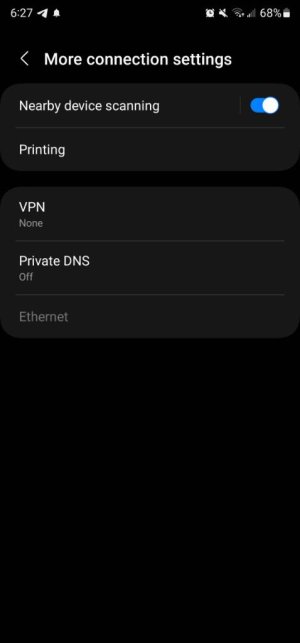
Double check here and if u can show a screenshot

Can u uninstall Malwarebytes and reboot the phone Screenshot_20220815_182715_Settings.jpg
 
Double check here and if u can show a screenshot

Can u uninstall Malwarebytes and reboot the phone View attachment 347654

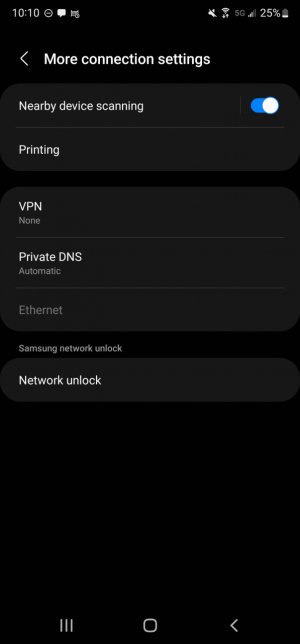
I uninstalled Malwarebytes and I double checked the setting. Here's the screenshot. Waiting on my wife to send me a video. I'll let you know what happens...

And thank you so much for your responses, you're giving me hope with every troubleshoot haha
 

Attachments

  • Screenshot_20220815-221019_Settings.jpg
    Screenshot_20220815-221019_Settings.jpg
    73.7 KB · Views: 2
Ok good screenshot looks ok , no problem hopefully we can get this solved

Ok my wife sent me two videos—both worked! I'm guessing you were right about the Malwarebytes. Though I've been using that for a long time and never had an issue before. Wonder what happened.

Thank you, thank you, thank you!
 
Ok my wife sent me two videos—both worked! I'm guessing you were right about the Malwarebytes. Though I've been using that for a long time and never had an issue before. Wonder what happened.

Thank you, thank you, thank you!
Probably blocked it some how , I'm not crazy for security app, antivirus,app cleaners they create more problems then worth especially you have latest Samsung which is harder to get anything on it unless you visit shady sites or download something unknown sources or emails.

Glad I could help , your welcome
 
Ok good screenshot looks ok , no problem hopefully we can get this solved

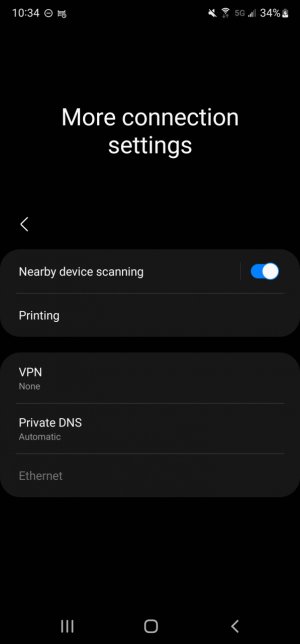
I also did click on "Network Unlock" in that settings menu, seeing that your screenshot didn't have it. It just kind of "flickered" and redirected me back to the menu but without the option
 

Attachments

  • Screenshot_20220815-223422_Settings.jpg
    Screenshot_20220815-223422_Settings.jpg
    69.9 KB · Views: 2
I also did click on "Network Unlock" in that settings menu, seeing that your screenshot didn't have it. It just kind of "flickered" and redirected me back to the menu but without the option
Mine don't have that because I have Samsung unlocked version which is sim unlock, once you meet Verizon unlock criteria it will disappear or say permanently unlocked
 
Mine don't have that because I have Samsung unlocked version which is sim unlock, once you meet Verizon unlock criteria it will disappear or say permanently unlocked

Ah! That makes sense. Thank you again for all your help! If it happens again or I'm using other issues, I'm definitely coming back here!
 

Latest posts

Trending Posts

Members online

Forum statistics

Threads
963,069
Messages
6,992,618
Members
3,164,980
Latest member
pamatika