Mobile Data

PainFX

Well-known member
May 2, 2014
852
0
0
My carrier is T-mobile. I think I'm missing the Mobile data on/off toggle switch. Can anyone confirm?? How do I turn it on and off? Thanks.

Anyone with a factory T-mobile version s5 have the ability to turn off mobile data please chime in.
 
Last edited:
It sounds like certain carrier versions of Galaxy phones don't have the mobile data toggle in the Quick Settings. This was something that was noted in the S4 as well. You could always add your own custom toggle bar to the swipe down notification shade using Power Toggles.
 
My carrier is T-mobile. I think I'm missing the Mobile data on/off toggle switch. Can anyone confirm?? How do I turn it on and off? Thanks.

Try settings>mobile data>more. There is probably an inconspicuous check box for mobile data.

Signed, XenonRom, Nexus 5 and AC Forums App
 
Yeah, there will always be a setting hidden deep in the settings menu, but a quick toggle is so much easier. I've long suspected that this was a subtle way for carriers to make people use more data, and therefore possibly pay for overages. Call me a cynic, but why not have a mobile data toggle built-in? Anyway, Power Toggles solves that problem.
 
Just swipe down from top, click the settings gear, then under quick settings hit data usage. Its right there on top, mobile data.
 
Ok, just to be sure--Settings>Wireless & Networks>More>Mobile Networks>Data Enabled. Not there?
 
I use Battery Doctor.

It has a Switcher Widget that will toggle DATA, SYNC, WIFI, BLUETOOTH, GPS off.

I use it every time I put the phone to sleep. That is how I get greatly extended battery life.

If DATA and WIFI are turned OFF, there is no way apps can talk to the outside world and run up your tab for data chargers.

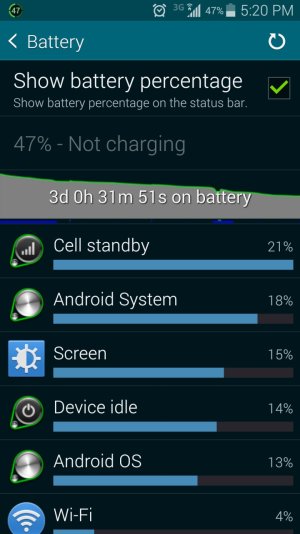
My habit of turning that stuff off is getting me 3 days minimum..... I have 3 days now and 47% left.... and have had 5 days use once... I'm going to continue this particular use cycle to see how many days I can get out of this battery before it has to be charged.

I have a wireless charger installed, so it is just an exercise for curiosity reasons. I don't use the USB port anymore unless I need to transfer files/pictures to/from the phone to the PC
 

Attachments

  • Screenshot_2014-06-02-17-20-38.jpg
    Screenshot_2014-06-02-17-20-38.jpg
    159.5 KB · Views: 8
Sorry, but can you post a pic because I do not see wireless & network nor Mobile Networks.

It probably wouldn't help a lot, because I think the menus for your S5 and my Nexus 5 are different. But I'll try to do so a little later.

Posted via Android Central App--please excuse the brevity and any typos!
 
I use Battery Doctor.

It has a Switcher Widget that will toggle DATA, SYNC, WIFI, BLUETOOTH, GPS off.

I use it every time I put the phone to sleep. That is how I get greatly extended battery life.

If DATA and WIFI are turned OFF, there is no way apps can talk to the outside world and run up your tab for data chargers.

My habit of turning that stuff off is getting me 3 days minimum..... I have 3 days now and 47% left.... and have had 5 days use once... I'm going to continue this particular use cycle to see how many days I can get out of this battery before it has to be charged.

I have a wireless charger installed, so it is just an exercise for curiosity reasons. I don't use the USB port anymore unless I need to transfer files/pictures to/from the phone to the PC

wrong place? lol