My Honor 8 setup and questions

gtt1

Well-known member
Dec 21, 2012
554
127
43
So have been familiarizing with this terrific new phone.

I read somewhere that you can setup screen shots by using your knuckle to tap but I cannot find anything in settings. Is this available?

Wants to update to EMUI 5.0 but I am happy with current setup. Any good reasons why I should especially as I am using Nova launcher?

Keyboards: Not a big fan of Honor keyboard. Anyone use something else? I like a keyboard that you get numbers, ABC and symbols by long pressing a letter. I can get Google keyboard but anything else that does what I want for me to try.

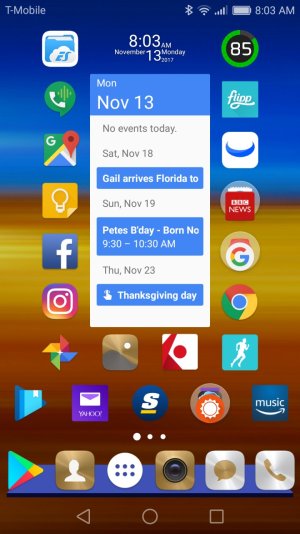
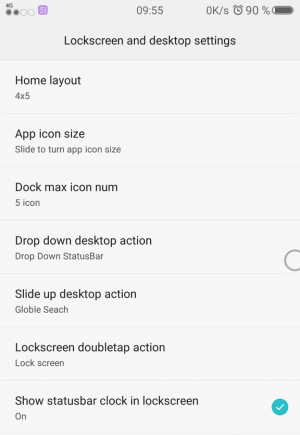
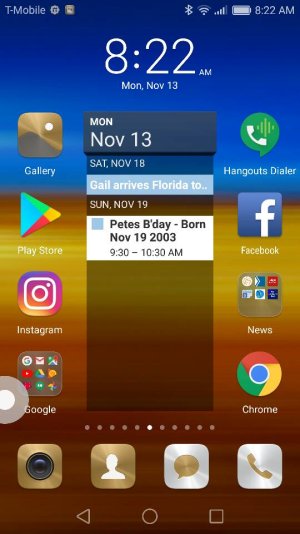
Tried out EMUI but maybe it would do what I want but lot of learning involved and probably getting themes. For example I couldn't figure out how to change size of icons, and the calendar doesn't load as well. Nova has it all in a nice package. Will try to add a screen shot of each.

Lots to like about this phone, great so far especially for unerring $250.
 

Attachments

  • acc=1;doc=2678.jpg
    acc=1;doc=2678.jpg
    55.1 KB · Views: 23
My screenshot with Nova, it didn't post on my original msg

nova.jpg
 
I didn't look under motion control.

Knuckle tap was already enabled I just didn't try it.

To get a screen recording is tricky as you have to hit the screen simultaneously with 2 knuckles, harder than it would seem.
 
I didn't look under motion control.

Knuckle tap was already enabled I just didn't try it.

To get a screen recording is tricky as you have to hit the screen simultaneously with 2 knuckles, harder than it would seem.
Yeah it is a little tricky. Gets easier with practice.
 
This isn't on an honor 8. But do you see this option under lock screen to change grid size ?

uploadfromtaptalk1510673638871.png
 
You'll get some improved performance and little other things when updated to EMUI 5. you'll lose your pull down notification separation
 
My phone came with 6.0 and while I have the update pending for 5.0 not seen the Nougat update. Don't really care as I have seen my wife's Samsung tablet updated from 6.0 to 7.0 and I am not thrilled with it.

Will I eventually see an update or do you have to look for it and download. I just don't want it to auto load.

My Samsung Tab S2 tablet has a notification for upgrading to 7.0 and it stays in the notification bar and a screen pops up every couple days asking me to update. Have not been able to get of this annoying reminder.
 
So I do like one change but not sure whether it is EMUI 5 or android 6 to 7 related. That is the recent apps drawer. with the up and down 3d view. I suspect that is part of 7.0 not EMUI 5 am I correct.
 
I've never tried the knuckles for a screen shot as I just use a double press of the fingerprint sensor for screen shots. Way easier to me than using your knuckles I would think. I'll pass on that feature I think. I knew about it but never once tried it. Setting it my fingerprint sensor is just so easy.
 
I've never tried the knuckles for a screen shot as I just use a double press of the fingerprint sensor for screen shots. Way easier to me than using your knuckles I would think. I'll pass on that feature I think. I knew about it but never once tried it. Setting it my fingerprint sensor is just so easy.

I like using knuckle drawings/gestures for opening things like my SMS app and Chrome app; but I do press my fingerprint sensor to bring up my messaging app, so that would be a quicker gesture... But it's still fun to draw on the screen. 😊
 
So I do like one change but not sure whether it is EMUI 5 or android 6 to 7 related. That is the recent apps drawer. with the up and down 3d view. I suspect that is part of 7.0 not EMUI 5 am I correct.
I don't really know about this. Anyone can chip in to answer this ?
 

Trending Posts

Forum statistics

Threads
962,947
Messages
6,992,255
Members
3,164,950
Latest member
DannaOgle83