Mysterious notification beeps

Big Rich

Member
Sep 27, 2025
7
1
3
I have a new Android phone (Samsung S25+) and I have been getting notification beeps. Most are normal and the associated app shows up with a notification bubble and a icon pops up in the top left hand corner of the home screen. But lately, the notification beep occurs and there is no icon or app bubble.

It's like the old trick where kids ring your doorbell and run away. In this case, I pick up the phone and there's nothing there. It happens about once a day (sometimes more) and it is really annoying.

Is there any event log or something I can check to find out where these notifications are coming from? I have a lot of apps and I wouldn't even know what classification of permissions to look at so I'm trying to find out what's happening the easiest way possible.
 
How often is the beeping?
Make sure NFC off and Bluetooth and might want try safe mode to see any 3rd party apps responsible after the above steps in the thread.
 
  • Like
Reactions: Laura Knotek
Thank you all. I "stumbled" upon the "Notification history" which was not where the youtube videos showed it should be.

As spARTacus mentioned, it was under "Notifications", then under "Advanced settings", then "Notification history".

The nuisance notification in this case was Google taking it upon themselves to backup my photos and contacts and pretty much anything it wants from the phone, quietly, and without asking.

The app calls itself "Google Play services".

Apparently there are lots of apps that ask for certain or all permissions and then take it upon themselves to upload data you may not know is included with the reason you grant the permission. This is utterly convoluted in my opinion but we are slaves to our phones these days.

My problem is deciding how to differentiate what permissions to disable and when, doing that, may render the app useless for any purpose of having the app on the phone in the first place. Or apps like this one that I didn't even know was on the phone in the first place.

Thank you all again for your help.
 
  • Like
Reactions: Laura Knotek
In my experience, the device shouldn't on its own be backing up things like photos and contacts (and doing that via Google Play services) unless the user has set (or allowed to be set) specific device, account and app settings for such behaviour. In my experience, control over such is not specifically burried in app permissions but instead is a bit clearer in the device/account/app settings themselves. I suggest you review what your device has set as functions for backup, within things like your Samsung and Google account and device settings, and then also within things like the photos/gallery and contacts apps (or pretty much any app) you are using, plus also for how you might be using apps like GoogleDrive or OneDrive (which also "offer" to help for management and back up of files and photos), because all of it tries to make things simple, transparent and seamless for the average user and yes all of it presents as default to assume what most people want even if "they" are assuming such in what would be considered by some as taking liberties.
 
Last edited:
Thanks again.

I need to take some time to figure all this out. I can say that I am very frugal when it comes to authorizing permissions but I must have missed some things with this new phone. I never had these issues before. I’m more prone to believe one of the large company apps (Google, Samsung, Verizon, Microsoft) is trying to “help” too much.
I don’t want to backup any photos or contacts or message history or apps to anything other than my personal computer. I don’t want “cloud services” or storage.

I just noticed a few things that are disturbing. I went to check "Notification history" and it has the phrase "Last 24 hours" greyed out, so I can only see the notifications for the past 24 hours.

Then I tried to see what set a notification off at 3:35 this morning. Nothing was listed. I have nothing but quality apps on my phone so I can’t imagine what rogue app or setting is doing this. There was nothing listed in the notification history. In addition to that, I have “Do Not Disturb” set for all night long. I allow calls from my contacts because I want to allow them.
If there is a setting to stop the large company apps from automatically downloading games I’d appreciate being able to turn them off forever without affecting other downloads like system updates etc.

CaribMas suggested an app that I read about somewhere else in this forum called “Nice Catch”. If I continue to be unsuccessful, I will load that up and see if I can control these notifications.

If someone can post the best link to go to change the Google or Samsung account permissions without taking away from what most normal people consider normal help I’d appreciate it.

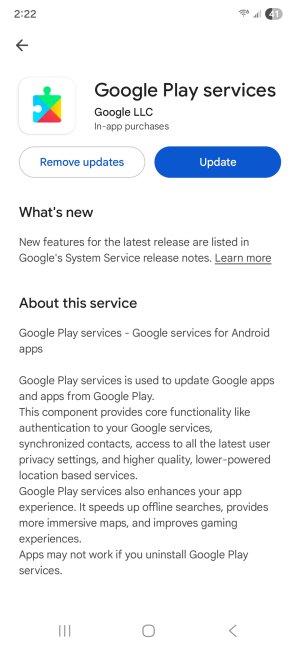
Here’s a screenshot which shows the conundrum I feel I’m in. It lists only some of the stuff it is accessing “for me”. Then it follows the description up with my new favorite phrase, “Apps may not work if you uninstall Google Play services”. That explains nothing.

Google Play services.jpg
 
Last edited:

Forum statistics

Threads
959,833
Messages
6,980,313
Members
3,164,309
Latest member
Mama Mia