Navigation bar disappeared S9+

  • Thread starter Thread starter Android Central Question
  • Start date Start date
A

Android Central Question

New S9+ the navigation bar disappeared after first night. I have done everything to include resetting the phone to defaults and it does not show up. Is this a glitch? Is it being fixed? ETA? I have no back button or recents button to close or switch between apps easily. It is not hidden as pulling up from bottom does not show it. It is simply gone. The home button works but not visible
 
You might go into settings and check to make sure it did not get switched off. I dont know why it would,but maybe? Also, try the hard press method. Just hold down where it should be in the middle for a second, see if it does anything?
 
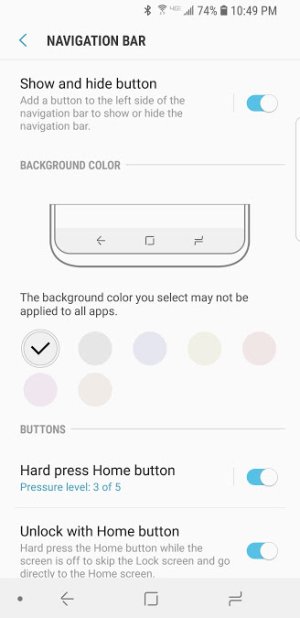
Same issue... I can hard press home, but nothing else works. Don't turn that feature off unless you get one of the nav bar work around apps like "simple control". I also did a factory and "full" reset 2x before getting the nav bar app. Yes, I've turned the nav bar "show hide" option on/off several times and it has zero effect. I've tried changing the color and switching the button layout. This is the first thread I've heard someone else has this issue like me. Hope it gets fixed soon as I hate having to use the nav bar app for something so trivial that should work on a flagship device.
 
Mine did the same thing. I opened it and it was fine then about 3 hrs later my navigation buttons disappeared and I have tried everything! My navigation bar is there still but no buttons, home button works on hard press but that's it. I am super frustrated already. I hope they find a fix soon!
 
so did u all hit the little dot to the left side if the navigation bar to get it to stay up? u swipe up...then on the left side...there is a little dot. double tap that...it will stay up...double tap it...nav bar will slide down.
 
Yes, swipe up not working to bring back any nav buttons. Hard press only on home button works. Dot was there to dbl tap. Tried it the first time and it worked fine for "awhile". Next two "full resets" didn't mess with the dot and it still f'd up.
Exactly as Caburns86 describes. Frustrating....
 
I have the same issuing with the disappearing navigation bar. The first time it happened, I did a factory reset and it came back. However, within a few hours it was gone again. This is super frustrating because I cannot utilize the recent apps function or the split screen view. I'm glad I'm not the only one this is happening to; hopefully that means they'll fix it soon. It's a beautiful phone otherwise!
 
Woah I'm glad I got a good unit. I have no issues with the navigation bar at all, good luck to y'all! Try going back to the store and replacing it within the 14 day grace period, or wait for an update that fixes it.
 
navigation bar on S9 not working.

The navigation bar was working when I bought the S9 now it is there but without recent and back parts, is there a bug?
 
Re: navigation bar on S9 not working.

Not aware of a bug, but try getting it back by playing with the settings.

Clicks: Settings >> display >> navigation bar

Hope this helps; few of my settings seem to be a bit glitchy too.
 
Re: navigation bar on S9 not working.

Click: Settings > display > navigation bar and toggle the top one off.
 

Attachments

  • Screenshot_20180320-224906_Settings.jpg
    Screenshot_20180320-224906_Settings.jpg
    31.8 KB · Views: 74
we I haven't had this problem but I've only had the device a few days. I'd go back to where you purchased the device if it doesn't turn out to be one of the settings.
 
After having the same problem, I searched in settings and discovered some apps are "optimized" to full screen, losing the navigation bar AND IT'S NOT OPTIONAL! Other apps it's optional. Loss of the navigation bar is new - upgrade result? This is very upsetting and inconvenient. The back arrow button is one of the 3 reasons I use Android and not iPhone. I hope Samsung is paying attention and will make it optional for all apps.
 
After having the same problem, I searched in settings and discovered some apps are "optimized" to full screen, losing the navigation bar AND IT'S NOT OPTIONAL! Other apps it's optional. Loss of the navigation bar is new - upgrade result? This is very upsetting and inconvenient. The back arrow button is one of the 3 reasons I use Android and not iPhone. I hope Samsung is paying attention and will make it optional for all apps.

That's entirely different. For optimized apps you can pull up the nav bar from being hidden.
 
Open an App and swipe up from the bottom. That will bring up your navigation bar. Now on the left side of the bar you will see a small dot. Double tap to lock your bar in place. Double tap tote it disappear, then swipe up. That easy.
 
Go go Settings/Nav Bar. Deselect Show &Hide Button. This will overlay the recent, home and back button permanently.
 
Is the show and hide button activated? Settings/Display/Navigation, here you will find the control for the bottom left of screen icon function.
 

Trending Posts

Members online

Forum statistics

Threads
962,701
Messages
6,991,438
Members
3,164,901
Latest member
racoo