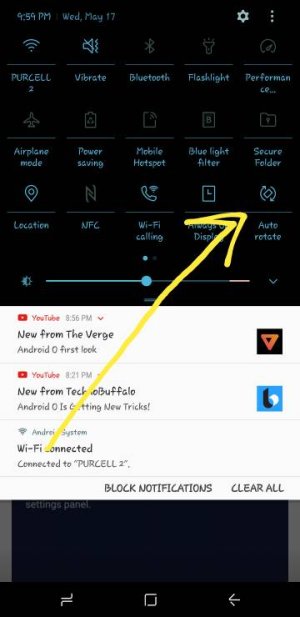
T-Mobile Galaxy S8 No Option for auto screen rotation

steveh552

Trusted Member
Mar 6, 2010
584
9
0
I could have swore that when I bought my phone last week the toggle to auto rotate the screen was on the the device but I am unable to find it now. I wanted to use my phone in landscape mode and not being able to find that toggle, I cannot figure out how to get the screen to rotate.

Anyone have any thoughts here?
 

Attachments

  • Screenshot_20170506-221938.jpg
    Screenshot_20170506-221938.jpg
    105.4 KB · Views: 176
  • Screenshot_20170506-221924.jpg
    Screenshot_20170506-221924.jpg
    110.4 KB · Views: 176
  • Screenshot_20170506-221920.jpg
    Screenshot_20170506-221920.jpg
    137.3 KB · Views: 176
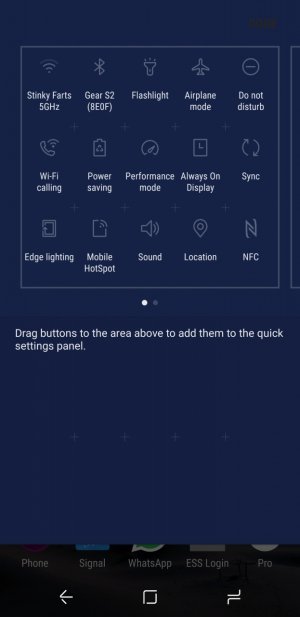
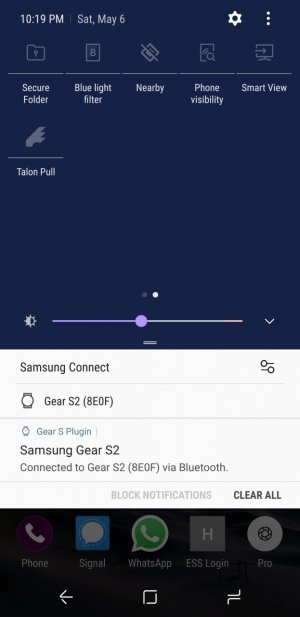
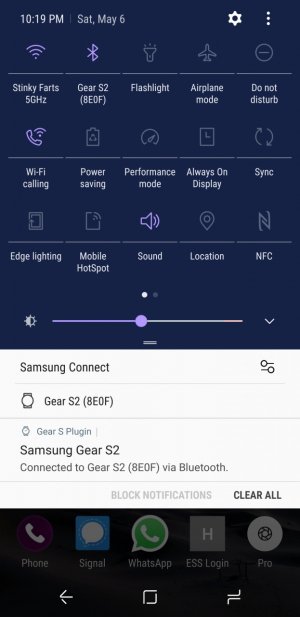
I am on T-mobile. I did change the order of the toggles to be where it made sense to me based on what I use but yeah, its not there.
 
On AT&T, there are two tabs. Try swiping left. It may be the same for TMO.
 
On AT&T, there are two tabs. Try swiping left. It may be the same for TMO.

I have done that as evidenced by the screen shot. I just downloaded and app that controls it, it turned rotation back on but unless I want to keep an app for it, I cannot turn it off. Only I only want rotation when watching videos and editing some photos on it.

I am an apple person and iPhone made this so much easier. I may go to T-Mobile tomorrow and see if they have it on their demo model.
 
I have done that as evidenced by the screen shot. I just downloaded and app that controls it, it turned rotation back on but unless I want to keep an app for it, I cannot turn it off. Only I only want rotation when watching videos and editing some photos on it.

I am an apple person and iPhone made this so much easier. I may go to T-Mobile tomorrow and see if they have it on their demo model.

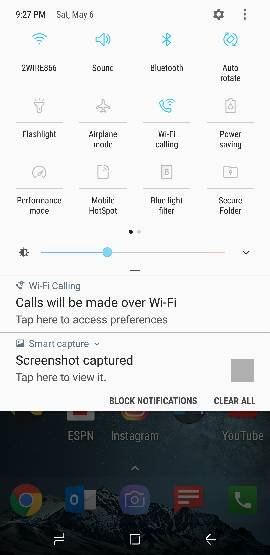
I'm on tmobile and it's on mine up above
 
Yeah and I am sure it was there when I first got the phone. I seem to recall it not being there after I reorganized them. I tried to delete ones on there and long hoping to try to get to add to see if its just a matter of I deleted it by accident but it does not appear possible.
 
What is Talon Pull btw. Other than that (and the missing auto-rotate) everything else is there.
 
Edit: Never mind you did the edit button order and still don't see there
 
I have searched my phone and see no options for screen rotation. Help I like to watch videos and etc while my phone is charging
 
Go into the setting for the grid layout and button order. Choose button order and see if the screen orientation button is below the last page in the add button section.
 
Go into the setting for the grid layout and button order. Choose button order and see if the screen orientation button is below the last page in the add button section.

I know for mine it is not, even did a reset and nothing. I downloaded an "app" that controls it for me.
 
I have a dumb question, I don't see it in your pics. But when you go to change button order do you see a button that says portrait? Just add and click that. If that is not there then you may need to hard reset the phone or maybe contact Samsung and see if they can help.
 
I really don't know what to tell you but my S8+, my co-worker's S8 and my friend S8 all of them from T-mobile have the option and on the Quick Toggles by default.

So, seeing that the only thing different in yours based on the screenshots you posted and your comment that you are sure that you have seen it before on the phone, my only guess is that somehow that app you have on the Quick Settings, Talon Pull, is directly involved in the disappearance of the Rotation toggle. I mean, you know how this third party apps can work sometimes, to be able to show a quick toggle for an app, the code must edit somehow the system file that works with that, so like I said above my only guess is that by installing that app it may have caused a corruption or simply in order to show a new one, a default one must be replaced.
 
I could have swore that when I bought my phone last week the toggle to auto rotate the screen was on the the device but I am unable to find it now. I wanted to use my phone in landscape mode and not being able to find that toggle, I cannot figure out how to get the screen to rotate.

Anyone have any thoughts here?
Is it possible you accidentally removed it from the quick toggles? When you go into "button order, there's a section on the bottom for removed toggles. See pic.
89959f332f6abb5f0966e22cc53d8f4f.jpg
 

Members online

Forum statistics

Threads
962,585
Messages
6,990,995
Members
3,164,870
Latest member
wobblefix