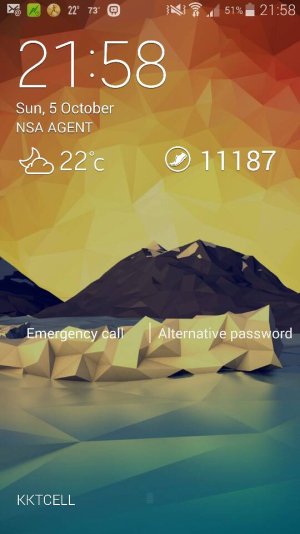
no pedometer on lock screen

LaurieSm

New member
Oct 5, 2014
1
0
0
I have enabled both the weather and the pedometer on the lock screen and only the weather is showing up. Would like to see pedometer as well. Wondering what I didn't do right.

Posted via the Android Central App
 
No you can have it on the lockscreen. I can see my step count on my lockscreen.

Posted from my S5
 
They show up on the regular lock screen too. Mine does. I don't have the flipview case. Don't know exactly how I got them up there. Just tinkering with settings.
 
I have it no s view

using SM-G900H KNOX WARRANTY VOID 0X1
I9505 WARRANTY VOID 0X0 in vacation
 

Attachments

  • Screenshot_2014-10-05-21-58-07.jpg
    Screenshot_2014-10-05-21-58-07.jpg
    45.1 KB · Views: 34
I need an app to remind me to use the pedometer in the first place. The problem is that I have to start it once I get off the train, because it really racks up the steps as the train hurls along at 80mph if I don't. Then I have to remember to stop it in the evening once I get back on the train to go home. As it is, I only remember to do it right about twice a month.
 
I need an app to remind me to use the pedometer in the first place. The problem is that I have to start it once I get off the train, because it really racks up the steps as the train hurls along at 80mph if I don't. Then I have to remember to stop it in the evening once I get back on the train to go home. As it is, I only remember to do it right about twice a month.

I don't think there is

using SM-G900H KNOX WARRANTY VOID 0X1
I9505 WARRANTY VOID 0X0 in vacation
 
I need an app to remind me to use the pedometer in the first place. The problem is that I have to start it once I get off the train, because it really racks up the steps as the train hurls along at 80mph if I don't. Then I have to remember to stop it in the evening once I get back on the train to go home. As it is, I only remember to do it right about twice a month.

I haven't had a problem with it picking up a significant number of extra steps while on train, car, etc.
 
I haven't had a problem with it picking up a significant number of extra steps while on train, car, etc.

I wonder why I have such a problem then. The last time I left it running on the train, I had had over 1000 extra steps by the time I got to work. Mind you, our train bangs us around like a bumper car. It's normally a freight line, so the track is horrible.
 
I wonder why I have such a problem then. The last time I left it running on the train, I had had over 1000 extra steps by the time I got to work. Mind you, our train bangs us around like a bumper car. It's normally a freight line, so the track is horrible.
Not sure why. I've done Amtrak from New Orleans to Chicago and from San Antonio to Chicago. On the 24 hour trip I pick up less than 500 extra steps on my Fitbit. My S5 picks up a few more than that, but that's over a 24 hour trip, not just a commute to work. Even on a regular day though, My S5 seems to pickup more steps than my Fitbit. I think it's because I keep my S5 in my lab coat pocket and it swings around a bit more. My Fitbit is clipped to my belt.
 
I had this same problem around the last update (The same one that makes Google Now come up everytime I hit my home button)

I went into my settings and disabled the additional info from the lock screen and then just re-enabled it. Works fine now.

Now if I can just get google to stop coming up when I hit the home button...
 

Trending Posts

Forum statistics

Threads
963,287
Messages
6,993,005
Members
3,164,998
Latest member
Ashok Dharshan