Not so "seamless" update today (but close)

jeffreytz

Mayor of Awesometown
Apr 22, 2010
301
5
18
So my unlocked Pixel XL received the November 5 security update this morning and I would call the process "semi-seamless". There was a notification that an update was ready to download, I had to click that, watch the 60MB file download (quick), then it started the install, which took an hour and a half! I seriously thought the phone was frozen at 15% for a long time. Once it finished I clicked "reboot" and it was done.

Now the good part was I could use the phone while the update was happening (new, and awesome). I was getting notifications, I answered an email, etc. There was no notification the install was happening in the background but I could switch back to it via the task switcher.

That sure beats having the phone unusable while "android is updating" my 150+ apps, but it wasn't the "seamless" process I'd heard explained for Android 7: that the download would happen automatically, that it would update in the background and when it was ready the only thing I would see is a notification that it was time to reboot my phone.

Is there a setting I need to change to get the download to happen automatically? Or is this how "seamless" upgrades are actually going to work?
 
So my unlocked Pixel XL received the November 5 security update this morning and I would call the process "semi-seamless". There was a notification that an update was ready to download, I had to click that, watch the 60MB file download (quick), then it started the install, which took an hour and a half! I seriously thought the phone was frozen at 15% for a long time. Once it finished I clicked "reboot" and it was done.

Now the good part was I could use the phone while the update was happening (new, and awesome). I was getting notifications, I answered an email, etc. There was no notification the install was happening in the background but I could switch back to it via the task switcher.

That sure beats having the phone unusable while "android is updating" my 150+ apps, but it wasn't the "seamless" process I'd heard explained for Android 7: that the download would happen automatically, that it would update in the background and when it was ready the only thing I would see is a notification that it was time to reboot my phone.

Is there a setting I need to change to get the download to happen automatically? Or is this how "seamless" upgrades are actually going to work?

It still needs your approval to move forward. I would honestly still consider that seamless. It did not affect your daily life in any way by making your phone unusable.
 
It still needs your approval to move forward. I would honestly still consider that seamless. It did not affect your daily life in any way by making your phone unusable.

Agreed. Maybe an option to download over wifi would be the only thing I would like in that process, but approval to install should always be required.

I love the update process too. a 2 minute reboot sure beats a 15 minute "android is upgrading" screen.
 
An hour and a half seems like a long time, wow!

The process is probably throttled way down so it doesnt affect the user experience while it is working in the background. This in turn would make the update take longer, but the phone wouldnt be bogged down.
 
The process is probably throttled way down so it doesnt affect the user experience while it is working in the background. This in turn would make the update take longer, but the phone wouldnt be bogged down.

Exactly what I was going to say. Most likely uses the lower clocked cores for heat, battery, and user experience.
 
yeah its one of those things where its almost meant to not be watched. just go about your business and at the end of the day reboot (as it doesn't appear to have a notification telling you to reboot, which kinda makes sense)
 
Yeah I get what you're all saying, I guess I just didn't think there would be that "approval" process to initiate it, and its funny once I saw the screen with the progress bar I didn't realize I could jump away to other stuff at first (nothing on the screen made that clear), it wasn't until a notification popped up and I hit it instinctively that I realized I could keep using the phone for other stuff while the upgrade continued on its merry way. But now I know :)
 
It still needs your approval to move forward. I would honestly still consider that seamless. It did not affect your daily life in any way by making your phone unusable.

Agreed, just would have been nice if instead of getting the message there was an update available to instead have just picked up the phone and seen "an update has been installed, reboot to continue". But your right, now that I know it all happens in the background once I click download its basically seamless.
 
Yeah I get what you're all saying, I guess I just didn't think there would be that "approval" process to initiate it, and its funny once I saw the screen with the progress bar I didn't realize I could jump away to other stuff at first (nothing on the screen made that clear), it wasn't until a notification popped up and I hit it instinctively that I realized I could keep using the phone for other stuff while the upgrade continued on its merry way. But now I know :)

That's a good thing. Say you don't want the update (because it breaks the phone or whatever). It would be tough if it all happened automatically. The only way to avoid it would be to not reboot your phone.
 
I would not want my phone updated without some input from me - an app or two is one thing - but not an update of this magnitude.
 
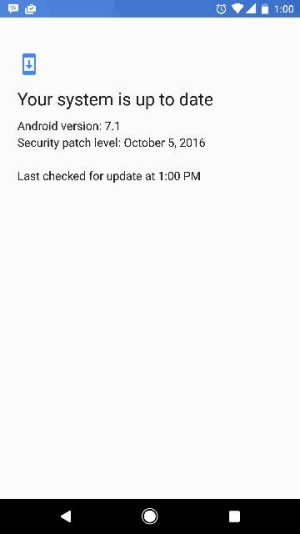
I still haven't gotten the update on my Google store Pixel XL
I got it yesterday on mine. Did you try manually checking? It showed up for me after I checked, said no update was available but then immediately after exiting out of that screen the notification popped up.
 
I got it yesterday on mine. Did you try manually checking? It showed up for me after I checked, said no update was available but then immediately after exiting out of that screen the notification popped up.

Nope lol
 

Attachments

  • Screenshot_20161108-130044.jpg
    Screenshot_20161108-130044.jpg
    11.1 KB · Views: 173
Yeah, the update process wasn't exactly as it was initially described. Google's presentations at IO and afterwards claimed the update would download silently in the background, install in the dormant partition, then prompt you to restart so that the active and dormant partitions switch place.
 
Re: Not so "seamless" update today (but close)

Yeah, the update process wasn't exactly as it was initially described. Google's presentations at IO and afterwards claimed the update would download silently in the background, install in the dormant partition, then prompt you to restart so that the active and dormant partitions switch place.
If someone were to ignore the update notification it's very possible that what you described WILL happen after a certain amount of time.

Most of us here just want the update as soon as possible.
 
Still haven't gotten my update. Purchased through Google. same screen status as Lengend
 
Getting a text in my car is horrible my car Bluetooth notification goes nuts. Hope it fixes that
 

Trending Posts

Members online

Forum statistics

Threads
960,065
Messages
6,981,003
Members
3,164,373
Latest member
luigui443