Note 4 Background Data Setting

kittenphelia

Member
Oct 22, 2014
20
0
0
Where on earth is the setting for enabling and disabling the restriction of background data? I can't find it anywhere.
 
Where on earth is the setting for enabling and disabling the restriction of background data? I can't find it anywhere.

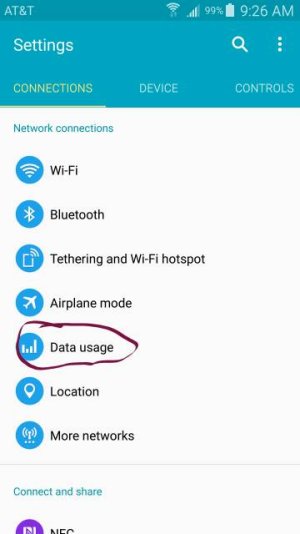
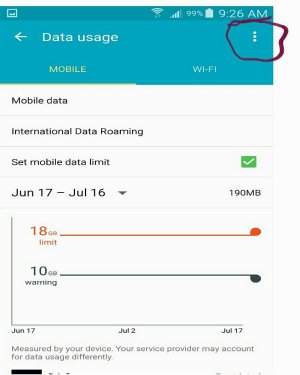
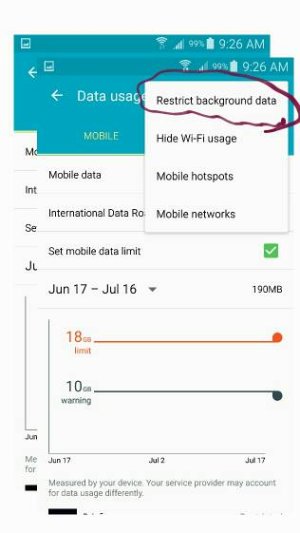
Settings > Connections > scroll down to Data Usage > tap the 3 vertical dots in the upper right corner > tap "Restrict Background Data".

Hope this helps.

Posted via the Android Central App
 
Thanks for responding, but the only options are Hide WiFi, Mobile Networks, Mobile Hotspots, Show units and Help. There's no option to restrict background data.
 
Where on earth is the setting for enabling and disabling the restriction of background data? I can't find it anywhere.

Thanks for responding, but the only options are Hide WiFi, Mobile Networks, Mobile Hotspots, Show units and Help. There's no option to restrict background data.
Just curious here, I have the VzW SGN.IV and is this what you're seeking to secure (in this case "restrict"?)?


WygBgccl.png
9RPEvdal.png
3qzIlB8l.png
FCcg4S6l.png
Oh36hZDl.png


Don't know if the above representation is of some help to you. Hope you find what you're wanting to do. :cool:
 
Thanks for responding, but the only options are Hide WiFi, Mobile Networks, Mobile Hotspots, Show units and Help. There's no option to restrict background data.

I have at&t:

Posted via the Android Central App
 

Attachments

  • Screenshot_2015-06-20-09-26-25-1.jpg
    Screenshot_2015-06-20-09-26-25-1.jpg
    20.4 KB · Views: 61
  • Note062015_1_1-2.jpg
    Note062015_1_1-2.jpg
    50.9 KB · Views: 42
  • Note062015_2-1.jpg
    Note062015_2-1.jpg
    21.1 KB · Views: 64
Thanks guys, I just went there again and the option is there. Thank you so much for all the help, still not sure why it wasn't there in the first place lol
 

Forum statistics

Threads
960,260
Messages
6,981,632
Members
3,164,451
Latest member
einchewon