I moved pics to my backup drive but now my Gallery files are missing only camera and screenshots appear. How do I get Downloads and VZpics back in gallery? They are in storage but not in gallery.
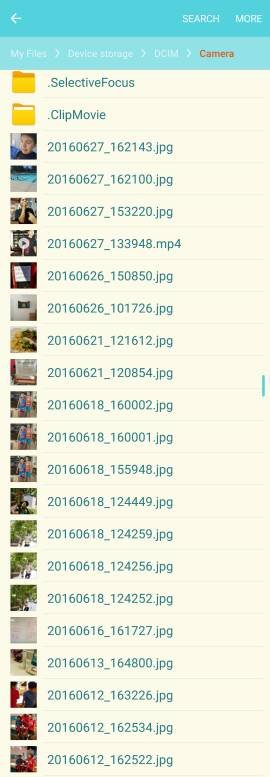
Welcome to Android Central! What backup drive are you referring to? What directory are the missing photos in? Use a file manager app to look in that directory, and see if there is a ".nomedia" file there. If so, delete it, because that instructs the system to ignore that directory and any subdirectory when scanning for photos to add to the Gallery database.
If you've moved then to an OTG flash drive that you have plugged into your phone then the stock gallery app won't find them and it's the same with music. I downloaded Qik Pics and Power amp, so when I plug in my flash drive I am able to view or play.. Worked for me.. Hope it helps.. Cheers
I recently updated my AT&T Note 5 to MM and now I can't see my pictures under Camera on the Gallery app or the Google Photos app. When I use My Files app or Amazon I can still see them. Any ideas what's going on? I did a reset and still having issues.
You can or cannot see pictures in the Camera, Gallery, or Photos app? I assume you meant that you cannot see the pictures.
What directory are the pictures in? Using My Files, check to make sure there isn't a file called ".nomedia" in that directory, or in any parent directory.
When it doubt I use S Finder. Put "pictures" in the search box and it will locate all pictures on your phone. I understand that this does not resolve your underlying problem. I'm just pointing out that S Finder is under utilized and is a powerful solution in at least tracking down information on your phone that can end up in some pretty obscures places.
Sorry, but I'm not sure what to try next. I have seen this issue mentioned several times in the forums, so it may very well be a glitch with the update.





 Facebook
 Twitter
 Instagram