One UI 8.0 - Notification shade stuck and Gallery maps not loading

Kharl

Well-known member
Apr 25, 2014
66
4
8
Hey guys, I just updated my Galaxy XCover6 Pro to One UI 8.0 (Android 16) and I’m having two super annoying issues. Is anyone else seeing this?

  1. Notification Menu: The swipe down from the top is basically broken. It doesn't respond to the first 2 or 3 swipes. I have to lock/unlock the screen and press really hard at the top to get it to work. It used to be super smooth before the update.
  2. Gallery App: When I try to see a photo's location on the map, it just shows a blank screen. It’s like the app has no internet access even though everything else is working fine.
I’ve already tried clearing the cache and checking permissions but nothing works. Is this a known bug in this build (G736U1UESAGYL1)? Any tips on how to fix this?
 
The notifications panel has been redesigned you can edit it to go back to the old way instead of split for notifications and quick panel

To do so pull your notifications panel down from right and tap icon then choose edit panel and select together then hit done for it to stay.


Is this for one photo or more?
 
The notifications panel has been redesigned you can edit it to go back to the old way instead of split for notifications and quick panel

To do so pull your notifications panel down from right and tap icon then choose edit panel and select together then hit done for it to stay.


Is this for one photo or more?
What?

split what? photo?
 
What?

split what? photo?
Your notifications panel
fd49c31a0b4e32508104ca7c1c93e760.jpg
 
Your notifications panel
fd49c31a0b4e32508104ca7c1c93e760.jpg
I think there is a misunderstanding. I’m not talking about the new layout or the split between notifications and quick settings. I know how to edit the panel.

The problem is that the gesture itself is broken. The screen does not respond when I swipe down. It takes 3 or 4 aggressive attempts, or locking and unlocking the screen, just to get the menu to appear. It’s a touch responsiveness issue caused by the update, not a design preference.

Regarding your question about the photos: it happens with every single photo in the gallery. The map simply refuses to load, showing a blank screen instead. It’s like the Gallery app lost its connection to the map server after the update.

It’s not about how the menu looks, it’s about the fact that it doesn't open

watch
 
I think there is a misunderstanding. I’m not talking about the new layout or the split between notifications and quick settings. I know how to edit the panel.

The problem is that the gesture itself is broken. The screen does not respond when I swipe down. It takes 3 or 4 aggressive attempts, or locking and unlocking the screen, just to get the menu to appear. It’s a touch responsiveness issue caused by the update, not a design preference.

Regarding your question about the photos: it happens with every single photo in the gallery. The map simply refuses to load, showing a blank screen instead. It’s like the Gallery app lost its connection to the map server after the update.

It’s not about how the menu looks, it’s about the fact that it doesn't open

watch
Thanks for clarifying this
On my s25u and Fold 7 on One UI 8 and now in beta 8.5 don't experience it.
Try safe mode to see if it is still an issue?
 
So check your 3rd party apps downloaded, one of them is responsible.
uhhm...
no new app downloaded in the previous 20 dais after neither before (to the date)
The point is, everything worked perfectly before the One UI 8.0 update. I did noticed the problem AT THE FIRST RESTART after the update.
If a 3rd party app is now interfering with a basic system gesture like the notification shade, it's because the new OS build has a compatibility flaw or a touch-layer bug that wasn't there before.
 
This would not be that unusual. It's up to app developers to keep their apps updated and compatible with new Android updates, but not all of them do. If you can identify the app that's causing issues, then you can send feedback to that dev to let them know the issues it's causing.
 
  • Like
Reactions: Laura Knotek
I understand that developers need to keep up with Android updates, but we are talking about a core system gesture being blocked. A well-optimized OS shouldn't allow a 3rd party app to break the main navigation of the phone so easily. Also, that doesn't explain why the native Samsung Gallery is failing to load maps.

Also, that doesn't explain why the native Samsung Gallery (a first-party app) is failing to load maps.

In case this helps: the notification shade works perfectly on the lock screen. As soon as I unlock the phone, the gesture becomes unresponsive. This confirms it’s a software layer or a process that triggers only after the UI loads.

Since I can't afford to play 'detective' and uninstall my work tools one by one, I'll have to wait for a stability patch
 
Last edited:
Since it works fine in Safe Mode, that still points to a 3rd party app causing problems. 3rd party apps can still bork system apps or processes -- that's why Safe Mode as a troubleshooting method exists. So it still is up to the app developer to fix their problem.
 
  • Like
Reactions: Laura Knotek
I understand that developers need to keep up with Android updates, but we are talking about a core system gesture being blocked. A well-optimized OS shouldn't allow a 3rd party app to break the main navigation of the phone so easily. Also, that doesn't explain why the native Samsung Gallery is failing to load maps.

Also, that doesn't explain why the native Samsung Gallery (a first-party app) is failing to load maps.

In case this helps: the notification shade works perfectly on the lock screen. As soon as I unlock the phone, the gesture becomes unresponsive. This confirms it’s a software layer or a process that triggers only after the UI loads.

Since I can't afford to play 'detective' and uninstall my work tools one by one, I'll have to wait for a stability patch
Doesn't necessarily have to be any new apps could be an app that got an update and glitches, this is very common.

Go to device care and check any apps that are acting up.

What issue was solved in safe mode it's been awhile in this thread?

If you don't want to try anything or waiting for updates that's fine but your asking for help so there will be steps involved trying to figure out your issue as you have multiple.
 
  • Like
Reactions: Laura Knotek
You both are assuming that if a problem disappears in Safe Mode, the app is 'broken' and the OS is 'fine'. That is not a 100% reliable rule. It is very possible—and common in major updates—that the apps are perfectly fine and the One UI 8.0 update itself has a regression bug that causes it to fail when handling standard 3rd-party processes

Doesn't necessarily have to be any new apps could be an app that got an update and glitches, this is very common.

Go to device care and check any apps that are acting up.

What issue was solved in safe mode it's been awhile in this thread?

If you don't want to try anything or waiting for updates that's fine but your asking for help so there will be steps involved trying to figure out your issue as you have multiple.

I checked the App Issue History in Device Care. It is completely clean. Why? Because the apps aren't crashing. The Gallery isn't closing, and the System UI isn't restarting. This is a logic/input bug where the OS is failing to prioritize the touch gesture over the active UI layer. A log of 'crashes' won't show a bug that doesn't cause a crash."


Did it not cross your mind that instead of 'blindly' uninstalling 300 apps—on a phone that has been perfectly stable for the last 5 months with the exact same apps—I am looking to see if this is a widespread system flaw?

If I find other users with the same issue, I confirm it's a system bug. That saves me from wasting days of work 'guessing' which app is the culprit, when the real solution must come from a Samsung patch.

I don't update my apps frequently for this exact reason. At the time of the system update, my last app update was 22 days ago. The phone was working perfectly until the very first reboot after installing One UI 8.0. The moment I unlocked the screen for the first time after the update, the bug was there. There is zero chance this was caused by a recent app glitch.

I’m not 'refusing' to do the work; I’m doing real troubleshooting by looking for patterns and evidence before taking drastic, unproductive measures. I am here for technical insights, not for 'factory reset' or 'delete everything' scripts. Never the less, I appreciate the time and effort of both of you! it is not that i just want to go agaist what you recommend me.
 
Last edited:
We're just suggesting a basic troubleshooting step, because the fact is that sometimes an app update can cause issues, and sometimes a system update that an app developer hasn't tested their app on can also cause issues. Safe Mode is a broad troubleshooting step that can narrow things down a little. It's true that it can be a hassle if you don't already have a few suspects, because otherwise it can mean uninstalling apps one by one until the problem goes away. Unfortunately, we're not going to have much else to suggest in this situation.
 
I can also suggest if you haven't already cleared cache in recovery this sometimes clears up glitches after OS updates .
 
  • Like
Reactions: Laura Knotek
Sounds like a One UI 8 regression bug, not just a random 3rd-party app. The fact that it works on the lock screen but breaks after unlock points to SystemUI/input layer conflicts. Gallery maps failing also hints at WebView/Play Services issues after the update. Cache partition + WebView/Play Services update might help, but Samsung should patch this.
 
You can also visit Forum in the Samsung member app to see if anyone with your device has an issue.

Your device doesn't seem popular here amongst users but one UI 8 is one UI 8 on all Samsung just Little different flare between flagship, mid-range ..
 
  • Like
Reactions: Laura Knotek
"Good morning everyone,

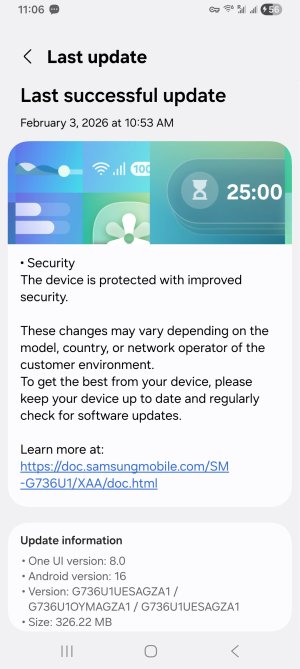
Today, I received a notification for a new system update (a software patch from Samsung or Android, I'm not sure exactly which side the fix came from). Since I was already expecting this to happen, I hit download and install immediately, feeling hopeful.
Screenshot_20260203_110655_Software update.jpg
Once it finished, I restarted the phone and started testing everything. I’ve been using the device for a good while now, and the glitch is gone. I haven't experienced the notification shade lag or the Gallery map issue even once.

This confirms my suspicions from the start: the problem was never my apps or my personal data, but a bug within the initial One UI 8.0 / Android 16 release.