Over Sharpening

KyleDC

Active member
Dec 12, 2014
32
0
0
I've just noticed this on my device and I'm not sure if I'm the only one but when I open the gallery app to look at pictures my entire screen becomes over-sharpened. Its very noticeable if you open the gallery app and then open another app in multi-window mode. Its also very apparent on the notification bar while the gallery app is open. Does anyone else have this issue with their Note 4?
 
Ha ha I just opened a pic in a separate window and the screen got brighter as well and dimmed when I closed the window. Seems to be a feature of the Gallery app to make pics look their best on the screen. BTW, if you use Google Wallet for Loyalty cards, the screen gets blindingly bright as well, I made the mistake of looking too close at the screen when I used the app once lol..
 
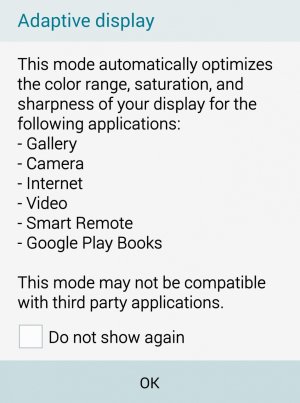
Thats most likely a result of the setting for you display screen mode set to Adaptive display.
 
Good find.. I forgot I had Adaptive Display chosen. I never go to that option. Turning it off does dull the screen for everything including the gallery... Still gets blindingly bright for Wallet loyalty cards lol.
tmp_5095-Screenshot_2015-03-28-16-25-26-1-2086990042.jpg
Thats most likely a result of the setting for you display screen mode set to Adaptive display.
 
it does say it may not be compatible with third party apps, maybe you found one of the apps thats not very compatible! lol
 
it does say it may not be compatible with third party apps, maybe you found one of the apps thats not very compatible! lol

Still doesn't explain why my screen is over-sharpened when I open up a picture in the gallery app
 

Trending Posts

Forum statistics

Threads
962,141
Messages
6,989,223
Members
3,164,782
Latest member
Nomor Wa CS Dana Cepat